
How to Fix Windows Vista Help and Support
 Information
If when you try to open Help and Support in Vista and you get a error message and Help will not open properly, or you get a message that WinHlp32.exe is no longer supported, then this will show you how to fix these common errors and others for Help and Support.
 OPTION ONE
 Note
NoteFor more information, see: Windows Help and Support: KB917607 Article
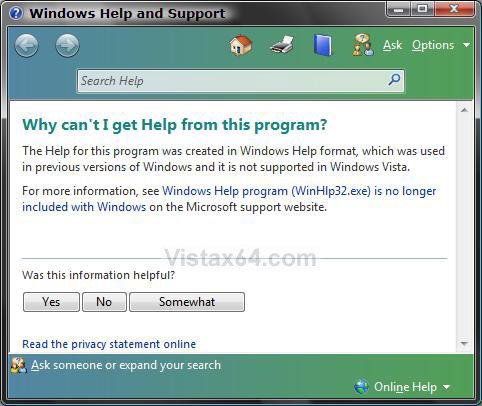
- The Windows Help (WinHlp32.exe) program is no longer included in Windows
1. Go to this site: Microsoft Download Center: Windows Help program (WinHlp32.exe) for Windows Vista
2. Click Continue at the site above to download and install the patch.
NOTE: If you get the error 80070422, the macro error code 1037, or the patch above will not install or work, then see: MS KB917607 WinHelp32 Patch
OPTION TWO NoteThese are usually caused when the Content Type registry settings for the file types: .XML, .XSL, .PNG, .JPG, .CSS is incorrect or missing.
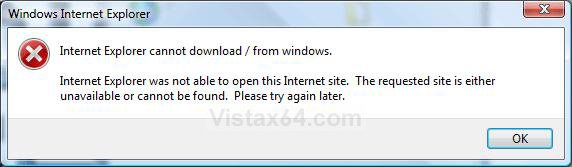
- Red X mark appears where the images are to be displayed.
- CSS styles are not applied to the pages in Help and Support.
- Error: Internet Explorer cannot download / from Windows
STEP ONE:
NOTE: To make sure that you have Online Help and Support enabled.
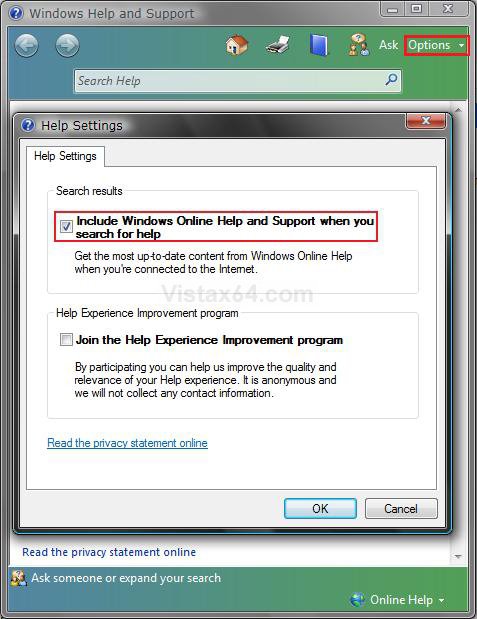
1. Click on Options at the top right corner of the Help window, and click on Settings. (See screenshot below step 3)
2. Check the Include Windows Online Help and Support when you search for help box.
3. Click on OK.
STEP TWO:
1. Click on the Download button below to download the Fix Help.reg file.

2. Click on Save and save it to the desktop.
3. Right click on the downloaded Fix Help.reg file, and click on Merge.
4. Click on the Run, Continue, Yes , and OK when prompted.
5. When done, you can deleted the downloaded Fix Help.reg file if you like.
That's it,
Shawn
Attachments

Last edited:


