Windows Vista Forums
Vista Forums Home Join Vista Forums Windows 7 Forum Vista Tutorials Tags
Welcome to Windows Vista Forums. Our forum is dedicated to helping you find solutions with any problems, errors or issues you are experiencing with Windows Vista. The Vista forum also covers news and updates and has an extensive Windows Vista tutorial section that covers a wide range of tips and tricks.

Go Back   Vista Forums > Vista Forums > Tutorials

Vista - Folder Icon Change

Comment
 
Old 08-28-2007  
Brink


Vista x64 Ultimate SP2, Windows 7 Ultimate x64


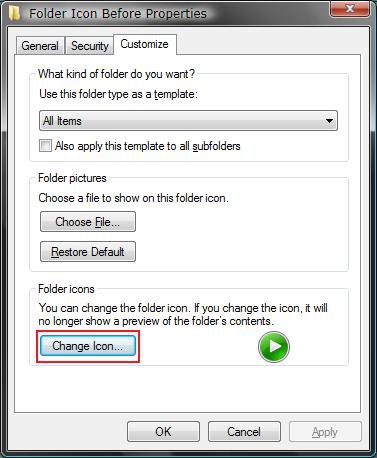
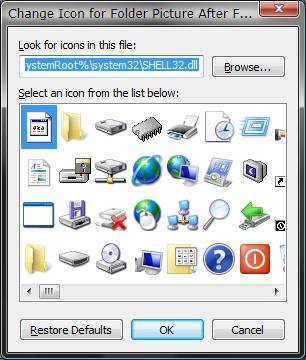
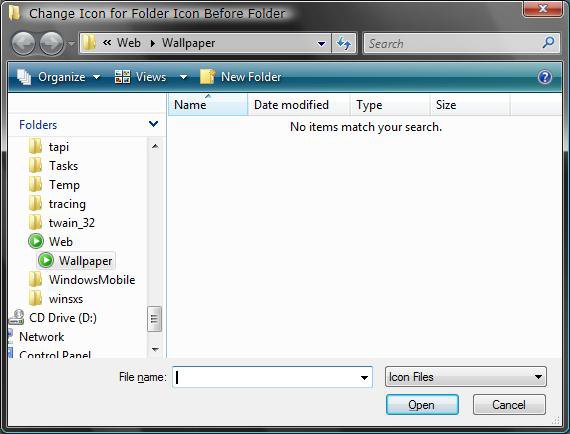
Folder Icon Change

How to Change a Folder Icon in Vista
...


Last edited by Brink; 05-04-2009 at 02:54 PM..
My System SpecsSystem Spec
Old 04-07-2009  
spoiled1379


Vista Home Premium 32bit


Re: Folder Icon Change

That works for regular folders but I am trying to change the icon for the Music folder. For some reason the icon for my Music folder defaulted to a yellow folder icon instead of the blue with a cd/music note. Is there any way to change this back without doing a system restore.

I am not really sure when the folder icon changed I just noticed it one day so I am not sure if I installed something that changed it or what happened.

Any help would be appreciated
Thanks

My System SpecsSystem Spec
Old 04-07-2009  
Brink


Vista x64 Ultimate SP2, Windows 7 Ultimate x64


Re: Folder Icon Change

Hello Spoiled,

As per the yellow TIP box at the top of the tutorial, you can use the tutorial below to fix a user folder.

Personal User Shell Folders

Hope this helps,
Shawn
My System SpecsSystem Spec
Old 05-04-2009  
knoughtyd


Vista Ultimate x64


Re: Folder Icon Change

Is there a way to make a SYSTEM WIDE CHANGE to the yellow folder icon in vista?? It would be impracticle to change the icons one by one.
My System SpecsSystem Spec
Old 05-04-2009  
Brink


Vista x64 Ultimate SP2, Windows 7 Ultimate x64


Re: Folder Icon Change

Hello Knoughtyd,

Yes. This tutorial was just for changing one folder's icon.

You can change the Folder key's default icon full path to one you want instead using step 6 on in the tutorial below to do so.

File Extension Type Icon - Change

You may need to have the full path like this example though for it work.

C:\full path of icon,0

instead of

C:\full path of icon

Hope this helps,
Shawn
My System SpecsSystem Spec
Old 07-12-2009  
Andyk119


Vista Home Premium 32bit


Re: Folder Icon Change

Hi there,
the tutorial is brilliant!
But when i right click my 'Videos' folder there isnt an option to change the icon :S
My System SpecsSystem Spec
Old 07-12-2009  
Brink


Vista x64 Ultimate SP2, Windows 7 Ultimate x64


Re: Folder Icon Change

Hello Andy, and welcome to Vista Forums.

For User Folders, you will need to unhide the Protected Operating System Files first. Next, open the Desktop.ini file inside the Videos folder. Now, change the icon full path location to the icon that you want to use instead.

IconFile=fullpath of you icon

Click on File and Save in Notepad. It should be changed now. Sometimes you will need to log off and log on to apply though.

user_folder.jpg

If you ever wanted to restore it back to the default icon, then this will show you how to.

Personal User Shell Folders

Hope this helps,
Shawn
My System SpecsSystem Spec
Old 07-13-2009  
Andyk119


Vista Home Premium 32bit


Re: Folder Icon Change

Wouldn't it just be easier to create a new folder, change the icon of that to the default video icon, and then copy all of the stuff to that folder?
My System SpecsSystem Spec
Old 07-13-2009  
Brink


Vista x64 Ultimate SP2, Windows 7 Ultimate x64


Re: Folder Icon Change

Andy,

Sorry, but no. User folders use a symbolic link with the C:\Users\(user name) folders and the other locations like in the Start Menu. If you were to just create a new folder, it would not be linked with the C:\Users\(user name) folder location.

For the default Icon, you can use the download at that link though instead for that folder.
My System SpecsSystem Spec
Old 07-13-2009  
Andyk119


Vista Home Premium 32bit


Re: Folder Icon Change

Oops, i did that with my 'Downloads' folder, and then deleted it, now there're all muddled up What do i do?

Edit:
it's ok now, i solved the problem, i just fiddled around with it for a bit... now trying to sort out other folder

Last edited by Andyk119; 07-13-2009 at 06:06 AM.. Reason: Problem Solved
My System SpecsSystem Spec
Old 07-29-2009  
MRBurn86


Vista Home Premium x32


Re: Folder Icon Change

Hi,

I'm new to the forums, and have been searching for a guide to change my folder icons. I'm aware of how to change each folder individually, but is there a way to change the master default? Basically, I want to change EVERY folder at once, and default it so that when I make a new folder, it is also already the new icon that I want. Any suggestions appreciated. Thanks.

Burn

*edit: Forgot to add: I'd like to customize an empty folder icon and not empty folder icon separately, as I've created two separate icons for each. I'm know I'm a pain, but I'm a little particular like that. Thanks again in advance.

Last edited by MRBurn86; 07-29-2009 at 08:48 PM..
My System SpecsSystem Spec
Comment

Tutorial Tools


Similar Threads
Tutorial Category
Folder Icon - Change Vista Default Folder Icon Tutorials
How to change folder icon that can preview images in the folder? Vista General
Change JUST tree view folder icon General Discussion
Folder icon change Vista file management
How to change folder icon in documents folder Vista General


Vista Forums is an independent web site and has not been authorized,
sponsored, or otherwise approved by Microsoft Corporation.
"Windows Vista", the Start Orb, and related materials are trademarks of Microsoft Corp.
© Designer Media Ltd
Tutorial powered by GARS 2.1.8m ©2005-2006

1 2 3 4 5 6 7 8 9 10 11 12 13 14 15 16 17 18 19 20 21 22 23 24 25 26 27 28 29 30 31 32 33 34 35 36 37 38 39 40 41 42 43 44 45 46