
How to Create a Complete Computer Backup and Restore Image in Vista
 Information
Windows Complete PC Backup creates a backup image, which contains copies of your programs, system settings, and files. The backup image is then stored in a separate location from the original programs, settings, and files. You can use this backup image to restore the contents of your computer if your hard disk or entire computer ever stops working. For more information, see: Windows Help and How-to: Back up your programs, system settings, and files
 Note
NoteBACKUP LOCATION:
A) If you want to delete or copy the entire WindowsImageBackup folder to save it to another location to keep a copy of it, you will need to open each subfolder in the WindowsImageBackup folder and grant access permission to them first by clicking Continue twice for eace folder. You will then be able to copy this folder like any other folder. You may want to do this because when a new Complete PC Backup is made it can overwrite the previous Complete PC Backup with the differences to create the new backup.
C) To delete the Complete PC Backup completely, you just need to take ownership of the WindowsImageBackup folder and subfolders. Afterwards, you will be able to delete the folder.
A) If you want to delete or copy the entire WindowsImageBackup folder to save it to another location to keep a copy of it, you will need to open each subfolder in the WindowsImageBackup folder and grant access permission to them first by clicking Continue twice for eace folder. You will then be able to copy this folder like any other folder. You may want to do this because when a new Complete PC Backup is made it can overwrite the previous Complete PC Backup with the differences to create the new backup.
- Backups are saved in a folder with this format: (backup drive letter)\WindowsImageBackup\(your computer name)\Backup (year-month-day) (time)
- If the backup was done on Local Disk D: at 9/7/2007 1:00:50 PM (It uses 24 hour time), then the full backup file path would be:
- D:\WindowsImageBackup\Computer\Backup 2007-09-07 130050
- You would right click the folder Backup 2007-09-07 130050 and click Delete to delete that backup.
C) To delete the Complete PC Backup completely, you just need to take ownership of the WindowsImageBackup folder and subfolders. Afterwards, you will be able to delete the folder.
 Warning
- Windows Complete PC Backup is only available in the Vista Enterprise, Ultimate, and Business editions.
- Vista cannot backup the partition or drive that you are saving the complete backup to.
- If you dual boot with Windows XP, then everytime you start in XP the System Restore Points and all except the most recent Complete PC Backup files in Vista get deleted. For how, see: How to Stop System Restore Points from being Deleted in Vista when Dual Booting with XP
- You cannot restore a 32 bit Vista version complete pc backup on a 64 bit Vista version, or the other way around.
Here's How:
1. Open Control Panel. (Classic View)
2. Click on the Backup and Restore Center icon.
3. Click on the Back up Computer button. (See screenshot below)
4. Click on Continue in the UAC prompt.
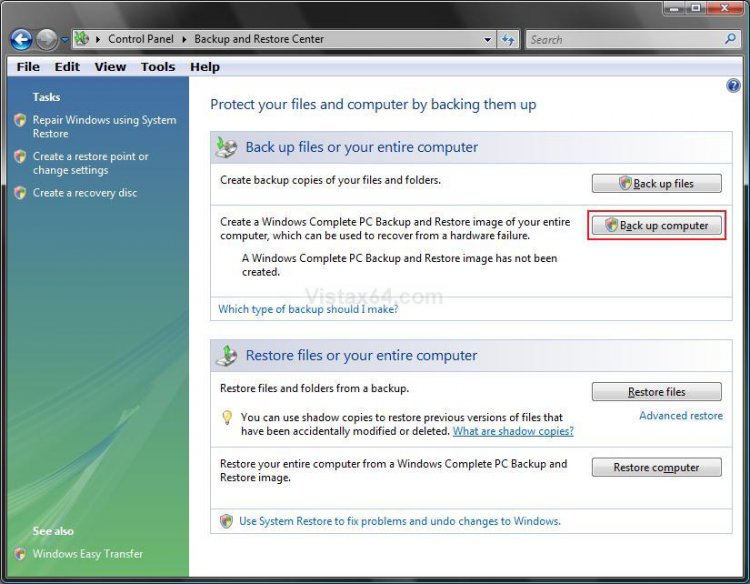
5. You will see this for a moment as Vista searches for backup devices. (See screenshot below)

6. Dot the location to save the backup image to. (See screenshot below)
WARNING: Vista cannot backup the partition or drive that you are saving the complete backup to.
A) On a Hard Disk: For saving to a different hard drive or partition.
NOTE: You cannot save the backup image on the same partition as Vista is installed on. It can only be saved on another partition, a separate hard drive, USB device (external hard drive), or on multiple DVDs. If you wish to create a new partition for backups, then see: How to Shrink and Create a Partition with Disk Management in Vista
B) On One or More DVDs: For saving to multiple DVDs that are bigger than 1 GB in size each.
C) Click on Next.
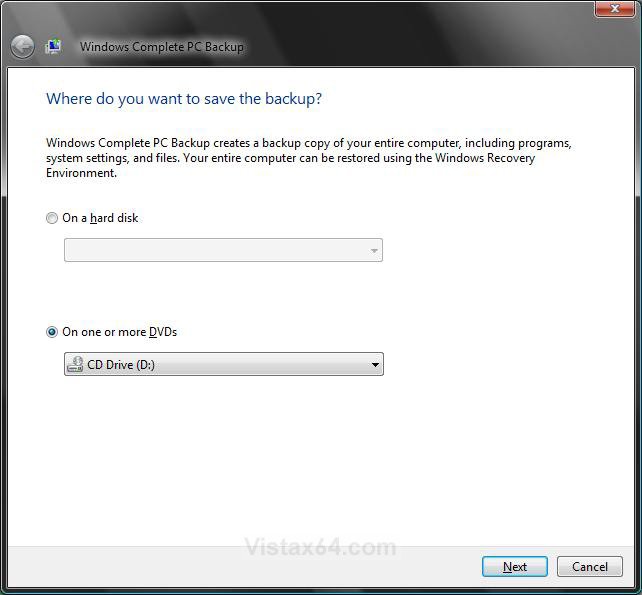
7. Click Start backup to confirm the backup settings and start the backup process. (See screenshots below)
NOTE: This will tell you how much space will be used on the other hard drive, or how many DVDs it will take.
WARNING: If you have a previous complete PC backup in this location, this complete backup will only backup the differences between now and when the previous backup was made. (See the right screenshot below)
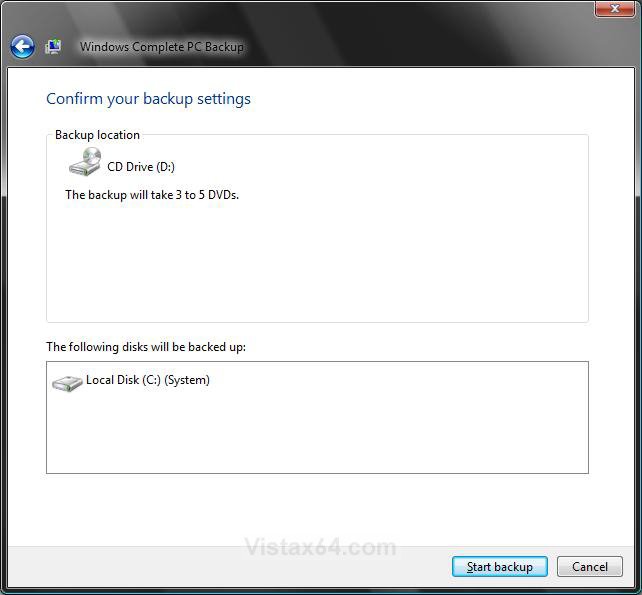
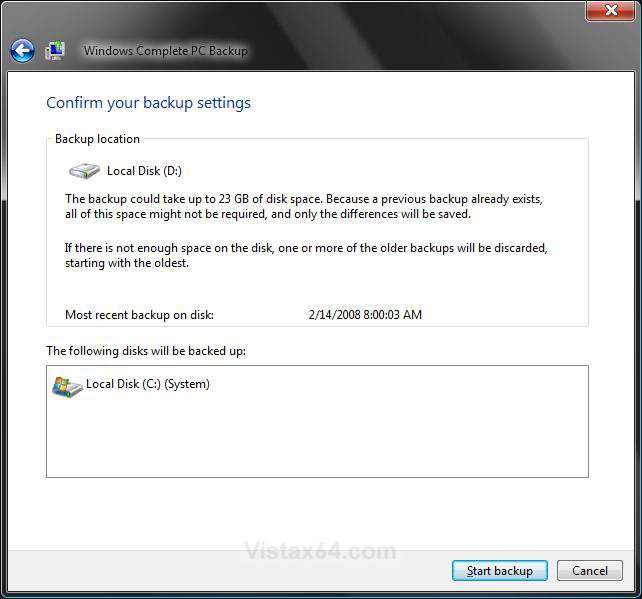
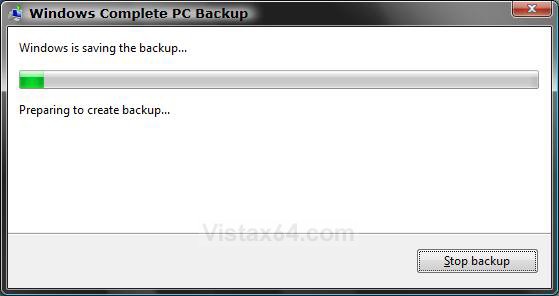
8. You will now see this window. (See screenshot below)
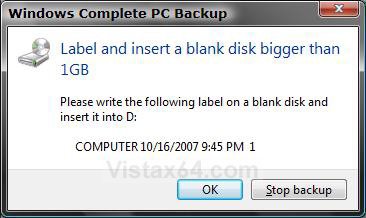
9. If you selected On One or More DVDs (step 6), then this window will pop-up asking for the first DVD. (See screenshot below)
A) Insert a blank DVD into the DVD drive and click on OK.
NOTE: It will continue to ask for DVDs until it is finished. See step 7 to see how many DVDs will be required.
10. When the backup is completed it will let you know. Click on Close.
11. Close the Control Panel window.
That's it,Shawn
Related Tutorials
- How to Extract Vista System Image Files Using Virtual PC 2007
- How to Restore the Complete Computer from a Complete Backup and Restore Image in Vista
- How to Create a System Restore Point in Vista
- How to Backup Files with Optional Automatic Backups in Vista
- How to Restore Previous Versions of a File and Folder in Vista
- How to Reset the Last Backup Listing for Vista Complete PC Backup
- How to Reset the Last Backup Listing for Vista Back Up Files
- How to Enable or Disable Backup Status and Configuration in Vista
- How to Backup Specific Files in Vista Like NT Backup in XP
Attachments

Last edited by a moderator:


