![]() |
![]() | ![]() | ![]() | ![]() | ![]() | ![]() | ![]() |
| Welcome to Windows Vista Forums. Our forum is dedicated to helping you find solutions with any problems, errors or issues you are experiencing with Windows Vista. The Vista forum also covers news and updates and has an extensive Windows Vista tutorial section that covers a wide range of tips and tricks. |
| |||||||
![]() |
| |
| | #1 (permalink) |
| VISTA ULTIMATE SP2 | Cannot Check For Updates?? Hi, I am using windows vista ultimate. I recently reinstalled vista, because of a virus I could not remove.. I have not installed any windows updates as yet??.. because.. The message I get when I check for updates is.. To check for updates, you first must install an update, for windows update.. Then it tries to install the update, then I get the error message 800736cc..??? and cannot install??.. I am lost?.. I have had not this problem in the past??.. Windows is set to recieve updates daily.. Maybe my copy is pirated? |
My System Specs![]() |
| | #2 (permalink) |
| Vista Bussiness x64 PL | Re: Cannot Check For Updates?? Try this tool CLICK |
My System Specs![]() |
| | #3 (permalink) |
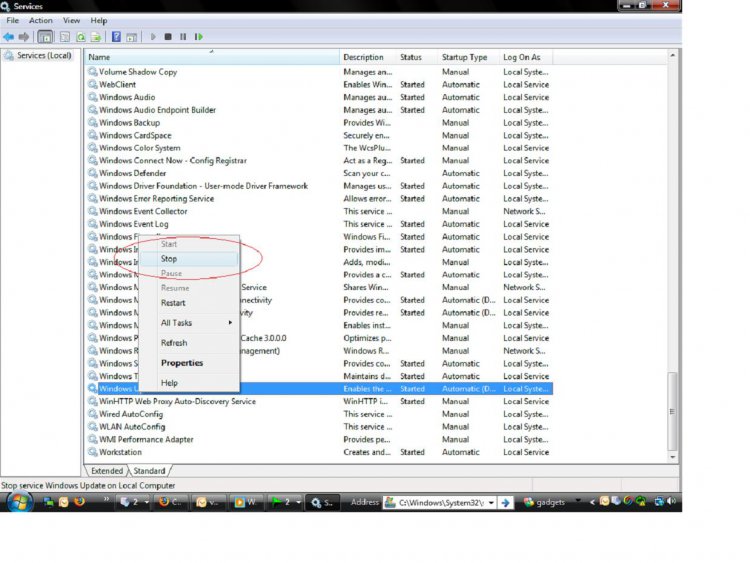
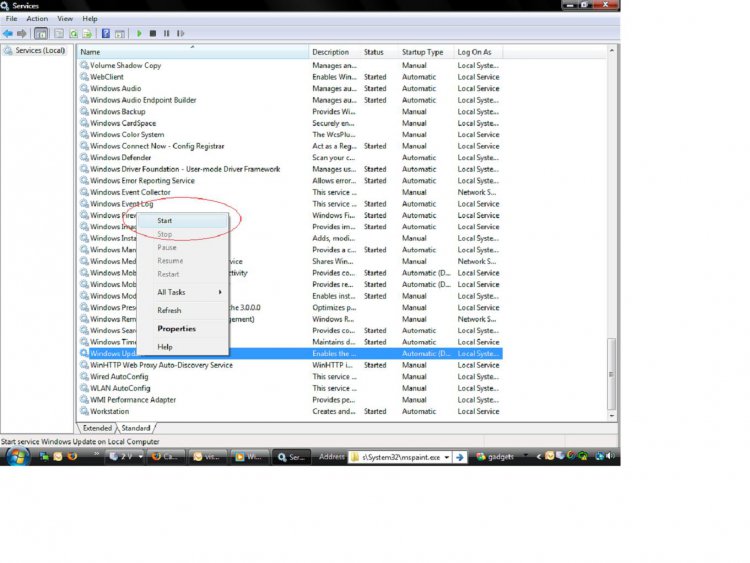
| Windows 7 | Re: Cannot Check For Updates?? Hi, I am using windows vista ultimate. I recently reinstalled vista, because of a virus I could not remove.. I have not installed any windows updates as yet??.. because.. The message I get when I check for updates is.. To check for updates, you first must install an update, for windows update.. Then it tries to install the update, then I get the error message 800736cc..??? and cannot install??.. I am lost?.. I have had not this problem in the past??.. Windows is set to recieve updates daily.. Maybe my copy is pirated? ![]() Hi, stop the windows update service by following the screen shots, 1. In run type services.msc 2.In the services window find windows update 3.right click on the windows update service and click stop ![]() 4.Now rename the software distribution folder into some other name(that folder will be located inside C:\windows folder) 5. Start the windows update service ![]() 6. Restart ur computer then try to update... Let me know the result |
My System Specs![]() |
![]() |
| Thread Tools | |
| |
Similar Threads | ||||
| Thread | Forum | |||
| Check for updates but let me choose... | Windows Updates | |||
| Check For Updates | Windows Updates | |||
| HELP! Can't change Automatic Updates or check for updates! | Vista performance & maintenance | |||
| My computer can't check for updates | Vista General | |||
| Windows can't check for updates... | Vista General | |||