Windows Vista Forums
Vista Forums Home Join Vista Forums Windows 7 Forum Vista Tutorials Tags
Welcome to Windows Vista Forums. Our forum is dedicated to helping you find solutions with any problems, errors or issues you are experiencing with Windows Vista. The Vista forum also covers news and updates and has an extensive Windows Vista tutorial section that covers a wide range of tips and tricks.

Go Back   Vista Forums > Vista Forums > Windows Updates

Vista - Windows Updates Questions

Reply
 
Old 3 Weeks Ago   #1 (permalink)


Vista Home Premium 32bit


Windows Updates Questions

Important and Recommended Windows Updates are scheduled to be automatically installed on my computer at 3 a.m., a time when the computer is turned off.

1. I thought the updates would be automatically installed the next time the computer was turned on. However, when I check updates, I sometimes get a message to install updates. Does the computer have to be on and online to have Important and Recommended Windows updates automatically installed?

2. If the computer is not on and online at scheduled time, do I have to install updates manually?

3. How can I see a description of the updates before I install them manually? (When I check I get a button to Install Now and I can view update history, but I don't see a way to check updates before I install them.

4. On my Update settings, one option is for Microsoft Update, updates for Microsoft products and check for new optional Microsoft software when Windows update occurs. Do I need this if I'm not interested in new Microsoft software?

Thanks.

My System SpecsSystem Spec
Old 3 Weeks Ago   #2 (permalink)


Vista Home Premium 32bit [x86] - SP2


Re: Windows Updates Questions

Quote  Quote: Originally Posted by moosescooter View Post
Important and Recommended Windows Updates are scheduled to be automatically installed on my computer at 3 a.m., a time when the computer is turned off.

1. I thought the updates would be automatically installed the next time the computer was turned on. However, when I check updates, I sometimes get a message to install updates. Does the computer have to be on and online to have Important and Recommended Windows updates automatically installed?

2. If the computer is not on and online at scheduled time, do I have to install updates manually?

3. How can I see a description of the updates before I install them manually? (When I check I get a button to Install Now and I can view update history, but I don't see a way to check updates before I install them.

4. On my Update settings, one option is for Microsoft Update, updates for Microsoft products and check for new optional Microsoft software when Windows update occurs. Do I need this if I'm not interested in new Microsoft software?

Thanks.
First of all moosescooter, get into the habit of spending a couple of minutes at each start-up by clicking Start>Windows Update>Check for Updates.

However, sometimes, and especially each 'Patch Tuesday', you will often find that you will have received prior notification of Windows Updates ready to be downloaded and installed, and in those circumstances, the header will be coloured a warning yellow.

Answer to Q1. As far as I am aware, the only 'automatic download and install' updates that occur, are for Windows Defender. However, you can often pre-empt the automatic download etc. for Windows Defender, if you do your daily start-up check.

Answer to Q2. Yes. Check and install manually.

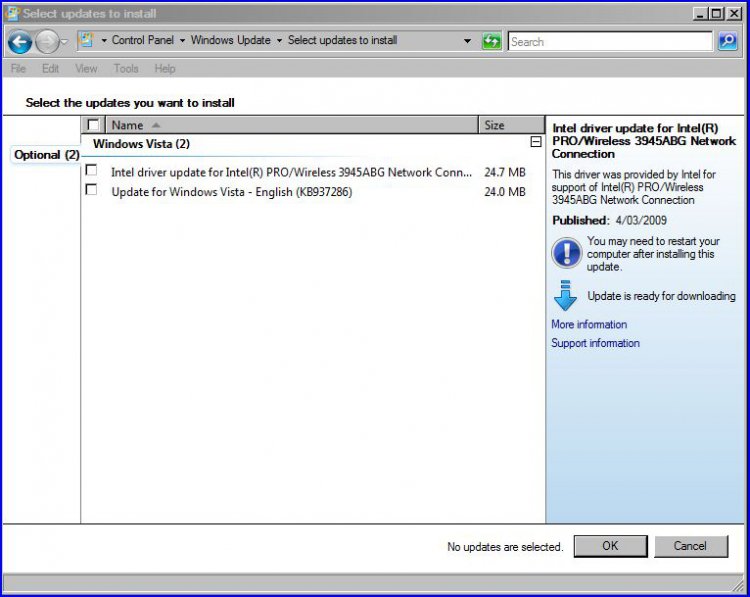
Answer to Q3.

windows-update-1.jpg......as you can see, if you click on the updates, you are now presented with information about the Updates that are ready for installation. More detail about each Update can be obtained by clicking on to 'More Information'.

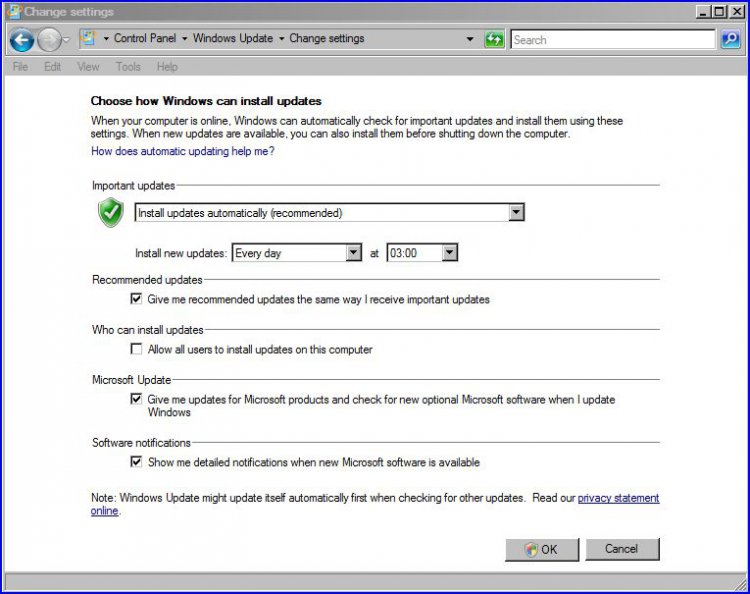
Answer to Q4.

windows-update-2.jpg......and again, my setup is exactly as you have described in your opening paragraph. What you don't want, just uncheck. These are after all, just optional extras. I choose to have them checked for my own information, bearing in mind that I still retain the option to accept or deny if advised of any new features etc.

Hope that this helps in some small way.
My System SpecsSystem Spec
Old 3 Weeks Ago   #3 (permalink)


Vista Home Premium 32bit


Re: Windows Updates Questions

sassofalco,

Thank you for the followup.
My System SpecsSystem Spec
Old 2 Weeks Ago   #4 (permalink)


Vista Home Premium 32bit [x86] - SP2


Re: Windows Updates Questions

Quote  Quote: Originally Posted by moosescooter View Post
sassofalco,
Thank you for the followup.
G'Day moosescooter,

As an example, I have a little more detailed follow-up that may help.

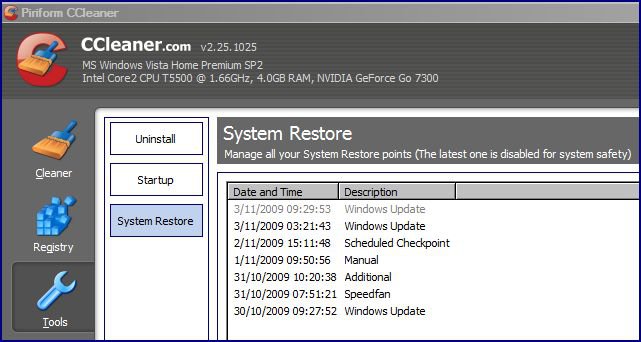
This morning as usual, I did a check on Windows Update, where nothing was reported. At that time I also do a check on my latest Restore Point. If you have CCleaner installed, you can actually check there for all current Restore Points - very useful info.

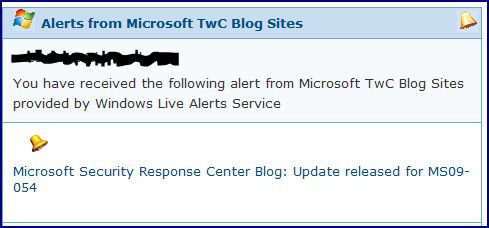
Then within the last hour, I received an email from MS giving notification of an important new Update;
windows-update-9.jpg

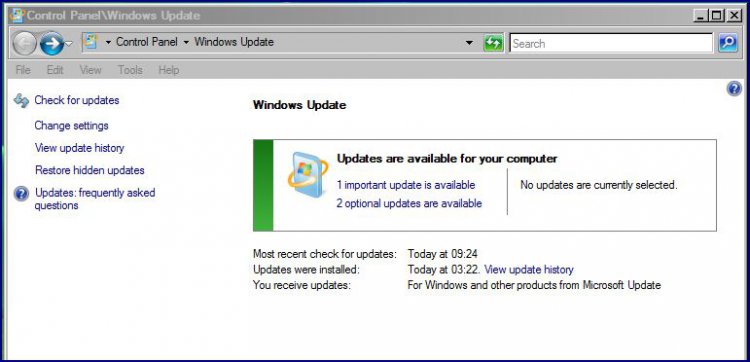
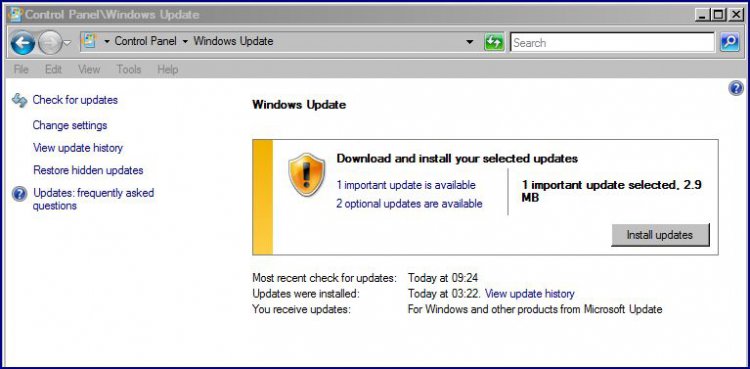
So it was back to check on Windows Update [after reading the relevant documents referred to in the email];
windows-update-3.jpg

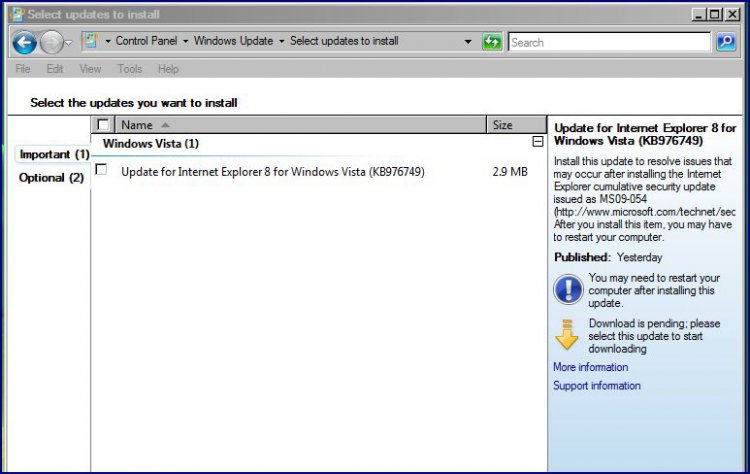
A click on 1 important update is available, opened this page;
windows-update-4.jpg

This is where you can read the details of the Update [your earlier concern] and if you choose to install it, a click on the box alongside it, places a check in it, then just click OK, which takes you back to here for installment;
windows-update-5.jpg

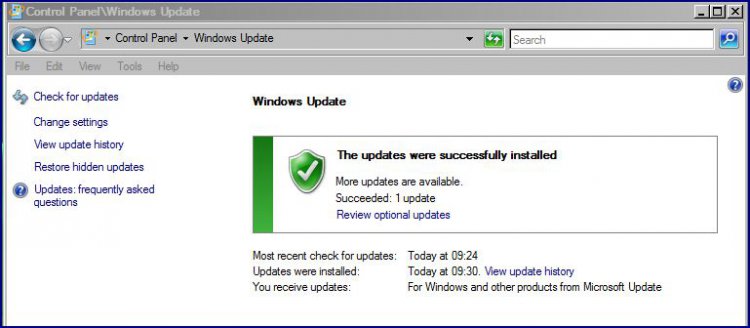
Once the install is completed, this page appears;
windows-update-6.jpg

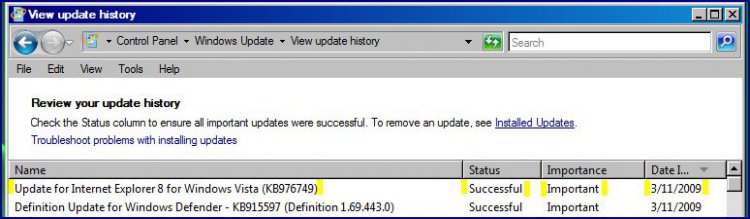
I always check on the installation by clicking on View Update history, where you will see confirmation of a successful [or not, sometimes] install;
windows-update-7.jpg

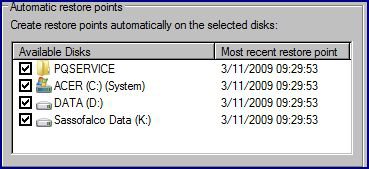
Finally, just to verify that all has gone as it should, I always double-check for the latest Restore Point [Windows Update] via Start>Control Panel>Backup and Restore>Create a Restore Point or change settings. The display should mirror your Windows Update details.
windows-update-8.jpg

And in conclusion, just to whet your appetite, this is CCleaner's record of the verification process.
windows-update-10.jpg


OK, it is just a small amount of time taken, but it does leave me happy in the knowledge that not only has the Windows Update been installed, but I also have the necessary 'fall-back' Restore Points to go to, should the Update generate any instability or other problems, in the meantime.

Hope that this all helps, and that you have a better idea about it all.
My System SpecsSystem Spec
Reply

Thread Tools


Similar Threads
Thread Forum
Export Installed updates(windows updates) Vista General
Windows Updates, and now other updates fail consistently Windows Updates
Questions, questions, questions... on how to improve PowerShell
Updates ... "Windows could not search for new updates" Vista General
Windows Live OneCare and Windows Defender Questions Vista General


Vista Forums is an independent web site and has not been authorized,
sponsored, or otherwise approved by Microsoft Corporation.
"Windows Vista", the Start Orb, and related materials are trademarks of Microsoft Corp.
© Designer Media Ltd

1 2 3 4 5 6 7 8 9 10 11 12 13 14 15 16 17 18 19 20 21 22 23 24 25 26 27 28 29 30 31 32 33 34 35 36 37 38 39 40 41 42 43 44 45 46