![]() |
![]() | ![]() | ![]() | ![]() | ![]() | ![]() | ![]() |
| Welcome to Windows Vista Forums. Our forum is dedicated to helping you find solutions with any problems, errors or issues you are experiencing with Windows Vista. The Vista forum also covers news and updates and has an extensive Windows Vista tutorial section that covers a wide range of tips and tricks. |
| |||||||
![]() |
| |
| | #1 (permalink) |
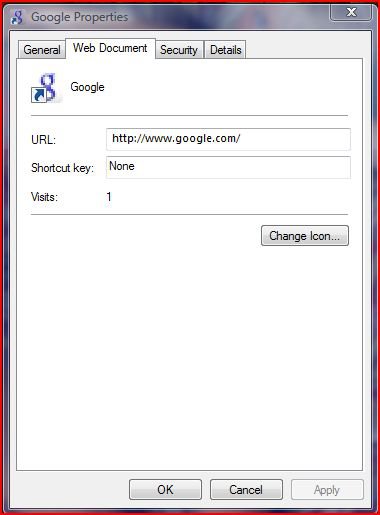
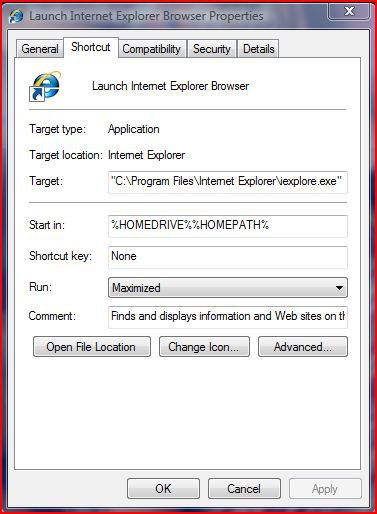
| Vista Home Premium 32bit SP2 | full screen view on IE how can i get my internet short cuts to load full screen instead of the small size? i click on the properties button and don't see any options for or run: normal window, minimized, maximized. all my short cut icon don't have this but my regular IE icon does. my internet short cuts used for going to favorite web sites. prior to this i had reset IE to factory settings cuz of dsl issues, befor i reset all my shortcuts would load full screen. thanks for the help |
My System Specs![]() |
| | #2 (permalink) |
| Vista Ultimate x64 SP1 / Windows 7 Ultimate x64 | Re: full screen view on IE |
My System Specs![]() |
| | #3 (permalink) |
| Ultimate x86 | Re: full screen view on IE First create a rstore point for safety becase you must edit the registry. Open the Registry Editor (searchbox: type run, run window: type regedit). Note: This is a two part modification. Complete both parts as listed below. Registry Key: HKEY_CURRENT_USER\Console Modify/Create the Value Name [FullScreen] according to the Value Data listed below. Data Type: REG_DWORD [Dword Value] // Value Name: FullScreen Value Data: [0 = Disabled / 1 = Enabled] [Start] [Run] [Regedit] Registry Key: HKEY_CURRENT_USER\Software\Microsoft\InternetExplorer\Main Modify/Create the Value Name [FullScreen] according to the Value Data listed below. Data Type: REG_SZ [String Value] // Value Name: FullScreen Value Data: [Modify Value to (Yes)] Exit Registry and Reboot I hope it works.. |
My System Specs![]() |
| | #4 (permalink) |
| Vista x64 Ultimate SP2, Windows 7 Ultimate x64 | Re: full screen view on IE Hi Fuzzy, This tutorial will show you how to set each internet shortcut to have it's window open to the size you want. Shortcut Default Open Window Size Hope this helps, Shawn |
My System Specs![]() |
| | #5 (permalink) |
| Vista Home Premium 32bit SP2 | Re: full screen view on IE |
My System Specs![]() |
| | #6 (permalink) |
| Vista Home Premium 32bit SP2 | Re: full screen view on IE ray when i modified this (red text) to yes it does work but only once then it goes back to no goes back to no after reboot also [Start] [Run] [Regedit] Registry Key: HKEY_CURRENT_USER\Software\Microsoft\InternetExplorer\Main Modify/Create the Value Name [FullScreen] according to the Value Data listed below. Data Type: REG_SZ [String Value] // Value Name: FullScreen Value Data: [Modify Value to (Yes)] Exit Registry and Reboot |
My System Specs![]() |
| | #7 (permalink) |
| Vista Ultimate x64 MAK, OpenSolaris 5, Gentoo 2008.1.... | Re: full screen view on IE The current user setting seems to get overridden - you'll need to adjust the setting in HKey_ Code: Users\S-1-5-21-xxxxxxxxxx-xxxxxxxxxx-xxxxxxxxxx-1000\ Software\Microsoft\InternetExplorer\Main Code: HKey_Local_Machine\Software\Microsoft\InternetExplorer\Main Someone else here can probably verify that, but in First key in my machine the Fullscreen RAG_SZ entry already exists, it is just set to no. |
My System Specs![]() |
| | #8 (permalink) |
| Vista Home Premium 32bit SP2 | Re: full screen view on IE johngalt tried both worked once after reboot then reverted to small screen ty tho |
My System Specs![]() |
| | #9 (permalink) |
| Ultimate SP1 x64 & x86 | Re: full screen view on IE Hi fuzzy, I do not really understand your problem as IE when launched remembers last settings. It is normal that your shortcut does not have any options as it is not "really" a shortcut but opens your default browser at a certain address or depending how your browser is configured, opens a new tab. Try this. close all your instances of IE. Open IE through your internet address shortcut, the window should be small size as you stated. Maximize the current IE window and close it. Try again now to open again using the same shortcut, the window, now should be full screen. Do remember that if you do it with already an instance of IE opened, it won't work |
My System Specs![]() |
| | #10 (permalink) |
| Vista Home Premium 32bit SP2 | Re: full screen view on IE sidney1st dosen't remember last settings. didn't work sorry ty tho |
My System Specs![]() |
![]() |
| Thread Tools | |
| |
Similar Threads | ||||
| Thread | Forum | |||
| Vista x64 Microsoft Photo Gallery View full screen | General Discussion | |||
| Unable to view photos in full screen | Vista General | |||
| Can't view Flash full screen | Vista General | |||
| Full-screen programs refuse to stay full-screen | Vista General | |||
| Full screen view of video? | Vista music pictures video | |||