I'm really not liking Microsoft Mail. I googled "download Outlook Express" and did find a free download. Can I run both programs at the same time? I'm getting old and change is harder than it used to be.

You are using an out of date browser. It may not display this or other websites correctly.
You should upgrade or use an alternative browser.
You should upgrade or use an alternative browser.
Solved Can I install Outlook Express 6 on Vista?
- Thread starter jbt
- Start date

I'm really not liking Microsoft Mail. I googled "download Outlook Express" and did find a free download. Can I run both programs at the same time? I'm getting old and change is harder than it used to be.
Windows Mail IS Outlook Express.
I'd be cautious of an "Outlook Express for Windows Vista" download, if I where you. There is no Microsoft-sanctioned version of OE for Vista, other than Windows Mail itself.
The difference is in XP it's called Outlook Express, while in Vista it's called Windows Mail. And the Vista version is more secure and stable than it's XP counterpart.
But in either case, you'd be better off using an alternative, such as Outlook 2007 (part of Microsoft Office 2007), or a free program like Mozilla Thunderbird (Thunderbird - Reclaim your inbox).
My Computer
System One
-
- Manufacturer/Model
- Custom Build
- CPU
- AMD Phenom 9600 Quad
- Motherboard
- ASUS MB-M3A32-MVP Deluxe/WiFi
- Memory
- 2 x A-Data 2GB DDR2-800
- Graphics card(s)
- ASUS ATI Radeon HD 2400PRO
- Monitor(s) Displays
- SAHARA 21"
- Screen Resolution
- 1600x1200
- Hard Drives
- 2 x 80GB Seagate (I) 2 x 120GB Seagate (I/S) 2 x 200GB Seagate (I/S) 2 x 250GB Seagate (I/S)
- PSU
- 800W
- Case
- Thermaltake Tai-Chi
- Cooling
- Tai-Chi Water Cooler
- Mouse
- Logitech
- Keyboard
- Genius
- Internet Speed
- 384kbps
- Other Info
- Currently dual booting between Vista x64 Ultimate Windows 7 BETA x64

Hello JBT,
Sorry, but you cannot install Outlook Express in Vista since Windows Mail is the new Outlook Express. It will not work in Vista, and you cannot uninstall Windows Mail.
However, you can use any other 3rd party email program as the default instead of, or at the same time with Windows Mail.
1. MS Office Outlook 2003 and newer.
2. Thunderbird -
Thunderbird - Reclaim your inbox
3. Windows Live Mail - (The one I use.)
http://www.vistax64.com/windows-live/92348-windows-live-suite-downloads.html
4. etc....
Hope this helps,
Shawn
Sorry, but you cannot install Outlook Express in Vista since Windows Mail is the new Outlook Express. It will not work in Vista, and you cannot uninstall Windows Mail.
However, you can use any other 3rd party email program as the default instead of, or at the same time with Windows Mail.
1. MS Office Outlook 2003 and newer.
2. Thunderbird -
Thunderbird - Reclaim your inbox
3. Windows Live Mail - (The one I use.)
http://www.vistax64.com/windows-live/92348-windows-live-suite-downloads.html
4. etc....
Hope this helps,
Shawn
My Computers
System One System Two
-
- Operating System
- Windows 10 Pro 64-bit
- Manufacturer/Model
- Custom
- CPU
- Intel i7-8700K 5 GHz
- Motherboard
- ASUS ROG Maximus XI Formula Z390
- Memory
- 64 GB (4x16GB) G.SKILL TridentZ RGB DDR4 3600 MHz (F4-3600C18D-32GTZR)
- Graphics card(s)
- ASUS ROG-STRIX-GTX1080TI-O11G-GAMING
- Sound Card
- Integrated Digital Audio (S/PDIF)
- Monitor(s) Displays
- 2 x Samsung Odyssey G7 27"
- Screen Resolution
- 2560x1440
- Hard Drives
- 1TB Samsung 990 PRO M.2, 4TB Samsung 990 PRO PRO M.2, 8TB WD MyCloudEX2Ultra NAS
- PSU
- Seasonic Prime Titanium 850W
- Case
- Thermaltake Core P3
- Cooling
- Corsair Hydro H115i
- Mouse
- Logitech MX Master 3
- Keyboard
- Logitech wireless K800
- Internet Speed
- 1 Gb/s Download and 35 Mb/s Upload
- Other Info
- Logitech Z625 speaker system, Logitech BRIO 4K Pro webcam, HP Color LaserJet Pro MFP M477fdn, APC SMART-UPS RT 1000 XL - SURT1000XLI, Galaxy S23 Plus phone
-
- Operating System
- Windows 10 Pro
- Manufacturer/Model
- HP Envy Y0F94AV
- CPU
- i7-7500U @ 2.70 GHz
- Memory
- 16 GB DDR4-2133
- Sound Card
- Conexant ISST Audio
- Monitor(s) Displays
- 17.3" UHD IPS touch
- Screen Resolution
- 3480 x 2160
- Hard Drives
- 512 GB M.2 SSD
Thank you for the replies. In OE6 I had 3 identities that I used daily. 1 for family and business, 1 for friends and 1 for places like this and places I don't want knowing my other identities. 3 address books, 3 sent folders, 3 draft folders etc. Haven't figured that out on Microsoft Mail. And I don't like the new messages auto loading into the preview pan. Guess I should look for a Microsoft Mail forum.
Thanks again!
Thanks again!
My Computer
Thank you for the replies. In OE6 I had 3 identities that I used daily. 1 for family and business, 1 for friends and 1 for places like this and places I don't want knowing my other identities. 3 address books, 3 sent folders, 3 draft folders etc. Haven't figured that out on Microsoft Mail. And I don't like the new messages auto loading into the preview pan. Guess I should look for a Microsoft Mail forum.
Thanks again!
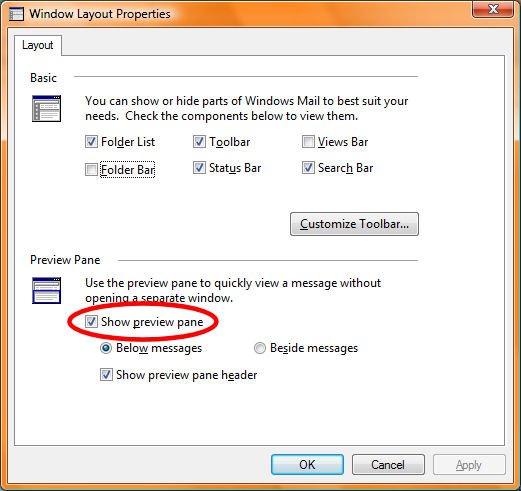
If you don'tlike the Preview Pane, then you can turn it off by clicking the "View" menu, then selecting the "Layout..." option. In the "Window Layout Properties" window, turn off the "Show Preview Pane" option, as shown in this screenshot:
Also, if you'd like to keep messages from specific sender seperate, you can always create rules:
- Select the message for which you want to create a rule
- Click the "Message" menu, then select the "Create Rule From Message..." option
- In the "New Mail Rule" window, select and check the "Move it to the specified folder" option in section 2.
- In section 3 of the "New Mail Rule" window, click the word "specified" in "Move it to the specified folder"
- Select the local folder to which you want to have that mail moved. Create the folder using "New Folder" if necessary. Click OK
- Type a name for the rule in section 4 of the "New Mail Rule" window.
- Click OK
- Click the "Tools" menu, click "Message Rules", then click "Mail"
- Click "Apply Now"
- Click "Select All"
- Check the "Include Subfolders" option
- Click "Apply Now"
- Click "OK"
- Click "Close"
- Click "OK"
Although I must reiterate that Vista Windows Mail (aka Outlook Express in XP) is not a great first choice for an email client. You'd best be using the suggestions that either I or Brink have made - Mozilla Thunderbird, Outlook 2007 or Windows Live Mail.
My Computer
System One
-
- Manufacturer/Model
- Custom Build
- CPU
- AMD Phenom 9600 Quad
- Motherboard
- ASUS MB-M3A32-MVP Deluxe/WiFi
- Memory
- 2 x A-Data 2GB DDR2-800
- Graphics card(s)
- ASUS ATI Radeon HD 2400PRO
- Monitor(s) Displays
- SAHARA 21"
- Screen Resolution
- 1600x1200
- Hard Drives
- 2 x 80GB Seagate (I) 2 x 120GB Seagate (I/S) 2 x 200GB Seagate (I/S) 2 x 250GB Seagate (I/S)
- PSU
- 800W
- Case
- Thermaltake Tai-Chi
- Cooling
- Tai-Chi Water Cooler
- Mouse
- Logitech
- Keyboard
- Genius
- Internet Speed
- 384kbps
- Other Info
- Currently dual booting between Vista x64 Ultimate Windows 7 BETA x64
Got rid of the Preview Pane! Slowly getting things to work like I want.
Thanks much!
Thanks much!
My Computer
Got rid of the Preview Pane! Slowly getting things to work like I want.
Thanks much!
Glad to be of help to you. If there's anything else, feel free to ask. That's what we're here for.
My Computer
System One
-
- Manufacturer/Model
- Custom Build
- CPU
- AMD Phenom 9600 Quad
- Motherboard
- ASUS MB-M3A32-MVP Deluxe/WiFi
- Memory
- 2 x A-Data 2GB DDR2-800
- Graphics card(s)
- ASUS ATI Radeon HD 2400PRO
- Monitor(s) Displays
- SAHARA 21"
- Screen Resolution
- 1600x1200
- Hard Drives
- 2 x 80GB Seagate (I) 2 x 120GB Seagate (I/S) 2 x 200GB Seagate (I/S) 2 x 250GB Seagate (I/S)
- PSU
- 800W
- Case
- Thermaltake Tai-Chi
- Cooling
- Tai-Chi Water Cooler
- Mouse
- Logitech
- Keyboard
- Genius
- Internet Speed
- 384kbps
- Other Info
- Currently dual booting between Vista x64 Ultimate Windows 7 BETA x64