Windows Vista Forums

How to set windows sidebar to open internet links in Firefox
  1. #1


    Newbie
    Join Date : Sep 2008
    Posts : 2
    Vista Ultimate 32bit
    Local Time: 04:13 AM

    How to set windows sidebar to open internet links in Firefox

    Hey, I need some helps !
    How to set windows sidebar to open internet links in Firefox ?
    I really really hate IE


      My System SpecsSystem Spec

  2. #2


    Junior Member
    Join Date : Aug 2008
    Posts : 13
    Vista Home Premium 32bit
    Local Time: 04:13 PM
    usa us illinois


    Re: How to set windows sidebar to open internet links in Firefox

    Which Sidebar gadget are you using? Does this happen with all gadgets? Is Firefox set as your default browser? I have FF3 as my default and the one gadget I use that opens links opens in Firefox.

      My System SpecsSystem Spec

  3. #3


    Newbie
    Join Date : Sep 2008
    Posts : 2
    Vista Ultimate 32bit
    Local Time: 04:13 AM


      Thread Starter

    Re: How to set windows sidebar to open internet links in Firefox

    the RSS reader points links to IE while the "add new gadgets" points to firefox

      My System SpecsSystem Spec

  4. #4
    Dzomlija's Avatar

    Resistance is Futile


    Join Date : Aug 2007
    South Africa
    Posts : 2,217
    Windows Vista x64 Ultimate
    Local Time: 11:13 PM
    south africa


    Re: How to set windows sidebar to open internet links in Firefox

    Quote Originally Posted by icyrainz View Post
    Hey, I need some helps !
    How to set windows sidebar to open internet links in Firefox ?
    I really really hate IE
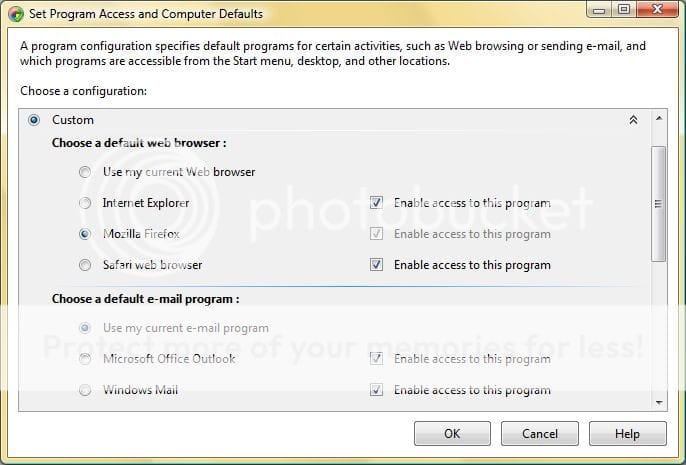
    Try this:
    1. Click the Start Orb (or press <WINDOWS_KEY>)
    2. Click "Default Programs"
    3. Click "Set program access and computer defaults" (You will need to respond to a UAC prompt)
    4. Click the down-chevron of the "Custom" item in the list
    5. Click the option icon for "Mozilla Firefox", and make sure it's associated "Enable access to this program" is also checked.
    6. Click "OK"

    Basically what the above does is change you default browser from Internet Explorer to Firefox.

      My System SpecsSystem Spec

  5. #5
    johngalt's Avatar

    Antidisestablishmentarian


    Join Date : May 2008
    3rd Rock
    Posts : 3,847
    Windows 7 Ultimate x64
    Local Time: 05:13 PM
    usa us georgia


    Re: How to set windows sidebar to open internet links in Firefox

    I use Fx almost exclusively on Vista 64bit and have it set as the default browser. My feed just opened in Fx....

      My System SpecsSystem Spec

How to set windows sidebar to open internet links in Firefox problems?

Similar Threads
Thread Thread Starter Forum Replies Last Post
Internet links will not open in Windows Mail kito Browsers & Mail 9 03 Oct 2008
Microsoft Mail - Can not open internet links ttownfamily Vista mail 3 03 Sep 2008
Internet links don't open Threedegrees Vista General 1 16 Feb 2008
movie links will not open in internet explorer 7 Jeff Vista General 1 02 Jul 2007
Internet Explorer 7: Links to files will no longer open with the default program Toby Reid Vista General 1 01 Feb 2007