
![]() |
![]() | ![]() | ![]() | ![]() | ![]() | ![]() | ![]() |
| Welcome to Windows Vista Forums. Our forum is dedicated to helping you find solutions with any problems, errors or issues you are experiencing with Windows Vista. The Vista forum also covers news and updates and has an extensive Windows Vista tutorial section that covers a wide range of tips and tricks. |
| |||||||
![]() |
| |
| | #1 (permalink) |
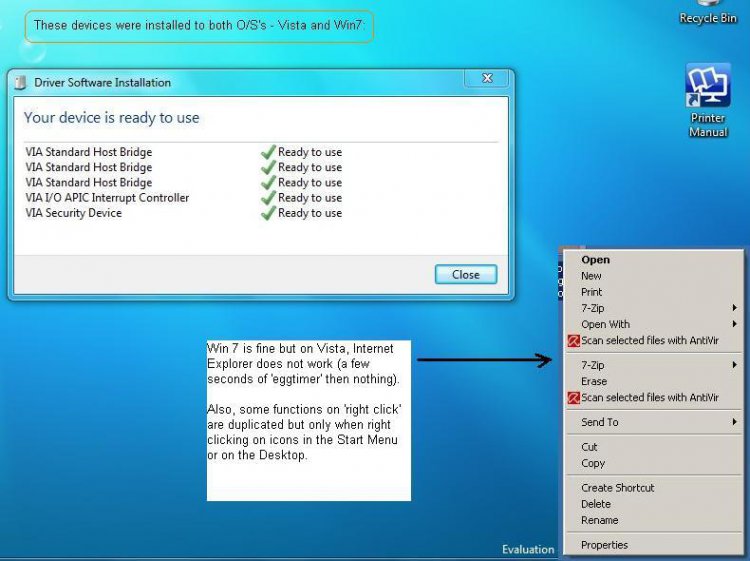
| Vista Home Premium 32bit | Internet Explorer not working Hello. I've described my problem in the attachment. I rarely use Internet Explorer so can't be sure that it died with the installation of the new motherboard drivers but it seems likely. Odd, though, that I can still use IE on Win7 (I'm 'dual boot' at the moment). I've done a Vista System Restore but to no avail. Can anyone suggest how to revive IE to Vista and cure that strange bug on the Context Menu (when right clicking on Start Menu and Desktop icons)? Many thanks |
My System Specs![]() |
| | #2 (permalink) |
| Vista Home Premium 32bit | Re: Internet Explorer not working No takers for that one then? Don't blame you, very strange problem. Fixed it, though. Did a clean install. It passed an otherwise uneventful Sunday... |
My System Specs![]() |
| | #3 (permalink) |
| Vista Home Premium 64bit SP2 | Re: Internet Explorer not working ha ha yes mate i had a look yesterday.........and decided to leave it to somebody else if you had left it here long enough im sure somebody would have had some optionsdid you just reinstall IE? |
My System Specs![]() |
| | #4 (permalink) |
| Vista Home Premium 32bit | Re: Internet Explorer not working No, I reinstalled Vista which includes IE as part of the 'bundle'. It all takes a while to do what with having to reinstall all your apps afterwards but it does seem to leave you with a more responsive system. And, of course, everything working as it should... |
My System Specs![]() |
| | #5 (permalink) |
| Vista Home Premium 64bit SP2 | Re: Internet Explorer not working might have been quicker to reinstall internet explorer ![]() i should have suggested it yesterday sorry |
My System Specs![]() |
| | #6 (permalink) |
| Vista Home Premium 32bit | Re: Internet Explorer not working No, I'd tried that. Downloaded IE8 from Microsoft, tried to install it but couldn't. Can't recall the error message. Anyways, there was still that problem of the duplication within the context menu. It's also cured following my reinstall. |
My System Specs![]() |
![]() |
| Thread Tools | |
| |
Similar Threads | ||||
| Thread | Forum | |||
| pop-up box internet explorer not working | Browsers & Mail | |||
| Windows Explorer Stopped Working, Internet Explorer Stopped Working, what DOES work? | General Discussion | |||
| internet explorer is not working | Vista General | |||
| Internet Explorer - not working | Vista General | |||
| Re: Internet Explorer not working | Vista performance & maintenance | |||