Windows Vista Forums

sign in to trusted websites

  1. #1


    Newbie
    Join Date : Aug 2009
    Posts : 3
    Vista Home Premium 64bit
    Local Time: 05:26 PM
    usa

    sign in to trusted websites

    I am not able to post a thread on one of the websites that I have added as a trusted site on my computer.

    I sign in immediately after visiting the site. After that I am asked to sign in again to allow me to post a message. The same screen shows up repeatedly after I put in the same info I used when I started. It doesn't indicate that the password or the name is incorrect.

    The website was contacted for assistance. Their solution was to delete all temporary internet files which was done, but it didn't help.

    I am posting my question here because it is a problem with my computer, not their site.

    Can anyone help with this problem? It does seem to be a bit strange that since I am signed in that I would have to sign in to post a message on the forum. A bit redundant.

    Thank you.


      My System SpecsSystem Spec

  2. #2
    delphin's Avatar

    Eager to learn

    Join Date : Nov 2008
    Chennai
    Posts : 636
    Windows 7
    Local Time: 02:56 AM
    india


    Re: sign in to trusted websites

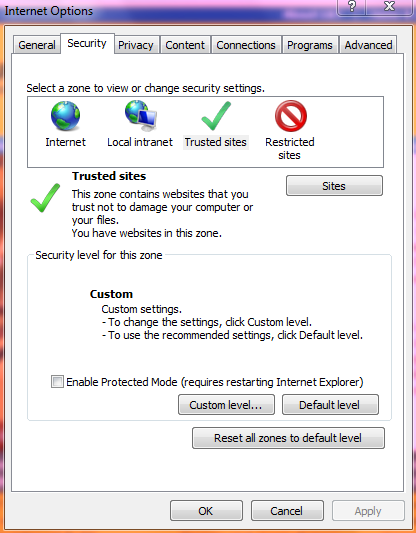
    Open internet explorer, tools> internet options>security. Highlight trusted sites and click on default level. Restart internet explorer and try


    capture.png


      My System SpecsSystem Spec

  3. #3


    Newbie
    Join Date : Aug 2009
    Posts : 3
    Vista Home Premium 64bit
    Local Time: 05:26 PM
    usa

      Thread Starter

    Re: sign in to trusted websites

    Thanks for your reply. I tried it, even though I had the security level on low and the default setting is medium, and it didn't work.

      My System SpecsSystem Spec

  4. #4
    delphin's Avatar

    Eager to learn

    Join Date : Nov 2008
    Chennai
    Posts : 636
    Windows 7
    Local Time: 02:56 AM
    india


    Re: sign in to trusted websites

    Have You instructed your iexplore to accept all cookies?.

    If not in privacy tab, make it to allow all cookies.

    Are you experiencing the same problem while using firefox?

      My System SpecsSystem Spec

  5. #5


    Join Date : Aug 2009
    Sydney, Australia
    Posts : 218
    Vista Ultimate 64-bit
    Local Time: 07:26 AM
    australia au new south wales


    Re: sign in to trusted websites

    if this doesnt work in your browser, go to tools>internet tools>advanced tab and reset, (you might want to make sure that you untick the box deleting personal data

      My System SpecsSystem Spec

  6. #6


    Newbie
    Join Date : Aug 2009
    Posts : 3
    Vista Home Premium 64bit
    Local Time: 05:26 PM
    usa

      Thread Starter

    Re: sign in to trusted websites

    I have no problem with firefox.

      My System SpecsSystem Spec

  7. #7
    delphin's Avatar

    Eager to learn

    Join Date : Nov 2008
    Chennai
    Posts : 636
    Windows 7
    Local Time: 02:56 AM
    india


    Re: sign in to trusted websites

    Have u changed the cookies setting to accept all cookies? in privacy tab.


      My System SpecsSystem Spec

sign in to trusted websites

Similar Threads
Thread Thread Starter Forum Replies Last Post
Live Messenger - Multiple Computers - Sign in and Sign Out George Live Messenger 1 04 Feb 2010
Live Mail Sign Out Error, unable to sign out: flyboydale54 Vista mail 2 07 Nov 2009
mailto not trusted even when click from trusted site with IE7 & Vi Eric Vista mail 11 03 Jun 2008
I cannot sign on to several of my paid websites . . . debarybabs Vista security 0 04 Aug 2007
mailto not trusted even when click from trusted site with IE7 & Vi Eric Vista General 7 05 May 2007