Windows Vista Forums

Where are dump files (.dmp) saved after crash ?

  1. #1


    Member
    Join Date : Feb 2010
    Romania
    Posts : 74
    Windows 7 ultimate build 7100
    Local Time: 12:13 PM
    romania

    Where are dump files (.dmp) saved after crash ?

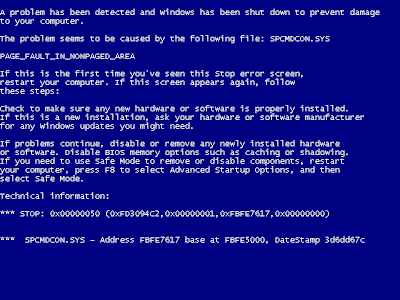
    When system crash, i get a bsod like this:


    After it crash, windows saves the log in C as prefix crash.dmp Where can i get to that log file?


      My System SpecsSystem Spec

  2. #2


    Banned

    Join Date : Dec 2009
    Posts : 3,375
    Vista Home Premium x86 SP2
    Local Time: 06:13 PM
    uk european union


    Re: Where are dump files (.dmp) saved after crash ?

    Hi,

    If you want us to analyse the dump file for you, you need to make sure you are minidumping (not full etc) and the zip up and upload

    C:\Windows\Minidump

    folder. Busy now, but for general tips see my recent posts.

    Richard

      My System SpecsSystem Spec

  3. #3


    Member
    Join Date : Feb 2010
    Romania
    Posts : 74
    Windows 7 ultimate build 7100
    Local Time: 12:13 PM
    romania

      Thread Starter

    Re: Where are dump files (.dmp) saved after crash ?

    Thanks. I found 13 dump files there lol.

      My System SpecsSystem Spec

  4. #4


    Member
    Join Date : Feb 2010
    Romania
    Posts : 74
    Windows 7 ultimate build 7100
    Local Time: 12:13 PM
    romania

      Thread Starter

    Re: Where are dump files (.dmp) saved after crash ?

      My System SpecsSystem Spec

  5. #5


    Banned

    Join Date : Dec 2009
    Posts : 3,375
    Vista Home Premium x86 SP2
    Local Time: 06:13 PM
    uk european union


    Re: Where are dump files (.dmp) saved after crash ?

    Hi,

    You have two different BSODs here:

    CRITICAL_OBJECT_TERMINATION
    STOP: 0x000000f4
    x 12

    This means that a Windows critical thread or process (process in this case) has stopped when it should not have done.

    Also:
    CLOCK_WATCHDOG_TIMEOUT

    STOP: 0x00000101 x 1

    Referenced Drivers:
    cmdguard.sys
    igdkmd32.sys
    ntkrnlpa.exe

    BSODs are often caused by drivers, overheating, faulty hardware etc. The most important thing to do is to update all of your drivers. Here is a list of thing to try:

    • Update all of the drivers you can.


    • Run Memtest86+ or another memory testing tool that came with your computer.


    • Make sure all windows updates and service packs are installed.


    • See if these BSODs occur in Safe Mode and report back.


    • See if there are any errors showing in Device Manager.

    This problem may be caused by overheating, so can you please download GPU-Z and SpeedFan and write down/screenshot the temperatures of your cores/graphics card/hard disk.
    GPU-Z
    SpeedFan

    The referenced drivers may point to your Commodo Firewall. Fully update this, and you could also try to replace this (I would recommend uninstalling and replacing this, at least as a test because your Minidumps are pointing to this as the culprit. Also, the other reference points at your motherboard/chipset or grpahics card driver. Update these drivers and remove Commodo Firewall first.

    Your drivers are all very up to date. This is very impressive. Here are the list of slightly older drivers (2006 - 2008 and lost time stamp)

    2006:
    secdrv.SYS

    2007:
    e110b325.sys

    2008:
    VSTCNXT3.SYS
    VSTAZL3.SYS
    VSTDPV3.SYS

    Lost time stamp:
    TSDDD.dll

    Try to update these drivers if you can, but as I said earlier, all your drivers are very up to date and this is very impressive.

    In conclusion, your first task is to update/uninstall Commodo Firewall and to update your chipset/graphics drivers if you can.

    Good luck,

    Richard

    Last edited by niemiro; 21 Mar 2010 at 05:00 AM.
      My System SpecsSystem Spec

Where are dump files (.dmp) saved after crash ?

Similar Threads
Thread Thread Starter Forum Replies Last Post
Crash Dump files not saving Jane Rocksford Server General 2 25 Feb 2010
How to view Crash dump files(.dmp) Vijay Server General 1 25 Oct 2009
crash dump.. techker Crashes and Debugging 0 04 Oct 2009
Crash Dump. vmax Vista General 2 11 Dec 2007
Crash Dump/Corrupted Files Michelle Vista General 4 06 Dec 2007