Windows Vista Forums

Major System Crisis

  1. #1


    Member
    Join Date : Jun 2010
    London
    Posts : 32
    32bit
    Local Time: 05:52 PM
    england

    Major System Crisis

    Hello,
    I have been running Vista Basic 32bit on an ASUS (X58Lseries, 1024MB) for about 18 months (still on first battery). Started getting a blue crash screen about 3 weeks ago, which said it was shutting down to protect data & save data to disk. It also referred to CHKDSK. The laptop would then immediately restart normally, but there would always be an initial problem connecting to the Internet where it would be very slow connecting or show it was connected, but it wasn't. Last night the whole system crashed...when I start it up it goes straight into ASUS startup then into a black screen with Windows Error Recovery & 2 options, being Launch Startup Repair & Start Windows Normally. Whichever option you choose the Startup Repair starts & comes up with the message "Startup repair cannot repair this computer automatically" it then has options to send or not send information about the problem. It recommends to send information about the problem. The problem signatures are:
    Problem Event Name : Startup Repair V2
    Problem Signature 1: Auto failover
    Problem Signature 2: 6.0.6000.16386.6.0.6001.18000
    Problem Signature 3: 6
    Problem Signature 4:1507352
    Problem Signature 5: corrupt file
    Problem Signature 6: corrupt file
    Problem Signature 7: 3221225624
    Problem Signature 8: 1
    Problem Signature 9: WrpRepair
    Problem Signature 10: 0
    OS version 6.0.6000.2.0.0.256.1
    Locale ID: 1033

    If I press Send Information (recommended it says "Windows is checking for a solution to the problem" & then says "Windows cannot repair this computer automatically". It also says that if a device has been recently attached to the computer to remove it & restart the computer...I haven't added any hardware recently.


    I've been told it could be a Malware virus or the battery, but it's all guess work. Any help would be greatly appreciated. Thanks

    Last edited by maxwells; 26 Jun 2010 at 04:04 AM. Reason: bad english, typing too fast
      My System SpecsSystem Spec

  2. #2
    richc46's Avatar

    BSOD Squad


    Join Date : Dec 2008
    Fairfield County, CT
    Posts : 19,345
    Windows 7 SP1 x64
    Local Time: 12:52 PM
    usa us connecticut


    Re: Major System Crisis

    Welcome

    We need your dump (Blue Screen) Files

    Dump files - Upload to Seven Forums - Windows 7 Forums
    For Vista, too.

    While waiting run your antivirus and download and run this:
    http://www.malwarebytes.org/mbam.php

      My System SpecsSystem Spec

  3. #3


    Member
    Join Date : Jun 2010
    London
    Posts : 32
    32bit
    Local Time: 05:52 PM
    england

      Thread Starter

    Re: Major System Crisis

    Hi, I'm currently on my PC as I cannot access the system on my laptop at all although I can F8 & F2 (by constantly tapping them as the laptop starts up)...is there anyway of getting in through there to get the info you need. I am a complete novice when it comes to the workings of a computer...you might be able to tell

      My System SpecsSystem Spec

  4. #4


    Banned

    Join Date : Dec 2009
    Posts : 3,375
    Vista Home Premium x86 SP2
    Local Time: 05:52 PM
    uk european union


    Re: Major System Crisis

    Hello, and welcome to the Vista Forums!

    I am Richard, and I will be helping you with your problem today.

    You may need to write these instructions down, so that you do not forget them, print them off, or view them on another computer.

    Please turn your computer off.

    Start it up again, and immediately start tapping the F8 key.

    When you get a list of Advanced Startup Options, try Last Known Good Configuration.

    If this does not help (and this one probably won't, but occasionally it will, it is easy, and so it is worth a try), then go back into the Advanced Startup options, and select Safe Mode.

    Let Safe Mode boot, and tell me if it works or not. If you get a Blue Screen of Death(BSoD), then continue to read, to see what to do.

    If neither Safe Mode nor Last Known Good Configuration works, go back into Advanced Startup Options one more time, and select Disable Automatic Restart on System Failure. Wait for your computer to try to boot up again, and now you will get a BSoD.

    Please note down the following things. BSoDs follow the same pattern each time, and so there is no need to copy all of it, just the three things.

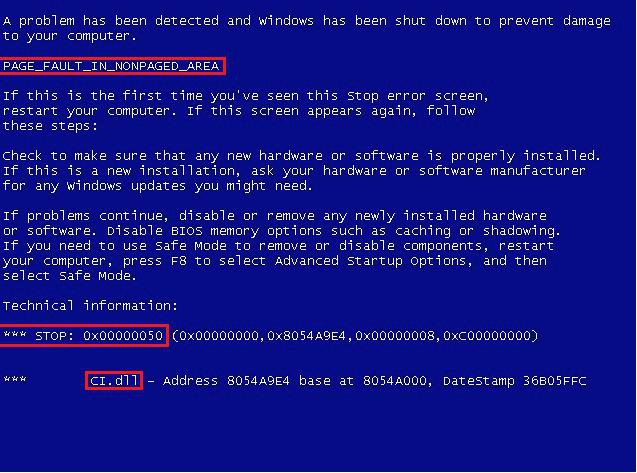
    A BSoD will look similar to the following (click on the image to expand)

    bsod.jpg

    • I need the text code (circled in red at the top) This will be different from the one in the picture, and may be like DRIVER_IRQL_NOT_LESS_OR_EQUAL Very, very occasionally this will not appear.


    • I need any files mentioned. The name of the file will move around the BSoD, so you cannot rely upon it being in the same place. It will not always be present, but it is particularly important if you get a File not Found error.


    • I need the STOP code (but only the bit before the brackets)

    Each of these is vital to know if shown, so please look hard for them, but sometimes they are not all shown, so just list what is shown!

    Good luck!

    Richard

    P.S. Do you have access to another computer during this time, to run fixes from?

      My System SpecsSystem Spec

  5. #5


    Banned

    Join Date : Dec 2009
    Posts : 3,375
    Vista Home Premium x86 SP2
    Local Time: 05:52 PM
    uk european union


    Re: Major System Crisis

    Hello again,

    Do not worry about the duplicate post and wrong forum, it has been sorted!

    Richard

    richc46: I have already reported it.

      My System SpecsSystem Spec

  6. #6


    Member
    Join Date : Jun 2010
    London
    Posts : 32
    32bit
    Local Time: 05:52 PM
    england

      Thread Starter

    Re: Major System Crisis

    Hi Richard, I've tried everything you asked, but it is still doing exactly same thing (going into start up repair). The blue screen isn't coming up, should I keep switching the machine off & going through Disable Automatic Restart until the BSoD comes up?

    I do have a PC so can look for fixes

    Vickii

      My System SpecsSystem Spec

  7. #7
    richc46's Avatar

    BSOD Squad


    Join Date : Dec 2008
    Fairfield County, CT
    Posts : 19,345
    Windows 7 SP1 x64
    Local Time: 12:52 PM
    usa us connecticut


    Re: Major System Crisis

    In addition, to Richards request, please follow the instructions in frame 4 to get the dump reports and list upload per my prior post
    BSOD + minidumps - Windows 7 Forums

    To make you more confused I am Richard

      My System SpecsSystem Spec

  8. #8


    Member
    Join Date : Jun 2010
    London
    Posts : 32
    32bit
    Local Time: 05:52 PM
    england

      Thread Starter

    Re: Major System Crisis

    Thanks Richard (Meerkat)...is it possible to download the MBAB file onto a CD using my PC & then start my laptop up from the CD drive? Or to use the command prompt on the laptop to start the CD drive. I can't access anything on the laptop at all. I am trying to get the blue screen now...will keep trying

      My System SpecsSystem Spec

  9. #9


    Member
    Join Date : Jun 2010
    London
    Posts : 32
    32bit
    Local Time: 05:52 PM
    england

      Thread Starter

    Re: Major System Crisis

    While trying to get the BSoD the laptop has just started up & has a message that says it is the ASUS Preload Wizard. This is a message (Wizard) that I have never seen before.

      My System SpecsSystem Spec

  10. #10
    richc46's Avatar

    BSOD Squad


    Join Date : Dec 2008
    Fairfield County, CT
    Posts : 19,345
    Windows 7 SP1 x64
    Local Time: 12:52 PM
    usa us connecticut


    Re: Major System Crisis

    Quote Originally Posted by maxwells View Post
    Thanks Richard (Meerkat)...is it possible to download the MBAB file onto a CD using my PC & then start my laptop up from the CD drive? Or to use the command prompt on the laptop to start the CD drive. I can't access anything on the laptop at all. I am trying to get the blue screen now...will keep trying
    Its worth a try, I think that it will work

    Very few people know that my Avatar is a meerkat. Atlanta GA Zoo last summer.

      My System SpecsSystem Spec

Page 1 of 7 123 ... LastLast
Major System Crisis

Similar Threads
Thread Thread Starter Forum Replies Last Post
Major system problem Jagex General Discussion 3 24 Oct 2008
Re: Is anything major missing from this first-pass freeware filing system by FUNCTION (not by brand)? Donna Ohl, Grady Volunteer Coordinator Vista installation & setup 0 22 Jan 2008
Crysis crisis! Grae Vista Games 4 16 Dec 2007
Activation Crisis Matthew Vista installation & setup 8 16 Jul 2007
5536 Major File System / Explorer.exe Crash Anon Vista General 7 01 Sep 2006