Windows Vista Forums

Startup Repair Loop Mystery
  1. #1


    Newbie
    Join Date : Oct 2012
    Posts : 3
    32bit
    Local Time: 04:42 PM

    Startup Repair Loop Mystery

    I have read previous encounters with this but none have lead me to solutions. So here is my issue and I hope this is the right area to post this.


    One day the power on my HP laptop went out. The battery is already old and lasts about 10 minutes. So I need constant supply. I went to start it and it comes up with the opening page (where you can press F8, F10 etc...to go to options)
    Then a black screen with a white bar on the bottom Loading Windows Files or something like that.
    Then the normal black screen with the Windows Vista gold bar loading
    then it goes to a blue screen, you see some quick black windows open (looks like cmnd windows) and then it goes right to Startup Repair.
    I have run this 50 times to no avail.
    After the manager finishes and tells me it cant fix and asks me to send a report (which I cannot do) I have been selecting to go to the System Recovery Options.
    Before I go further, I have tried to go into Safe mode, Normal Mode, Administrator startup, Start with Command Prompt and I get nothing. Same loop.
    In the SRO I have done the startup repair again, nothing fixes.
    I have done System Restore, but none of my backups can repair the problem.
    I have done the memory diag. Nothing.
    I do not even have the command prompt option.
    Which I find odd.
    I downloaded a recovery disk from some website for 10bucks and tried to change the startup to CD/DVD drive and it just goes into the loop again.

    Please help! The tech guys where I am living now (Iceland) can only save some of my memory and give me a blank laptop back. I know there must be a solution other than that.
    Oh and I was not given a Vista disk when I bought the computer that I know of and If I did it is in a locked black military footlocker in New Jersey somewhere and I am the only one with access to it.

    Thanks guys!

      My System SpecsSystem Spec

  2. #2
    richc46's Avatar

    BSOD Squad


    Join Date : Dec 2008
    Fairfield County, CT
    Posts : 19,257
    Windows 7 SP1 x64
    Local Time: 12:42 PM
    usa us connecticut


    Re: Startup Repair Loop Mystery

    Welcome
    First do you have stuff that you want to save?

      My System SpecsSystem Spec

  3. #3


    Newbie
    Join Date : Oct 2012
    Posts : 3
    32bit
    Local Time: 04:42 PM


      Thread Starter

    Re: Startup Repair Loop Mystery

    Yes, there are things I would like to save. I have documents, itunes music (from an old account that I cannot get back) pictures and programs that I use for art that I could download again I guess. Not alot of the stuff, mostly programs and some writings.

      My System SpecsSystem Spec

  4. #4


    Newbie
    Join Date : Oct 2012
    Posts : 3
    32bit
    Local Time: 04:42 PM


      Thread Starter

    Re: Startup Repair Loop Mystery

    Here, btw, is a startup repair diag and details if it will help
    Last Successful boot time: 7/28/2012 60104am GMT
    Number of Repair Attemps: 34

    Session Details
    Disk = /Device/Harddisk0
    Windows directory = C:/Windows
    Number of root causes = 1

    Test performed: All successful

    Root cause: Startup repair has tried several times but still cannot determine the cause of the problem

    I am flabbergasted.

      My System SpecsSystem Spec

  5. #5
    richc46's Avatar

    BSOD Squad


    Join Date : Dec 2008
    Fairfield County, CT
    Posts : 19,257
    Windows 7 SP1 x64
    Local Time: 12:42 PM
    usa us connecticut


    Re: Startup Repair Loop Mystery

    It looks bad. Your hard drive may have already failed. If so, your stuff may be gone. Try to save your stuff
    Use Ubuntu Live CD to Backup Files from Your Dead Windows Computer - How-To Geek

      My System SpecsSystem Spec

  6. #6
    SIW2's Avatar

    Senior Member


    Join Date : Jul 2008
    Posts : 2,676
    VISTA HOME PREMIUM X64/ 7 x64 / 7x86
    Local Time: 05:42 PM


    Re: Startup Repair Loop Mystery

    You can download a repair disc I made.

    https://skydrive.live.com/#cid=B0A22...89320E3247!345

    The file to d/l is called REP.7z.

    Rt click it >properties>unblock>Apply>OK

    It is a .7z file , so you need the free program 7-zip to unzip it. http://www.7-zip.org/

    That will give an .iso file, which you burn to cd as an image.

    If you don't have an image burner, use this from the lovely people at Terrabyte: burncdcc.zip

    Boot up the cd on the sick machine.

    Drive letters will look different from there - don't worry, that is normal.

    Find your windows drive letter and your active partition drive letter. ( You can fire up partition wizard to see which is the active partition - while you are there , check if your Windows partition is shown as Primary, or a Logical partition. )

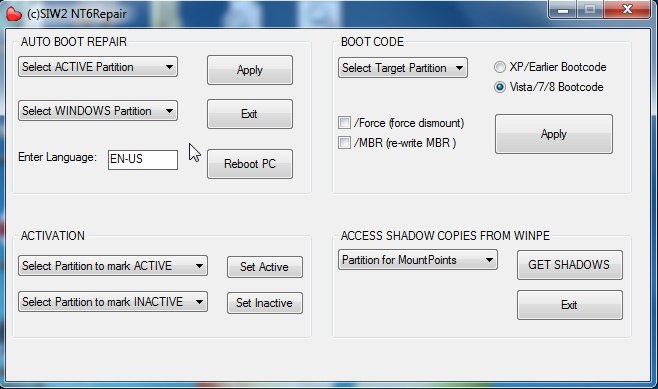
    Close partition wizard and open NT6Repair .


    nt6repair.jpg

    Under Auto Boot Repair , select your Windows partition and your active partition letters, and click Apply.

    See if that does it.

    If that doesn't do it - try it again - this time (IF your windows partition is a Primary ) , mark it Active , and then select your windows partition in both dropdowns.

    ( If that doesn't help, we can replace the registry hives from backups )

      My System SpecsSystem Spec

  7. #7
    Madhur B's Avatar

    Dell Social Media Team
    Join Date : Sep 2012
    Hyderabad
    Posts : 343
    win7 Ultimate x32 bit
    Local Time: 10:12 PM
    india


    Re: Startup Repair Loop Mystery

    Hi Edemardil,

    Remove static power (if any) from the computer to check if the computer is able to boot fine. To remove the static power, disconnect the power cable from the back of the computer, then press the power button for 10-15 seconds and then connect the power cable back to the computer.

    Run the built-in diagnostics provided by the manufacturer on the computer to check if the hard drive is working fine.

    If the hard drive fails, if the computer is in warranty contact the manufacturer so that they can replace it.

    For any further questions in future please feel free to contact us.

      My System SpecsSystem Spec

Startup Repair Loop Mystery problems?

Similar Threads
Thread Thread Starter Forum Replies Last Post
Help ! Vista Startup Repair Loop Startup General Discussion 1 31 Dec 2011
Vista startup repair cannot repair this computer-- problem event name StartupRepairV2 Jessie2012 General Discussion 2 05 Dec 2010
Vista startup repair cannot repair this computer-- problem event name StartupRepairV2 Jessie2012 Crashes and Debugging 1 04 Dec 2010
Startup Repair Loop HELP Brandon1 Vista installation & setup 0 21 Mar 2010
"Startup Repair" loop and graphics card problems a9gould General Discussion 0 24 Jul 2009