![]() |
![]() | ![]() | ![]() | ![]() | ![]() | ![]() | ![]() |
| Welcome to Windows Vista Forums. Our forum is dedicated to helping you find solutions with any problems, errors or issues you are experiencing with Windows Vista. The Vista forum also covers news and updates and has an extensive Windows Vista tutorial section that covers a wide range of tips and tricks. |
| |||||||
![]() |
| |
| | #1 (permalink) |
| 32bit | New Vista Computer & Disc Drive Won't Work Hi I just got a new vista computer for my Christmas and everything works perfectly apart from my disc drive. I have a few software cd's that I need to install but when I put the disc in, nothing happens. It doesn't even spin the disc and is not labelled on "My Computer." I don't know what else I can do to solve the problem so if you could help it would be highly appreciated! x |
My System Specs![]() |
| | #2 (permalink) |
| Windows 7 Ultimate 32 bit Beta, Vista Ultimate x86 | Re: New Vista Computer & Disc Drive Won't Work Hi I just got a new vista computer for my Christmas and everything works perfectly apart from my disc drive. I have a few software cd's that I need to install but when I put the disc in, nothing happens. It doesn't even spin the disc and is not labelled on "My Computer." I don't know what else I can do to solve the problem so if you could help it would be highly appreciated! x ![]() If the drive light doesn't come on, and the drive is not recognised by My Computer it is either faulty or not connected properly. Either way, as it is a new computer it needs to go back to the supplier. If you try to fix it yourself you could void the warranty Norm |
My System Specs![]() |
| | #3 (permalink) |
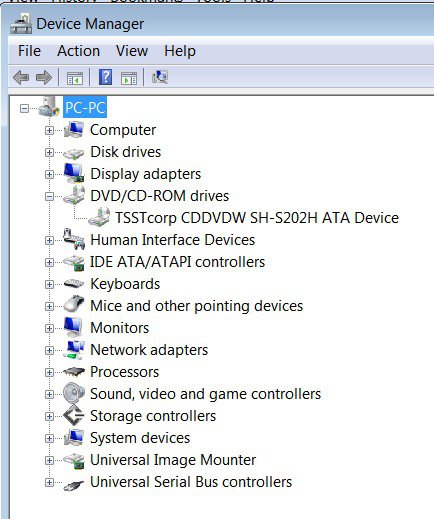
| VISTA HOME PREMIUM X64/ 7 x64 / 7x86 | Re: New Vista Computer & Disc Drive Won't Work Hi Vicki, As it's a new machine, you can always take it back. Out of curiosity, it's worth looking in Device Manager to see what shows up. Click the start Orb, Click Control Panel, click Classic View, double click Device Manager. See if anything is showing under DVD/CDROM Drives. ![]() What is "My Computer" - I don't have that on my Vista? Hope it helps SIW2 |
My System Specs![]() |
| | #4 (permalink) |
| Windows 7 Ultimate 32 bit Beta, Vista Ultimate x86 | Re: New Vista Computer & Disc Drive Won't Work |
My System Specs![]() |
| | #5 (permalink) |
| Vista Ultimate SP2 x64 : Seven Ultimate x64 | Re: New Vista Computer & Disc Drive Won't Work ![]() Vicki, Is it a Laptop or Desktop PC? Do as SIW2 suggested and check the device manager in Windows. With a disc in the drive, does the drive spin or the light flash BEFORE Windows loads? ie the light at least flashes briefly or trys to access a disc. If it's not showing in Windows, you can always check in BIOS to see if the device is 'seen' . To access BIOS, there is usually a a key to hit to enter setup ie "Del, F1, F2" and in BIOS it will show your Hard Drive and your DVD drive. If there is no DVD showing, then most likely it isn't connected. If it does show in BIOS, then it's a Windows problem. If your not comfortable with trying anything too advanced, such as checking the BIOS, take it back to where it was purchased. (No offence intended )(BIOS is the screen that shows up when you first turn the PC on and before Windows loads) |
My System Specs![]() |
![]() |
| Thread Tools | |
| |
Similar Threads | ||||
| Thread | Forum | |||
| new computer cannot read vista disc | Vista installation & setup | |||
| Vista 64 bit recovery disc on a wiped hard drive. | Drivers | |||
| CD/DVD drive shows wrong icon when I place a disc in the drive | Vista General | |||
| Will this disc work to get Vista back? | General Discussion | |||
| PC won't recognize Vista DVD. Both drive and disc are fine?! | Vista installation & setup | |||