hello to you i install 2 hard drive in my intel badaxe2 975 chipset marvell controller as non raid the marvell bios show me the 2 hard drive but in windows i dont see them enven in the manage what could possible goes wrong?

You are using an out of date browser. It may not display this or other websites correctly.
You should upgrade or use an alternative browser.
You should upgrade or use an alternative browser.
intel 975xbx2 sata help
- Thread starter neo01
- Start date

kword88
Power User
did you format them?
My Computer
System One
-
- Manufacturer/Model
- Aleinware Area-51
- CPU
- core 2 extreme x9000 2.8 Ghz
- Memory
- 4 Gig
- Graphics card(s)
- (2) Nvidia 8800m GTX in Sli
- Sound Card
- Onboard RealTek
- Monitor(s) Displays
- 42" JVC LCD HDTV
- Screen Resolution
- 1920x1080p 32 bit
- Hard Drives
- (2) seagate 7200rpm in RAID 0 (1) maxtor external 1 terabyte firewire
- Case
- laptop
- Mouse
- logitech Anywhere Mouse and built-in touchpad
- Keyboard
- a really spiffy backlit one that i can change color ;>)
- Internet Speed
- Cable
1 hard drive is with windows vista ultimate sp1 (c: volume)
the other one is (d: volume) few movies
i connected them to the marvell 88SE6145 controller in the marvell bios i see them but when windows vista complete loading up it restart automaticly try safe mode nothing then i connected c: volume to to the ich7 controller everything back to normal but the d: volume stay in marvell recognized in the marvell bios but in windows dont. in the book says
the other one is (d: volume) few movies
i connected them to the marvell 88SE6145 controller in the marvell bios i see them but when windows vista complete loading up it restart automaticly try safe mode nothing then i connected c: volume to to the ich7 controller everything back to normal but the d: volume stay in marvell recognized in the marvell bios but in windows dont. in the book says
NOTE
The Marvell 88SE6145 controller supports single drive non-RAID configurations as well
as RAID configurations.
as RAID configurations.
My Computer

hello to you i install 2 hard drive in my intel badaxe2 975 chipset marvell controller as non raid the marvell bios show me the 2 hard drive but in windows i dont see them enven in the manage what could possible goes wrong?
1 hard drive is with windows vista ultimate sp1 (c: volume)
the other one is (d: volume) few movies
i connected them to the marvell 88SE6145 controller in the marvell bios i see them but when windows vista complete loading up it restart automaticly try safe mode nothing then i connected c: volume to to the ich7 controller everything back to normal but the d: volume stay in marvell recognized in the marvell bios but in windows dont. in the book says
NOTE
The Marvell 88SE6145 controller supports single drive non-RAID configurations as well
as RAID configurations.
OK, since I have the same motherboard…
1- Make sure the "secondary" controller is enabled in the BIOS - that's for the Marvell controller.
2- If you did not install the Marvell RAID drivers while installing Windows, (page 93 of the owner's manual) then moving your C-Drive to the controller will cause windows not to boot. The fact that you got it to safe mode was good I suppose, Windows will usually just blue screen.
At any rate you'll need to leave the C-Drive on the Intel controller unless you reinstall the OS with the Marvell RAID drivers on the floppies. - Again, page 93 of the owner's manual.
If you plan on using the Marvell controller for a RAID setup, read at page 91-92.
So why are you attempting to use the Marvell controller? Do you have more than 4 SATA devices, or are you trying to run a RAID setup?
If the answer is no to either, personally I’d leave the Marvell controller alone, especially for RAID, which isn’t all that good and prone to problems, like dropping your RAID setup.
I run 3 hard drives and one SATA DVD writer and just use the Intel controller and disabled the Marvell controller, but that’s me.
Let me know.
My Computer
System One
-
- Manufacturer/Model
- Custom Built
- CPU
- Intel Core 2 Quad Q6600 2.4GHz
- Motherboard
- Intel D975XBX2
- Memory
- Corsair TWIN2X4096-PC8500 (2x2GHz)
- Graphics card(s)
- ATI Radeon HD 4890 (1GHz)
- Sound Card
- X-Fi Titanium - Fatality Pro Series
- Monitor(s) Displays
- hp w2207h (22" widescreen)
- Screen Resolution
- 1680 x 1050
- Hard Drives
- One 750GB, 2x500GB Western Digital Caviar Black Hard Drives (32meg)
- PSU
- Antec Neo HE 550
- Case
- Antec P182
- Cooling
- Zalman CNPS9500 AT
- Mouse
- Logitech MX Revolution
- Keyboard
- Logitech Wireless Wave
- Internet Speed
- "High" Speed DSL? Is that like low speed FIOS?
- Other Info
- Q6600 B3 Revision OC to 3.0GHz
hello to you i install 2 hard drive in my intel badaxe2 975 chipset marvell controller as non raid the marvell bios show me the 2 hard drive but in windows i dont see them enven in the manage what could possible goes wrong?
1 hard drive is with windows vista ultimate sp1 (c: volume)
the other one is (d: volume) few movies
i connected them to the marvell 88SE6145 controller in the marvell bios i see them but when windows vista complete loading up it restart automaticly try safe mode nothing then i connected c: volume to to the ich7 controller everything back to normal but the d: volume stay in marvell recognized in the marvell bios but in windows dont. in the book says
NOTE
The Marvell 88SE6145 controller supports single drive non-RAID configurations as well
as RAID configurations.
OK, since I have the same motherboard…
1- Make sure the "secondary" controller is enabled in the BIOS - that's for the Marvell controller.
2- If you did not install the Marvell RAID drivers while installing Windows, (page 93 of the owner's manual) then moving your C-Drive to the controller will cause windows not to boot. The fact that you got it to safe mode was good I suppose, Windows will usually just blue screen.
At any rate you'll need to leave the C-Drive on the Intel controller unless you reinstall the OS with the Marvell RAID drivers on the floppies. - Again, page 93 of the owner's manual.
If you plan on using the Marvell controller for a RAID setup, read at page 91-92.
So why are you attempting to use the Marvell controller? Do you have more than 4 SATA devices, or are you trying to run a RAID setup?
If the answer is no to either, personally I’d leave the Marvell controller alone, especially for RAID, which isn’t all that good and prone to problems, like dropping your RAID setup.
I run 3 hard drives and one SATA DVD writer and just use the Intel controller and disabled the Marvell controller, but that’s me.
Let me know.
ok i am very happy to talk with someone that have the same motherboard
want to ask you few qustion
1.if i format my hard drive c: volume that connected to marvell controller will work just fine after the format?
2.i dont want any raid at all i want my 2 wd hardrive 250 gb each will be connected to marvell controller (c: and d: volumes) and the rest to intel controller (another 2 harddrive and 2 sata dvd)
the format is 100% succses way to ensure good working of the marvell?
by the way yes my secondery marvell controller is on and it recognized the 2 hard drive but in windows vista dont see them even in the manage i have vista sp 1 32 bit, my badaxe2 is not bios updated at all is it neccesery also? thanks for your help i think i try to figured my self with the marvell controller for about 2 month if format is the easy way i dont care to do it.
Last edited:
My Computer
Do it this way,
No need to reformat – Just leave two hard drives on the Intel controller, including C-Drive, plus the DVD drives. Put the other two hard drives on the Marvell controller, if there’s no operating system on them. Here’s an example...
Intel Controller
C-Drive (Windows)
D-Drive (Movies) – (or another Windows drive)
E-Drive (SATA DVD)
F-Drive (SATA DVD)
Marvell Controller
G-Drive (Games) – Hard Drive
H-Drive (Backup) – Hard Drive
Make sure you have the controllers in the BIOS set the either IDE or AHCI, not RAID!!!
If the drives aren't formatted, then yes, they need to be formatted whether on the Marvell or Intel controllers. If they are, then Vista should see them. If for some odd reason can't see them then...
1- Right click Computer,
2- click Manage
3- Click Disk Management - check to see if the drives are formatted and have a drive letter assigned to them, if not format and assign a drive letter, or just assign a drive letter if none is assigned and the drives are formatted.
As for updating the BIOS, that’s easy on that board since it’s an .exe file, but yes, definitely update the BIOS. You can get the latest (2838) BIOS here – Intel® Desktop Board D975XBX2 BIOS Update [BX97520J.86A]. The one you want to get is this “BX97520J.86A.2838.EB.EXE” download it, click the .exe and follow the instructions.
DO NOT REBOOT OF SHUT OFF THE COMPUTER UNTIL TOLD TO DO SO!!! Once that's done you’re updated.
Also, in case you didn’t know it, that board is now retired by Intel
Good luck.
No need to reformat – Just leave two hard drives on the Intel controller, including C-Drive, plus the DVD drives. Put the other two hard drives on the Marvell controller, if there’s no operating system on them. Here’s an example...
Intel Controller
C-Drive (Windows)
D-Drive (Movies) – (or another Windows drive)
E-Drive (SATA DVD)
F-Drive (SATA DVD)
Marvell Controller
G-Drive (Games) – Hard Drive
H-Drive (Backup) – Hard Drive
Make sure you have the controllers in the BIOS set the either IDE or AHCI, not RAID!!!
If the drives aren't formatted, then yes, they need to be formatted whether on the Marvell or Intel controllers. If they are, then Vista should see them. If for some odd reason can't see them then...
1- Right click Computer,
2- click Manage
3- Click Disk Management - check to see if the drives are formatted and have a drive letter assigned to them, if not format and assign a drive letter, or just assign a drive letter if none is assigned and the drives are formatted.
As for updating the BIOS, that’s easy on that board since it’s an .exe file, but yes, definitely update the BIOS. You can get the latest (2838) BIOS here – Intel® Desktop Board D975XBX2 BIOS Update [BX97520J.86A]. The one you want to get is this “BX97520J.86A.2838.EB.EXE” download it, click the .exe and follow the instructions.
DO NOT REBOOT OF SHUT OFF THE COMPUTER UNTIL TOLD TO DO SO!!! Once that's done you’re updated.
Also, in case you didn’t know it, that board is now retired by Intel
Good luck.
My Computer
System One
-
- Manufacturer/Model
- Custom Built
- CPU
- Intel Core 2 Quad Q6600 2.4GHz
- Motherboard
- Intel D975XBX2
- Memory
- Corsair TWIN2X4096-PC8500 (2x2GHz)
- Graphics card(s)
- ATI Radeon HD 4890 (1GHz)
- Sound Card
- X-Fi Titanium - Fatality Pro Series
- Monitor(s) Displays
- hp w2207h (22" widescreen)
- Screen Resolution
- 1680 x 1050
- Hard Drives
- One 750GB, 2x500GB Western Digital Caviar Black Hard Drives (32meg)
- PSU
- Antec Neo HE 550
- Case
- Antec P182
- Cooling
- Zalman CNPS9500 AT
- Mouse
- Logitech MX Revolution
- Keyboard
- Logitech Wireless Wave
- Internet Speed
- "High" Speed DSL? Is that like low speed FIOS?
- Other Info
- Q6600 B3 Revision OC to 3.0GHz
ok good guide i understand it i have this bios update file i will update the bios but the hard drive e: and f: volume in my computer are very importent to me i repeat very improtent my question is if the marvell are 100% reliable in non raid mode and works exactly the like the intel controller and yes i know the intel d975xbx2 is retired by intel but remember that the new one x58 smack over (known as so) isent that good 2 pci exprees only 8 sata like we any way thanks for the info but still if you can write guide for the alternative
exemple
c: on non raid mode in marvell primary windows vista
d: movies on non raid mode in marvell
e:games on intel controller
f:beckup on intel controller
g: dvd on intel controller
h: dvd on intel controller
exemple
c: on non raid mode in marvell primary windows vista
d: movies on non raid mode in marvell
e:games on intel controller
f:beckup on intel controller
g: dvd on intel controller
h: dvd on intel controller
My Computer
i forget to tell you that i try to put a formated vista hard drive which works perfectly in intel controller in the marvel the e: volume but the windows vista dont show me the drive in my computer also in Manage but in the marvell bios its shown maybe it the bios
My Computer
ok good guide i understand it i have this bios update file i will update the bios but the hard drive e: and f: volume in my computer are very importent to me i repeat very improtent my question is if the marvell are 100% reliable in non raid mode and works exactly the like the intel controller and yes i know the intel d975xbx2 is retired by intel but remember that the new one x58 smack over (known as so) isent that good 2 pci exprees only 8 sata like we any way thanks for the info but still if you can write guide for the alternative
You lost me there???
However - why is it so important to have your main operating system drive on the Marvell controller?
Since you already have Vista loaded and it works just fine on the Intel controller, why not leave it there instead of reformating the drive to have it run on the Marvell controller.
If all your other drives are just data, they will work just fine on the Marvell controller. If the drives are already formatted all you have to do is connect them to the controller and Vista should see them.
You can arrange the drives in any combination you want, just leave the Vista drive on the Intel controller. I'm not understanding your question.
My Computer
System One
-
- Manufacturer/Model
- Custom Built
- CPU
- Intel Core 2 Quad Q6600 2.4GHz
- Motherboard
- Intel D975XBX2
- Memory
- Corsair TWIN2X4096-PC8500 (2x2GHz)
- Graphics card(s)
- ATI Radeon HD 4890 (1GHz)
- Sound Card
- X-Fi Titanium - Fatality Pro Series
- Monitor(s) Displays
- hp w2207h (22" widescreen)
- Screen Resolution
- 1680 x 1050
- Hard Drives
- One 750GB, 2x500GB Western Digital Caviar Black Hard Drives (32meg)
- PSU
- Antec Neo HE 550
- Case
- Antec P182
- Cooling
- Zalman CNPS9500 AT
- Mouse
- Logitech MX Revolution
- Keyboard
- Logitech Wireless Wave
- Internet Speed
- "High" Speed DSL? Is that like low speed FIOS?
- Other Info
- Q6600 B3 Revision OC to 3.0GHz
i told you i do what you say i leave the 1 main drive with windows vista (c: volume) on intel controller and the rest on marvell but the windows dont see them why?
My Computer
i told you i do what you say i leave the 1 main drive with windows vista (c: volume) on intel controller and the rest on marvell but the windows dont see them why?
I thought I provided that answer here...
If the drives aren't formatted, then yes, they need to be formatted whether on the Marvell or Intel controllers. If they are, then Vista should see them. If for some odd reason {Vista} can't see them then...
1- Right click Computer,
2- click Manage
3- Click Disk Management - check to see if the drives are formatted and have a drive letter assigned to them, if not format and assign a drive letter, or just assign a drive letter if none is assigned and the drives are formatted.
My Computer
System One
-
- Manufacturer/Model
- Custom Built
- CPU
- Intel Core 2 Quad Q6600 2.4GHz
- Motherboard
- Intel D975XBX2
- Memory
- Corsair TWIN2X4096-PC8500 (2x2GHz)
- Graphics card(s)
- ATI Radeon HD 4890 (1GHz)
- Sound Card
- X-Fi Titanium - Fatality Pro Series
- Monitor(s) Displays
- hp w2207h (22" widescreen)
- Screen Resolution
- 1680 x 1050
- Hard Drives
- One 750GB, 2x500GB Western Digital Caviar Black Hard Drives (32meg)
- PSU
- Antec Neo HE 550
- Case
- Antec P182
- Cooling
- Zalman CNPS9500 AT
- Mouse
- Logitech MX Revolution
- Keyboard
- Logitech Wireless Wave
- Internet Speed
- "High" Speed DSL? Is that like low speed FIOS?
- Other Info
- Q6600 B3 Revision OC to 3.0GHz
ok good guide i understand it i have this bios update file i will update the bios but the hard drive e: and f: volume in my computer are very importent to me i repeat very improtent my question is if the marvell are 100% reliable in non raid mode and works exactly the like the intel controller and yes i know the intel d975xbx2 is retired by intel but remember that the new one x58 smack over (known as so) isent that good 2 pci exprees only 8 sata like we any way thanks for the info but still if you can write guide for the alternative
You lost me there???
However - why is it so important to have your main operating system drive on the Marvell controller?
Since you already have Vista loaded and it works just fine on the Intel controller, why not leave it there instead of reformating the drive to have it run on the Marvell controller.
If all your other drives are just data, they will work just fine on the Marvell controller. If the drives are already formatted all you have to do is connect them to the controller and Vista should see them.
You can arrange the drives in any combination you want, just leave the Vista drive on the Intel controller. I'm not understanding your question.
can i connect my 2 sata dvd drives to the marvell controller?
i try also to connect the other hard drives to marvell controller but windows dont see them (vista sp1 32 bit ultimate) but in the marvell bios i see them could be old bios version also try in manage but windows dont see them what can i do?
thanks for the help
My Computer
can i connect my 2 sata dvd drives to the marvell controller?
i try also to connect the other hard drives to marvell controller but windows dont see them (vista sp1 32 bit ultimate) but in the marvell bios i see them could be old bios version also try in manage but windows dont see them what can i do?
thanks for the help
Yes, you can connect the sata dvd drives to the marvell. Then connect the 4 hard drives to the intel controller.
My Computer
System One
-
- Manufacturer/Model
- Custom Built
- CPU
- Intel Core 2 Quad Q6600 2.4GHz
- Motherboard
- Intel D975XBX2
- Memory
- Corsair TWIN2X4096-PC8500 (2x2GHz)
- Graphics card(s)
- ATI Radeon HD 4890 (1GHz)
- Sound Card
- X-Fi Titanium - Fatality Pro Series
- Monitor(s) Displays
- hp w2207h (22" widescreen)
- Screen Resolution
- 1680 x 1050
- Hard Drives
- One 750GB, 2x500GB Western Digital Caviar Black Hard Drives (32meg)
- PSU
- Antec Neo HE 550
- Case
- Antec P182
- Cooling
- Zalman CNPS9500 AT
- Mouse
- Logitech MX Revolution
- Keyboard
- Logitech Wireless Wave
- Internet Speed
- "High" Speed DSL? Is that like low speed FIOS?
- Other Info
- Q6600 B3 Revision OC to 3.0GHz
can i connect my 2 sata dvd drives to the marvell controller?
i try also to connect the other hard drives to marvell controller but windows dont see them (vista sp1 32 bit ultimate) but in the marvell bios i see them could be old bios version also try in manage but windows dont see them what can i do?
thanks for the help
Yes, you can connect the sata dvd drives to the marvell. Then connect the 4 hard drives to the intel controller.
ok i try this but in windows i dont see the drives maybe its the bios version?
also i need to know its could be bootable?
My Computer
You've yet to answer this question. If you don't asnswer the questions I can't help you! Are the drives formatted???
If they are, then Vista should see them. If for some odd reason can't see them then...
1- Right click Computer,
2- click Manage
3- Click Disk Management - check to see if the drives are formatted and have a drive letter assigned to them, if not format and assign a drive letter, or just assign a drive letter if none is assigned and the drives are formatted.
My Computer
System One
-
- Manufacturer/Model
- Custom Built
- CPU
- Intel Core 2 Quad Q6600 2.4GHz
- Motherboard
- Intel D975XBX2
- Memory
- Corsair TWIN2X4096-PC8500 (2x2GHz)
- Graphics card(s)
- ATI Radeon HD 4890 (1GHz)
- Sound Card
- X-Fi Titanium - Fatality Pro Series
- Monitor(s) Displays
- hp w2207h (22" widescreen)
- Screen Resolution
- 1680 x 1050
- Hard Drives
- One 750GB, 2x500GB Western Digital Caviar Black Hard Drives (32meg)
- PSU
- Antec Neo HE 550
- Case
- Antec P182
- Cooling
- Zalman CNPS9500 AT
- Mouse
- Logitech MX Revolution
- Keyboard
- Logitech Wireless Wave
- Internet Speed
- "High" Speed DSL? Is that like low speed FIOS?
- Other Info
- Q6600 B3 Revision OC to 3.0GHz
You've yet to answer this question. If you don't asnswer the questions I can't help you! Are the drives formatted???
If they are, then Vista should see them. If for some odd reason can't see them then...
1- Right click Computer,
2- click Manage
3- Click Disk Management - check to see if the drives are formatted and have a drive letter assigned to them, if not format and assign a drive letter, or just assign a drive letter if none is assigned and the drives are formatted.
yes they are formatted to windows vista (only games and music in them d,e,f volumes) and yes try in manage Disk Management dont see them
but i have question for you can i connect my 2 sata optical drives to marvell and work with them like the intel controller can you try to do it in your computer or you allready try befor because i need a solid answer i think it will be much more easyer to config 2 optical sata drives on this marvell controller
i want something like this
intel controller - all 4 sata hard drive connected
marvell controller - 2 sata optical drive
thanks for your help by the way my bios version is 2674
My Computer
Sir,
I'm afraid I've gone as far as I can go in this thread. I told you to update the BIOS, I told you the SATA DVD drives would work on the Marvell controllers. I even gave you an example. If you don't want to try what I've suggested, then that's on you.
Have a good day and good luck.
I'm afraid I've gone as far as I can go in this thread. I told you to update the BIOS, I told you the SATA DVD drives would work on the Marvell controllers. I even gave you an example. If you don't want to try what I've suggested, then that's on you.
Have a good day and good luck.
My Computer
System One
-
- Manufacturer/Model
- Custom Built
- CPU
- Intel Core 2 Quad Q6600 2.4GHz
- Motherboard
- Intel D975XBX2
- Memory
- Corsair TWIN2X4096-PC8500 (2x2GHz)
- Graphics card(s)
- ATI Radeon HD 4890 (1GHz)
- Sound Card
- X-Fi Titanium - Fatality Pro Series
- Monitor(s) Displays
- hp w2207h (22" widescreen)
- Screen Resolution
- 1680 x 1050
- Hard Drives
- One 750GB, 2x500GB Western Digital Caviar Black Hard Drives (32meg)
- PSU
- Antec Neo HE 550
- Case
- Antec P182
- Cooling
- Zalman CNPS9500 AT
- Mouse
- Logitech MX Revolution
- Keyboard
- Logitech Wireless Wave
- Internet Speed
- "High" Speed DSL? Is that like low speed FIOS?
- Other Info
- Q6600 B3 Revision OC to 3.0GHz
first of all thanks for your help much priciated just let you know that i read what you told me and do it but with no succses the dvd sata drive are connected to marvell and shown in the bios of marvell but in windows dont see them if its a 100% problem of bios version i will update but if i update the bios all my config gone or stay?
My Computer
Sir,
I'm afraid I've gone as far as I can go in this thread. I told you to update the BIOS, I told you the SATA DVD drives would work on the Marvell controllers. I even gave you an example. If you don't want to try what I've suggested, then that's on you.
Have a good day and good luck.
my 4 hard drive connect to the intel controller and work perfectly
my 2 sata dvd connect to the blue sata (marvell controller) dont seen in windows do i need to install drivers of marvell to get this dvds on or windows vista should detected them automaticly?
My Computer
my 4 hard drive connect to the intel controller and work perfectly
my 2 sata dvd connect to the blue sata (marvell controller) dont seen in windows do i need to install drivers of marvell to get this dvds on or windows vista should detected them automaticly?
Again, Suggestions given...
Make sure Marvell controller is enabled...
1- Make sure the "secondary" controller is enabled in the BIOS - that's for the Marvell controller.
Make sure the controller is set to IDE or AHCI; Update BIOS, check to see if drive letters are assigned....
Make sure you have the controllers in the BIOS set the either IDE or AHCI, not RAID!!!
...If for some odd reason {Vista} can't see them {the drives} then...
1- Right click Computer,
2- click Manage
3- Click Disk Management - check to see if the drives are formatted and have a drive letter assigned to them, if not format and assign a drive letter, or just assign a drive letter if none is assigned and the drives are formatted.
As for updating the BIOS, that’s easy on that board since it’s an .exe file, but yes, definitely update the BIOS. You can get the latest (2838) BIOS here – Intel® Desktop Board D975XBX2 BIOS Update [BX97520J.86A]. The one you want to get is this “BX97520J.86A.2838.EB.EXE” download it, click the .exe and follow the instructions.
DO NOT REBOOT OF SHUT OFF THE COMPUTER UNTIL TOLD TO DO SO!!! Once that's done you’re updated.
Again, check to see if drive letter is assigned...
(I also told you earlier to make sure the "Secondary Controller was enabled in the BIOS)
i told you i do what you say i leave the 1 main drive with windows vista (c: volume) on intel controller and the rest on marvell but the windows dont see them why?
I thought I provided that answer here...
If the drives aren't formatted, then yes, they need to be formatted whether on the Marvell or Intel controllers. If they are, then Vista should see them. If for some odd reason {Vista} can't see them then...
1- Right click Computer,
2- click Manage
3- Click Disk Management - check to see if the drives are formatted and have a drive letter assigned to them, if not format and assign a drive letter, or just assign a drive letter if none is assigned and the drives are formatted.
can i connect my 2 sata dvd drives to the marvell controller?
Yes, you can connect the sata dvd drives to the marvell. Then connect the 4 hard drives to the intel controller.
To answer your other questions...
yes they are formatted to windows vista (only games and music in them d,e,f volumes) and yes try in manage Disk Management dont see them
by the way my bios version is 2674
But did you check to see if they were listed here...notice the red dots. If you see the DVD Drives,but no drive letter is next to them, then you need to assign one! On the other hand if you still don't see the drives, then you have bad cables or the controller is NOT enabled, especially since you get the same condition with ANY drive connected to the contorllers!!!
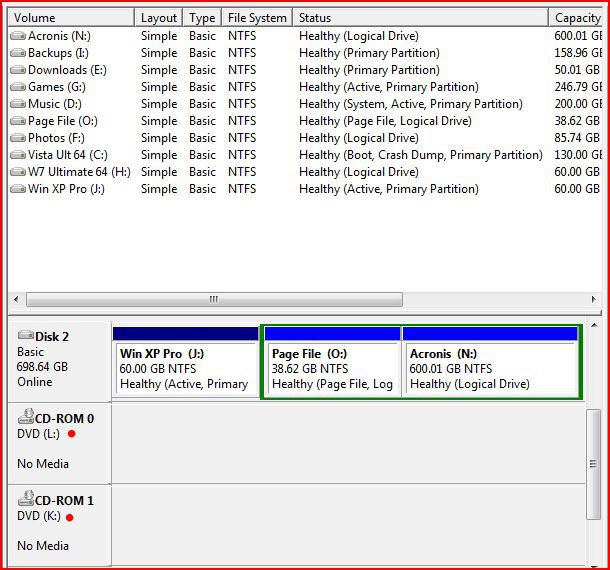
Which is why you need to update your BIOS to 2838
if its a 100% problem of bios version i will update but if i update the bios all my config gone or stay?
Updating the BIOS may reset some things, but in your case, that's probably good, as it "may" turn on the Marvell controllers if they're off. At any rate update the BIOS as there were some issues with the contollers on that board.
So to summarize...
Update the BIOS, Install the Marvell drivers and make sure the "Secondary Controller" is enabled in the BIOS!!!
If you have the controller enabled, and you updated the BIOS, and you checked to make sure a drive letter is assigned to each drive connected to the Marvell controller, and (added) the cables connecting to the Marvell controller are in working order, the Marvell drivers are installed....if ALL thoses things are checked, and you still can't see drives connected to the Marvell controller, then either the controller is bad or you have bad cables. If ALL of the above suggestions have not been met/checked, then there's no need to go any further untill they've ALL been answered.
Sorry for the long post but I needed to restate a few things and clearify others.
My Computer
System One
-
- Manufacturer/Model
- Custom Built
- CPU
- Intel Core 2 Quad Q6600 2.4GHz
- Motherboard
- Intel D975XBX2
- Memory
- Corsair TWIN2X4096-PC8500 (2x2GHz)
- Graphics card(s)
- ATI Radeon HD 4890 (1GHz)
- Sound Card
- X-Fi Titanium - Fatality Pro Series
- Monitor(s) Displays
- hp w2207h (22" widescreen)
- Screen Resolution
- 1680 x 1050
- Hard Drives
- One 750GB, 2x500GB Western Digital Caviar Black Hard Drives (32meg)
- PSU
- Antec Neo HE 550
- Case
- Antec P182
- Cooling
- Zalman CNPS9500 AT
- Mouse
- Logitech MX Revolution
- Keyboard
- Logitech Wireless Wave
- Internet Speed
- "High" Speed DSL? Is that like low speed FIOS?
- Other Info
- Q6600 B3 Revision OC to 3.0GHz