![]() |
![]() | ![]() | ![]() | ![]() | ![]() | ![]() | ![]() |
| Welcome to Windows Vista Forums. Our forum is dedicated to helping you find solutions with any problems, errors or issues you are experiencing with Windows Vista. The Vista forum also covers news and updates and has an extensive Windows Vista tutorial section that covers a wide range of tips and tricks. |
| |||||||
![]() |
| |
| | #1 (permalink) |
| Vista Ultimate 32bit | Grapics Card driver problems Hey all, I recently bought a new computer. Got all pretty top notch stuff. Im running the Radeon HD4800 series card. It came with the standard driver installed but i kept getting an error on boot up and a blue screen, then would reboot a couple times and finally boot to windows. I updated the driver with this one: ATI Radeon HD 4800 drivers for Windows Vista Now the problem on start up seems to be fixed but my dream scene doesnt work. Any ideas? Please help! ![]() Cheers Nathan |
My System Specs![]() |
| | #2 (permalink) |
| Vista Home Premium 64bit SP2 | Re: Grapics Card driver problems get your drivers from the vendor ![]() Drivers & Tools | GAME.AMD.COM download the full catalyst suite 04/08/2009 uninstall old drivers first , if you still have issues come back and ill talk you through how to properly and completely uninstall old drivers before installing new ones |
My System Specs![]() |
| | #3 (permalink) |
| Vista Ultimate 32bit | Re: Grapics Card driver problems Thanx for the reply Archie, Yeah ive tried that now with the same problems. This was the driver that came installed when i first purchased this computer. I uninstalled the other drivers first then installed The full catalyst suite. And again....Upon reboot it comes up with the screen saying computer was not properly shut down...then proceeds to the blue screen and repeats the process again. Sometimes it will only do it once then boot to windows. Other times and contines over and over. I switch power off and on and it usually will do it one more time then boots to windows ok. Once in windows i have no problems. (Im yet to test it with any games yet). Im using the Intel Core Quad Q9550 2.83gh processor, 4 gig Ram, Vista 32 bit, and of course the Radeon HD 4850 GC. Any Ideas? Thanx again Nathan |
My System Specs![]() |
| | #4 (permalink) |
| Vista Ultimate x64 | Re: Grapics Card driver problems Run a full virus scan of your pc using ESET Products antivirus. Then click on the link in my sig and do what is says there. Make sure your switching off your pc using the options in vista and never the power button on your pc case and also Dreamscene is a very buggy app (just google Dreamscene crash), my advise is to not use it. |
My System Specs![]() |
| | #5 (permalink) |
| Vista Ultimate 32bit | Re: Grapics Card driver problems Yeah im running Norton 360 and it doesnt pick up anything. Also the problem occurred when dream scene wasnt even downloaded and i had the same problem. And ive done a full scan using the full version of tuneup utilities 2009 with no errors found. This ones got me stumped. Might take it back to the store and get me a different graphics card if i cant resolve this. Thanx guys Nathan |
My System Specs![]() |
| | #6 (permalink) |
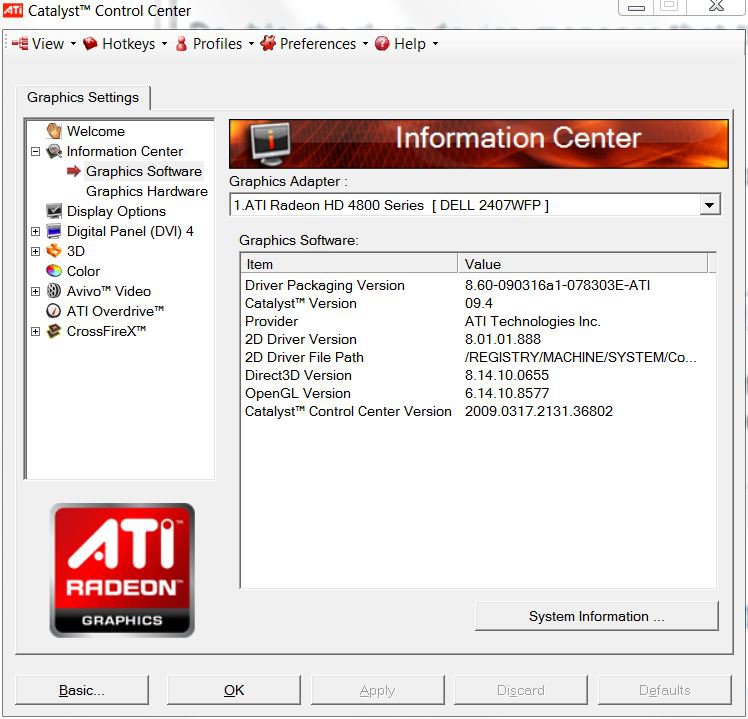
| Vista Ultimate SP2 x64 : Seven Ultimate x64 | Re: Grapics Card driver problems No need to change cards. The 4850 works fine with Vista Double check in device manager that the cat 9.4 drivers are actually installed. They should show as 8.60. Cat 9.4 has an installation issue. If they are 8.59 or lower you'll need to manually install the driver. In device manager, Expand Display adapter, right-click on the device>update driver software>List devices on this computer>have disk and point it to: C:\ATI\Support\9-4_vista64_win7_64_dd_ccc_wdm_enu\Driver\Packages\Drivers\Display\LH_INF\CH_78303.inf Once the drivers are installed open Catalyst Control Center and verify that both the Cat version and the drivers are from 9.4: ![]() You may need to re-boot to be able to open CCC once the drivers are installed. |
My System Specs![]() |
| | #7 (permalink) |
| Vista Ultimate x64 | Re: Grapics Card driver problems OK download Device Manager.bat then double click on it. It will open device manager. Now click on View then Show Hidden Devices and click on the small + sign next to Display adaptars The only drivers here should be your HD4850 and the onboard graphics which you can remove as well if you want to. Anything else listed you should right click on it and uninstall. Heres a pic of mine, if you are unsure then post a pic like mine and we will help. |
My System Specs![]() |
| | #8 (permalink) |
| Vista Ultimate 32bit | Re: Grapics Card driver problems Thanx for the detailed walkthrough guys but both catalyst version and driver version are as you said. 8.6 and 9.4... Hmm Could it maybe be a problem lying somewhere else that is causing this driver to malfunction? Ie a dodgy windows copy or something along those lines? Cant wait to test this graphics card out with a couple games. Ive heard only good things about it so far and hopefully the error only lies with boot up! |
My System Specs![]() |
| | #9 (permalink) |
| Vista Ultimate x64 | Re: Grapics Card driver problems Did you do as i said above as the .bat file device manager shows things that arent available through the normal device manager also look for any that have a yellow triangle next to them Also make sure and do everyhing in my sig as this will reduce compatability errors and optimize whats there. Then download http://www.cpuid.com/hwmonitor.php , run it then fully open it and take a screenshot and post it here so we can see your voltages, temps etc Last edited by stew2; 04-27-2009 at 01:05 AM.. |
My System Specs![]() |
| | #10 (permalink) |
| Vista Ultimate 32bit | Re: Grapics Card driver problems Ok ive done all those downloads in your sig and checked the device manager with no obvious errors. Here is my comp status: |
My System Specs![]() |
![]() |
| Thread Tools | |
| |
Similar Threads | ||||
| Thread | Forum | |||
| Wireless card driver problems in Vista 64The | Network & Sharing | |||
| Bug in SD Memory Card driver : driver remains in memory after remo | Vista hardware & devices | |||
| asio driver , driver updates for M-Audio Delta rpc1 card | Vista music pictures video | |||
| asio driver , driver updates for M-Audio Delta rpc1 card | Vista music pictures video | |||
| Grapics cards suggestions | Vista hardware & devices | |||