Windows Vista Forums
Vista Forums Home Join Vista Forums Windows 7 Forum Vista Tutorials Tags
Welcome to Windows Vista Forums. Our forum is dedicated to helping you find solutions with any problems, errors or issues you are experiencing with Windows Vista. The Vista forum also covers news and updates and has an extensive Windows Vista tutorial section that covers a wide range of tips and tricks.

Go Back   Vista Forums > Vista Forums > Drivers

Vista Tutorial - Trying to record on a laptop with Vista 32-bit

Reply
 
Old 06-17-2009   #1 (permalink)
Newbie


Join Date: Jun 2009
Vista Home Premium 32 bit


Trying to record on a laptop with Vista 32-bit

Hi all,

I bought a laptop last year that came with Vista Home Premium 32 bit...I am not at all computer savvy, but bought some recording software called Audiogram that is supposed to be the equivalent of Garage Band that comes on a Mac.

However, I have never been able to make the recording program work! It acknowledges there could be some problems with Vista, but ultimately it should work.

The latest message I get when I open the recording software is "The currently installed soundcard driver does not support Direct Sound Input. Recording audio is not possible."

What do I do? I can't return the recording software because I registered it, plus it's been months that I've been reading/downloading updates thinking I could get it to work.

I've been told by several people that vista has soundcard problems.

Any suggestions? Remember, I am NOT computer-savvy so keep it simple if you can. Thanks.

My System SpecsSystem Spec
Old 06-18-2009   #2 (permalink)
Gamerholic


Join Date: Apr 2008
Vista Ultimate x64, SP2


Re: Trying to record on a laptop with Vista 32-bit

Hello airheartamelia, (nice nick)
Could you give us a bit more info please, what make and model laptop is it ?, have you tried updating your sound card drivers ?, also which version of Audiogram is it?, more questions than answers i know, but we will get there.
My System SpecsSystem Spec
Old 06-18-2009   #3 (permalink)
Newbie


Join Date: Jun 2009
Vista Home Premium 32 bit


Re: Trying to record on a laptop with Vista 32-bit

I don't mind questions at all...the laptop is HP Pavilion Entertainment PC - at least that's what it says by the keyboard. Don't know where to find the exact model number? There are also some tiny numbers: SD-MS/Pro-MMC-XD

I have audiogram3 by Yamaha.

When I first installed audiogram there was a link that said if you have vista you might want to download a specific driver in order for it to work. So I did - and my computer lost all sound - I mean no clicks, no nothing. On the control panel for sound, there was nothing under playback or record. After searching the internet I found a link to some foreign site where I downloaded what it says was the right sound card - only all the writing was in Japanese or Chinese so I had to take their word for it. It did restore the sound - just still can't record. So I'm back to square one.
My System SpecsSystem Spec
Old 06-18-2009   #4 (permalink)
Gamerholic


Join Date: Apr 2008
Vista Ultimate x64, SP2


Re: Trying to record on a laptop with Vista 32-bit

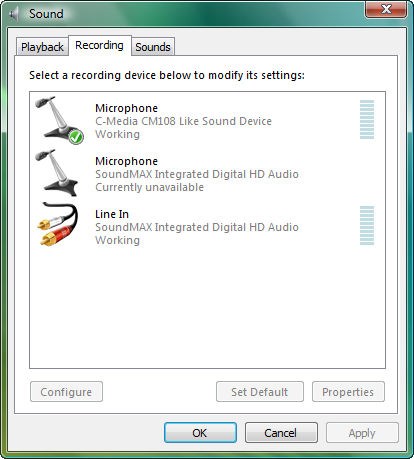
What we will try to do is to see what your default recording device is. Open the control panel and double click the sound icon, you should see a control panel like the one below, is your recording device listed there ? if it is , is it the default recording device ?, if it is, highlight it and configure. Been looking for a driver update but no luck so far, will keep looking, post your results when your done. Good luck.


Name:  18-06-2009 17-18-08 control panel.png
Views: 162
Size:  40.0 KB
My System SpecsSystem Spec
Old 06-18-2009   #5 (permalink)
Gamerholic


Join Date: Apr 2008
Vista Ultimate x64, SP2


Re: Trying to record on a laptop with Vista 32-bit

Go here and download the driver, it's for vista. It's the bottom one, install the driver before doing the above, it may be an idea to un-install the old driver first. Good luck.

Name:  18-06-2009 17-41-10 driver.png
Views: 134
Size:  2.9 KB


Drivers and Software | Downloads | YamahaSynth.com
My System SpecsSystem Spec
Old 06-18-2009   #6 (permalink)
Newbie


Join Date: Jun 2009
Vista Home Premium 32 bit


Re: Trying to record on a laptop with Vista 32-bit

When I clicked on that, there was a realtek microphone and realtek stereo mix - both were disabled. I right-clicked on them and enabled them - but they are just what picks up from the microphone built into the laptop. I don't know what you mean by "highlight and configure". The audiogram does not show up on there.

Oh I just saw that you posted a link...I'll try that.
My System SpecsSystem Spec
Old 06-18-2009   #7 (permalink)
Newbie


Join Date: Jun 2009
Vista Home Premium 32 bit


Re: Trying to record on a laptop with Vista 32-bit

Hallelujah! It's showing up under Sound recording now. I can't thank you enough. Now I still have to figure out how to record on Audiogram, but this is a big step in the right direction. Thanks so much!

I am going out of town but I may pop up in a few weeks with more questions.

Thanks again.
My System SpecsSystem Spec
Old 06-19-2009   #8 (permalink)
Gamerholic


Join Date: Apr 2008
Vista Ultimate x64, SP2


Re: Trying to record on a laptop with Vista 32-bit

Glad you got it fixed.
My System SpecsSystem Spec
Reply

Thread Tools


Similar Threads
Thread Forum
How do i record a few words using Vista? Vista mail
Record sound with Vista?? Vista General
Can't record stereo mix, and it isn't disabled... can't record line either? Vista General
How do you record songs in Vista Vista music pictures video
Windows Vista/XP Log Off Record General Discussion


Vista Forums is an independent web site and has not been authorized,
sponsored, or otherwise approved by Microsoft Corporation.
"Windows Vista", the Start Orb, and related materials are trademarks of Microsoft Corp.
© Designer Media Ltd

1 2 3 4 5 6 7 8 9 10 11 12 13 14 15 16 17 18 19 20 21 22 23 24 25 26 27 28 29 30 31 32 33 34 35 36 37 38 39 40 41 42 43 44 45 46