
Many people have been affected by the Vista and Sandbox 2 editor importing files to the program just Stops like a firewall, but not,
its a option is turned on by vista, for protection,
i believe,
not allowing the transfering of files,
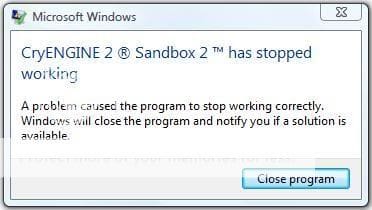
I turned off UAC and it seems to me like it is still on, or something
anyway here some others explainig it better,
Crymod Modding Portal | Feedback & Support Forum | Sandbox 2 Texture loading crash
"Hey, I'm having a crash problem with the editor. Whenever I go to the texture menu under "terrain" and try to create a texture other than the regular "default" ( I follow the exact steps in the online manual), I press "load texture" and immediately the editor screen lights up white and i get a "this program has stopped working" message.
I'm running windows vista ultimate 32bit with all the updates off of windows update and the virtual memory space fix. Just let me know, and I can do the crash diagnostic report thing but I didn't just yet in case there was an obvious solution."
----
Crymod Modding Portal | Feedback & Support Forum | Sandbox2 Crashing
"I was going to uploade my Editor.log file, but there is a 200Kb file size limit for uploads so it won't let me. The file is over 200Kb.
My problem is, every time I go to the Terrain Layer Editor, select a layer, and then click Load Texture, and then select a file and click open, the Program crashes with a Vista Appcrash notice. Crashes every time I try to load a texture."
This link has some error logs
Crymod Modding Portal | Feedback & Support Forum | Editor is still crashing!
What setting could be causing a software shutdown for transfering file on the same computer in Vista??????????????
I have been looking for other kind of programs having similiar problems to no avail,
but I did fix my 4 month old Adobe Flash player fullscreen diag, problem here, Today, thanks to one great reader!
its a option is turned on by vista, for protection,
i believe,
not allowing the transfering of files,
I turned off UAC and it seems to me like it is still on, or something
anyway here some others explainig it better,
Crymod Modding Portal | Feedback & Support Forum | Sandbox 2 Texture loading crash
"Hey, I'm having a crash problem with the editor. Whenever I go to the texture menu under "terrain" and try to create a texture other than the regular "default" ( I follow the exact steps in the online manual), I press "load texture" and immediately the editor screen lights up white and i get a "this program has stopped working" message.
I'm running windows vista ultimate 32bit with all the updates off of windows update and the virtual memory space fix. Just let me know, and I can do the crash diagnostic report thing but I didn't just yet in case there was an obvious solution."
----
Crymod Modding Portal | Feedback & Support Forum | Sandbox2 Crashing
"I was going to uploade my Editor.log file, but there is a 200Kb file size limit for uploads so it won't let me. The file is over 200Kb.
My problem is, every time I go to the Terrain Layer Editor, select a layer, and then click Load Texture, and then select a file and click open, the Program crashes with a Vista Appcrash notice. Crashes every time I try to load a texture."
This link has some error logs
Crymod Modding Portal | Feedback & Support Forum | Editor is still crashing!
What setting could be causing a software shutdown for transfering file on the same computer in Vista??????????????
I have been looking for other kind of programs having similiar problems to no avail,
but I did fix my 4 month old Adobe Flash player fullscreen diag, problem here, Today, thanks to one great reader!
Last edited: