Windows Vista Forums
Vista Forums Home Join Vista Forums Windows 7 Forum Vista Tutorials Tags
Welcome to Windows Vista Forums. Our forum is dedicated to helping you find solutions with any problems, errors or issues you are experiencing with Windows Vista. The Vista forum also covers news and updates and has an extensive Windows Vista tutorial section that covers a wide range of tips and tricks.

Go Back   Vista Forums > Vista Forums > Gaming

Vista - RAM Speed question?

Reply
 
Old 08-02-2008   #1 (permalink)


Vista Home Premium x64


RAM Speed question?

Hello,
I installed the following ram on my PC
OCZ Reaper HPC 4GB (2 x 2GB) 240-Pin DDR2 SDRAM DDR2 1066 (PC2 8500) Dual Channel Kit Desktop Memory - Retail

I have also installed the NVIDIA system monitor.

My question:
Why does my computer recognize the RAM at 800mhz (this shows on boot up and in the Nvidia monotor) when my motherboard supports 1066 and the ram is also 1066.
Any help would be appreciated.
I have a p7n diamond 780i motherboard from MSI.
Thanks

My System SpecsSystem Spec
Old 08-02-2008   #2 (permalink)


ultimate 64 SP1


Re: RAM Speed question?

Quote  Quote: Originally Posted by unexpectedjoe View Post
Hello,
I installed the following ram on my PC
OCZ Reaper HPC 4GB (2 x 2GB) 240-Pin DDR2 SDRAM DDR2 1066 (PC2 8500) Dual Channel Kit Desktop Memory - Retail

I have also installed the NVIDIA system monitor.

My question:
Why does my computer recognize the RAM at 800mhz (this shows on boot up and in the Nvidia monotor) when my motherboard supports 1066 and the ram is also 1066.
Any help would be appreciated.
I have a p7n diamond 780i motherboard from MSI.
Thanks
the ram divider is probably set to a ratio of 1-1 in the BIOS which will lower your ram speed to match your systems FSB

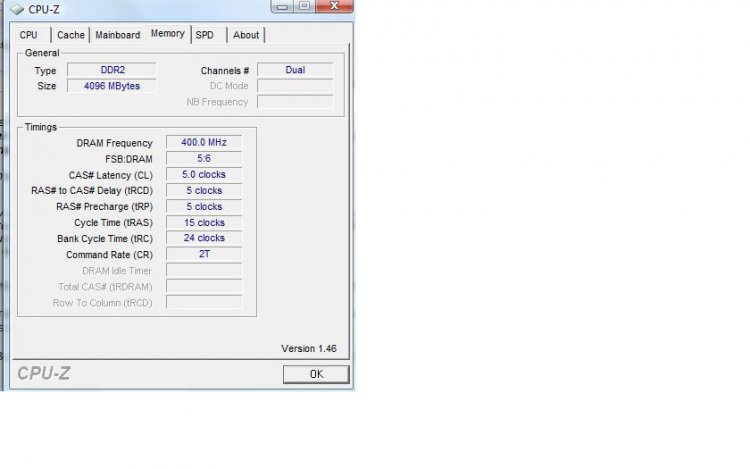
download this app & check the memory tab ..this should give you your current ratio...
CPUZ

if it is in fact 1-1 its an easy fix ...
enter the BIOS not sure about your boards actual layout but in advanced options there should be an option to alter ''ram frequency'' or ''divider'' set this to either 1066mhz or the nearest ratio to that value & reboot
My System SpecsSystem Spec
Old 08-02-2008   #3 (permalink)


Vista Home Premium x64


Re: RAM Speed question?

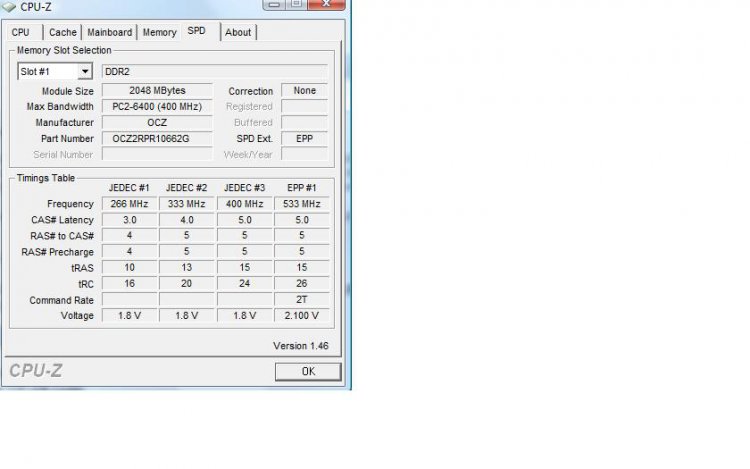
Thanks for the info. I downloaded that program and I attached a screenshot of the memory tab that you said to look at.
I'm not sure what the timing is... Does it look like I need to change a setting in my BIOS?

I also verified that my motherboad supports dr2 1066.
Attached Thumbnails
cpuz.jpg  
My System SpecsSystem Spec
Old 08-02-2008   #4 (permalink)


ultimate 64 SP1


Re: RAM Speed question?

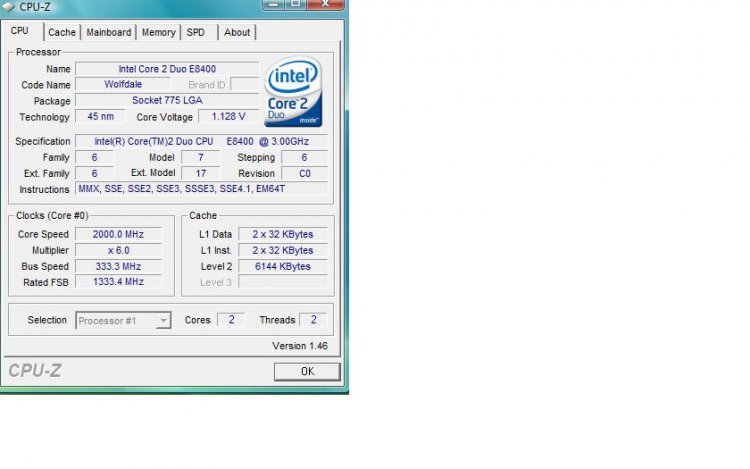
post me your cpu tab also ...so i can check it against the bus speed....
My System SpecsSystem Spec
Old 08-02-2008   #5 (permalink)


Vista Home Premium x64


Re: RAM Speed question?

Here is the CPU tab. (attached)
Attached Thumbnails
cpuz2.jpg  
My System SpecsSystem Spec
Old 08-02-2008   #6 (permalink)


ultimate 64 SP1


Re: RAM Speed question?

ok ....go into the BIOS & change to a higher ratio or frequency whatever the case may be on your board....you should not need to up the VDIMM as the ram sticks are currently under clocked
but i would aim for 1000mhz 900mhz OCZ ram is renowned for not reaching rated speeds


or OC that little gem of a chip to 500FSB & that will give you 1000mhz @ a 1-1 ratio

if you cannot get them past 1000mhz (which is a probability) keep them @ 800mhz & tighten the timings to 4-4-4-12 or whatever those ICs will sit stable at
this will give you very close to or the same perfomance you would get from the higher frequencies & looser timings

jump into the BIOS & let me know what you see...
My System SpecsSystem Spec
Old 08-02-2008   #7 (permalink)


Vista Ultimate x64 MAK, OpenSolaris 5, Gentoo 2008.1....


Re: RAM Speed question?

I spoke with OCZ about this same issue (I have the 2 x 2 GB HPC ReaperX PC8500 RAM) and they said the reason is because there is not a JEDEC standard for PC8500 so the motherboard will recognize only the JEDEC settings prescribed onto the RAM - which is PC6400.

You'll need to manually adjust your BIOS settings to match the settings stated by OCZ.
My System SpecsSystem Spec
Old 08-02-2008   #8 (permalink)


Vista Ultimate x64 SP1


Re: RAM Speed question?

Unless you plan on overclocking, anything over DDR2-800 is a waste. The reason to get DDR2-1000 or 1066 is to give you more overclocking headroom, that's it. If you were to set your RAM to 1066, unless you also overclocked your cpu, you would not see any performance gains. In fact, since you'd have to relax your timings, you'd most likely see a small dip in performance... not much granted, but still a small dip.

Don't just OC willy-nilly. Read this: http://forums.overclockersclub.com/i...howtopic=71656
My System SpecsSystem Spec
Old 08-02-2008   #9 (permalink)


Vista Home Premium x64


Re: RAM Speed question?

OK,
So I went into bios, then "cell Menu" then I changed "system clock mode" to "manual". There, I was able to change the "dram clock to 1066" I saved the settings and exited.

I saw that there was "dram timing mode" that was on "auto" I left it there.
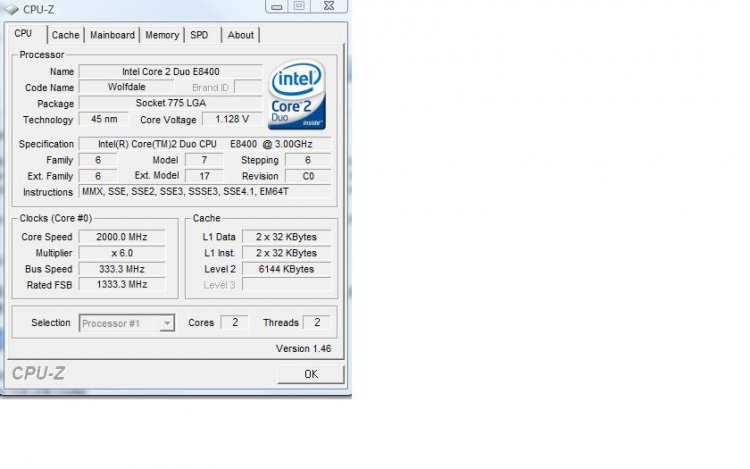
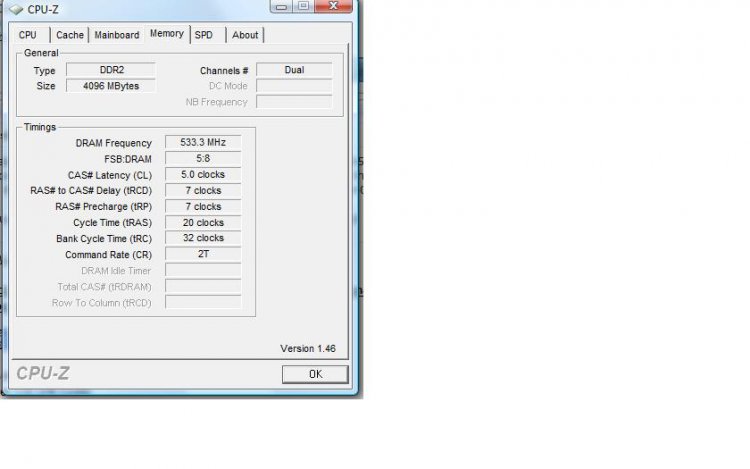
I attached a few screen shots of that CPUZ program.

The last post said that since I sped up the memory clock the timing may automaticaly change as well which will actually slow the memory? So, in some cases slower mhz can be faster with the correct timing?

With the changes I made the Nvidia system monitor shows the memor clock at 1065mhz.
Thanks
Attached Thumbnails
cpuz3.jpg   cpuz4.jpg   cpuz5.jpg  
My System SpecsSystem Spec
Old 08-02-2008   #10 (permalink)


ultimate 64 SP1


Re: RAM Speed question?

Quote  Quote: Originally Posted by unexpectedjoe View Post
OK,
So I went into bios, then "cell Menu" then I changed "system clock mode" to "manual". There, I was able to change the "dram clock to 1066" I saved the settings and exited.

I saw that there was "dram timing mode" that was on "auto" I left it there.
I attached a few screen shots of that CPUZ program.

The last post said that since I sped up the memory clock the timing may automaticaly change as well which will actually slow the memory? So, in some cases slower mhz can be faster with the correct timing?

With the changes I made the Nvidia system monitor shows the memor clock at 1065mhz.
Thanks
THERE YA GO.....

533mhz x2 = 1066mhz
My System SpecsSystem Spec
Reply

Thread Tools


Similar Threads
Thread Forum
overall speed upgrade question Vista hardware & devices
overall speed upgrade question Vista performance & maintenance
overall speed upgrade question Vista Games
RAM Speed Question. General Discussion
A question of speed Vista General


Vista Forums is an independent web site and has not been authorized,
sponsored, or otherwise approved by Microsoft Corporation.
"Windows Vista", the Start Orb, and related materials are trademarks of Microsoft Corp.
© Designer Media Ltd

1 2 3 4 5 6 7 8 9 10 11 12 13 14 15 16 17 18 19 20 21 22 23 24 25 26 27 28 29 30 31 32 33 34 35 36 37 38 39 40 41 42 43 44 45 46