![]() |
![]() | ![]() | ![]() | ![]() | ![]() | ![]() | ![]() |
| Welcome to Windows Vista Forums. Our forum is dedicated to helping you find solutions with any problems, errors or issues you are experiencing with Windows Vista. The Vista forum also covers news and updates and has an extensive Windows Vista tutorial section that covers a wide range of tips and tricks. |
| |||||||
![]() |
| |
| | #1 (permalink) |
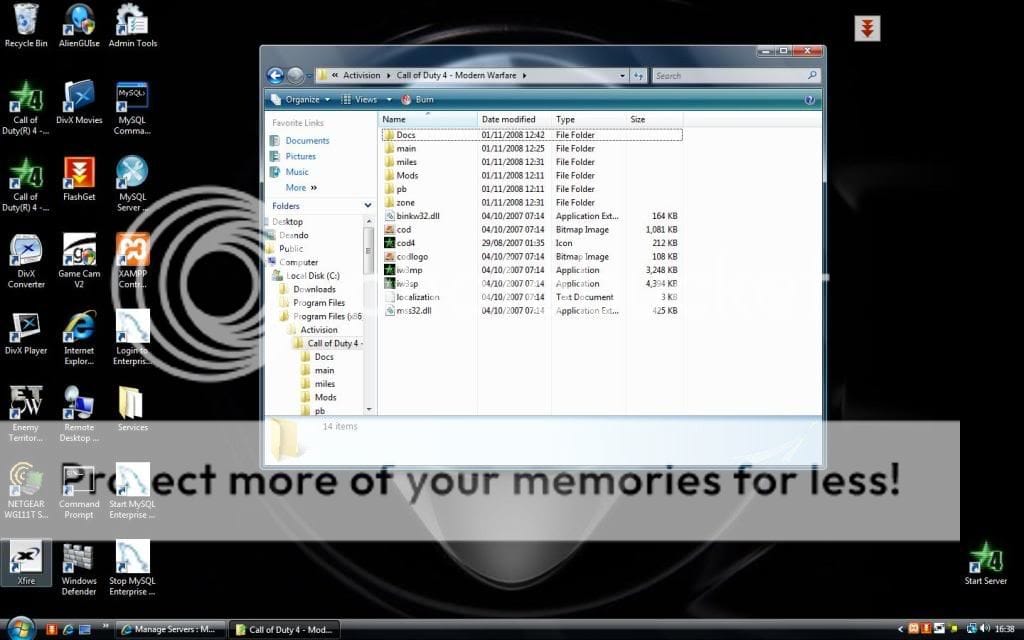
| Newbie | Missing Files/Folders in Call of Duty 4 Activision Folder Hey all! I am playing CoD4 and I am experiencing some problems with mods and files... When I installed CoD4 I let it install as default. In the program files, Activision, Call of Duty 4 Modern Warfare. Directly after the install I downloaded Patch 1.6 and 1.6-1.7 After that I went to the Call of Duty Modern Warfare folder so that I could add my custom maps. But the folders I am looking for are missing. The folders located in my CoD4 MW folder are: Docs, Main, Miles, Mods, pb, Zone. Then there are 2 folders missing: players and usermaps. My game runs fine, but I cant do anything more... I have all my ranks, but I cant find my players folder. I did a search throughout my pc, for the names of those folders but couldnt find anything... I reinstalled CoD4 twice... Any help? |
My System Specs![]() |
| | #2 (permalink) |
| Pre-Engineer | Re: Missing Files/Folders in Call of Duty 4 Activision Folder What do you mean by you can't do anything anymore? Can you still pplay the game like normal? The folder "usermaps" is created once you start downloading custom maps off of the server. If you don't have the folder yet and want to install a custom map, simply create the folder and place the map file in there. The "player" folder just contains information about your save points and the active profile in the game. Hope this helps |
My System Specs![]() |
| | #3 (permalink) |
| Buggin | Re: Missing Files/Folders in Call of Duty 4 Activision Folder I can't help you as far as the usermaps files goes; you may have to create it yourself... where exactly though I'm not sure? As far as your profile goes, when looking at your main cod folder, with docs, main etc etc, for your profile, click "compatibility files" in the menu bar below the address bar. Again, whether you put the new maps in the main folder here, or in the main cod folder I don't know? |
My System Specs![]() |
| | #4 (permalink) |
| Newbie | Re: Missing Files/Folders in Call of Duty 4 Activision Folder Thank you very much! I clicked on compatibility files and there they both were! usermaps and players! ![]() Thank you very much! |
My System Specs![]() |
| | #5 (permalink) |
| Buggin | Re: Missing Files/Folders in Call of Duty 4 Activision Folder No problem. |
My System Specs![]() |
| | #6 (permalink) |
| Vista Maniac Join Date: Nov 2008 Windows Vista Business (x64) (build 6000) SP1 / Ubuntu Linux Server / Windows XP Professional SP3 | Re: Missing Files/Folders in Call of Duty 4 Activision Folder Last edited by Deando; 11-01-2008 at 12:41 PM.. Reason: missed photo |
My System Specs![]() |
| | #7 (permalink) |
| Buggin | Re: Missing Files/Folders in Call of Duty 4 Activision Folder Hmm... this is a problem. Are the folders in your AppData folder? Control Panel/Appearance and Personalization/Folder Options, View tab, check 'show hidden files and folders', click apply. Hit the Windows Logo key, Deando folder/AppData/Local/Activision... see if they're there? ***EDIT*** Can you play the game? Have you created a profile? If you have, then it's got to be somewhere, the trick seems to be just finding it, right? |
My System Specs![]() |
| | #8 (permalink) |
| Vista Maniac Join Date: Nov 2008 Windows Vista Business (x64) (build 6000) SP1 / Ubuntu Linux Server / Windows XP Professional SP3 | Re: Missing Files/Folders in Call of Duty 4 Activision Folder i can play single player but not multiplayer i evin took the game back and got new 1 |
My System Specs![]() |
| | #9 (permalink) |
| Buggin | Re: Missing Files/Folders in Call of Duty 4 Activision Folder What's the multi-player error message? |
My System Specs![]() |
| | #10 (permalink) |
| Vista Maniac Join Date: Nov 2008 Windows Vista Business (x64) (build 6000) SP1 / Ubuntu Linux Server / Windows XP Professional SP3 | Re: Missing Files/Folders in Call of Duty 4 Activision Folder iw3mp.exe has stopped working a problem caused the program to stop working correctly windows will close the program and notify you if a solution is available |
My System Specs![]() |
![]() |
| Thread Tools | |
| |
Similar Threads | ||||
| Thread | Forum | |||
| Files/folders missing from my C:/users/username folder | General Discussion | |||
| Call Of Duty 2.. :( | Gaming | |||
| Call of Duty 5... | Gaming | |||
| Call of Duty 2 MP | Vista Games | |||
| call of duty | Vista Games | |||