
Windows Vista Forums
Vista Forums Home Join Vista Forums Windows 7 Forum Vista Tutorials Tags
Welcome to Windows Vista Forums. Our forum is dedicated to helping you find solutions with any problems, errors or issues you are experiencing with Windows Vista. The Vista forum also covers news and updates and has an extensive Windows Vista tutorial section that covers a wide range of tips and tricks.

Go Back   Vista Forums > Vista Forums > Gaming

Vista Tutorial - Blizzard's Diablo 1

Reply
 
Old 01-05-2009   #1 (permalink)
Resistance is Futile


Join Date: Aug 2007
Windows Vista x64 Ultimate


Blizzard's Diablo 1

For all those detractors out there who believe Vista is rubbish for older games, and in particular Vista x64, I'd like to present some evidence to the contrary, in the form of a blast from the past. 1995 to be exact.

I've recently re-aquired an original Diablo 1 (what can I say - I'm a Diablo fan), and figured because I was using Vista Ultimate x64, I'd have to run it in Windows XP under Microsoft Virtual PC 2007. However, when I got home from work this afternoon, I inserted the disk and allowed the autoplay to run.

The game installed without problems. Although I must mention that I changes the install path from "C:\Program Files (x86)\Diablo" to "C:\Games\Diablo". And it played! To top it off, it even showed up in the Vista Games Explorer.


This has surely got to be the oldest game I know of that has installed without any issues whatsoever onto Vista x64, and does not even need to have any compatibility mode settings manually changed!

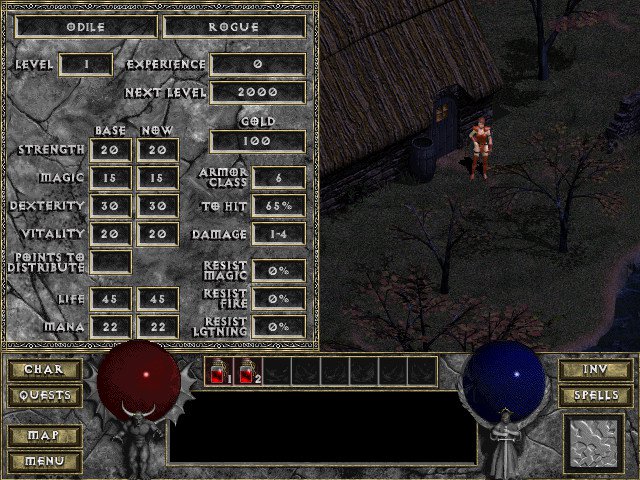
Here are two screenshots that shows the following information:
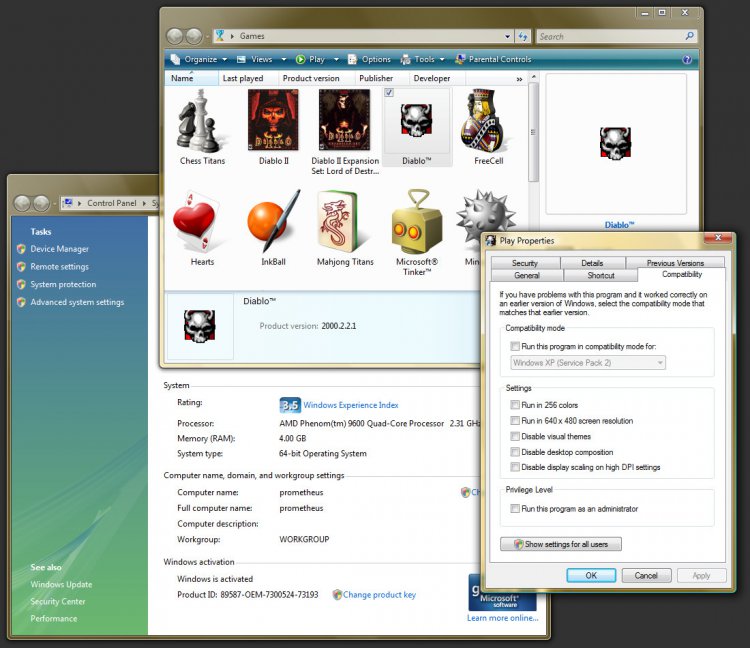
  • That I am using Vista x64
  • Diablo 1 displays in the Game Explorer
  • Diablo 1 runs without any Compatibility Mode settings!
  • A view of the game in action, with a newly created character
diablo1.jpg

diablo1screen01.jpg

This is truly a testament to the compatibility of Windows Vista x64, and the quality of games produced by Blizzard!

My System SpecsSystem Spec
Old 01-05-2009   #2 (permalink)
PC Geek


Join Date: Oct 2008
Vista Home Premium x64


Re: Blizzard's Diablo 1

Quote  Quote: Originally Posted by Dzomlija View Post
For all those detractors out there who believe Vista is rubbish for older games, and in particular Vista x64, I'd like to present some evidence to the contrary, in the form of a blast from the past. 1995 to be exact.

I've recently re-aquired an original Diablo 1 (what can I say - I'm a Diablo fan), and figured because I was using Vista Ultimate x64, I'd have to run it in Windows XP under Microsoft Virtual PC 2007. However, when I got home from work this afternoon, I inserted the disk and allowed the autoplay to run.

The game installed without problems. Although I must mention that I changes the install path from "C:\Program Files (x86)\Diablo" to "C:\Games\Diablo". And it played! To top it off, it even showed up in the Vista Games Explorer.


This has surely got to be the oldest game I know of that has installed without any issues whatsoever onto Vista x64, and does not even need to have any compatibility mode settings manually changed!

Here are two screenshots that shows the following information:
  • That I am using Vista x64
  • Diablo 1 displays in the Game Explorer
  • Diablo 1 runs without any Compatibility Mode settings!
  • A view of the game in action, with a newly created character

This is truly a testament to the compatibility of Windows Vista x64, and the quality of games produced by Blizzard!
i can do one better than that m8, got the ultimate doom working :P
Attached Thumbnails
ultimatedoom1.jpg   doom95-2009-01-05-17-50-41-96.jpg  
My System SpecsSystem Spec
Old 01-05-2009   #3 (permalink)
Resistance is Futile


Join Date: Aug 2007
Windows Vista x64 Ultimate


Re: Blizzard's Diablo 1

Quote  Quote: Originally Posted by MrNeeds View Post
Quote  Quote: Originally Posted by Dzomlija View Post
For all those detractors out there who believe Vista is rubbish for older games, and in particular Vista x64, I'd like to present some evidence to the contrary, in the form of a blast from the past. 1995 to be exact.

I've recently re-aquired an original Diablo 1 (what can I say - I'm a Diablo fan), and figured because I was using Vista Ultimate x64, I'd have to run it in Windows XP under Microsoft Virtual PC 2007. However, when I got home from work this afternoon, I inserted the disk and allowed the autoplay to run.

The game installed without problems. Although I must mention that I changes the install path from "C:\Program Files (x86)\Diablo" to "C:\Games\Diablo". And it played! To top it off, it even showed up in the Vista Games Explorer.


This has surely got to be the oldest game I know of that has installed without any issues whatsoever onto Vista x64, and does not even need to have any compatibility mode settings manually changed!


Here are two screenshots that shows the following information:
  • That I am using Vista x64
  • Diablo 1 displays in the Game Explorer
  • Diablo 1 runs without any Compatibility Mode settings!
  • A view of the game in action, with a newly created character


This is truly a testament to the compatibility of Windows Vista x64, and the quality of games produced by Blizzard!
i can do one better than that m8, got the ultimate doom working :P
About on a par there - Both where released in '95, and "Ultimate Doom" is a Windows re-write of the original Doom (for DOS). Diablo was originally written for Windows.

Where can I get "Ultimate Doom", btw?
My System SpecsSystem Spec
Old 01-05-2009   #4 (permalink)
PC Geek


Join Date: Oct 2008
Vista Home Premium x64


Re: Blizzard's Diablo 1

Quote  Quote: Originally Posted by Dzomlija View Post
Quote  Quote: Originally Posted by MrNeeds View Post
Quote  Quote: Originally Posted by Dzomlija View Post
For all those detractors out there who believe Vista is rubbish for older games, and in particular Vista x64, I'd like to present some evidence to the contrary, in the form of a blast from the past. 1995 to be exact.

I've recently re-aquired an original Diablo 1 (what can I say - I'm a Diablo fan), and figured because I was using Vista Ultimate x64, I'd have to run it in Windows XP under Microsoft Virtual PC 2007. However, when I got home from work this afternoon, I inserted the disk and allowed the autoplay to run.

The game installed without problems. Although I must mention that I changes the install path from "C:\Program Files (x86)\Diablo" to "C:\Games\Diablo". And it played! To top it off, it even showed up in the Vista Games Explorer.


This has surely got to be the oldest game I know of that has installed without any issues whatsoever onto Vista x64, and does not even need to have any compatibility mode settings manually changed!


Here are two screenshots that shows the following information:
  • That I am using Vista x64
  • Diablo 1 displays in the Game Explorer
  • Diablo 1 runs without any Compatibility Mode settings!
  • A view of the game in action, with a newly created character


This is truly a testament to the compatibility of Windows Vista x64, and the quality of games produced by Blizzard!
i can do one better than that m8, got the ultimate doom working :P
About on a par there - Both where released in '95, and "Ultimate Doom" is a Windows re-write of the original Doom (for DOS). Diablo was originally written for Windows.

Where can I get "Ultimate Doom", btw?
hehe, well, you can get it from steam if you want, i got it with the doom trilogy about 8 years ago, gathering dust in my loft :P
it was quite easy to get it working though, it kept asking me for dxplay.dll, but obviously the file system wasnt the same as windows 95's setup so i copied all the directx files on the disc into c:/windows/system and it worked like a dream.
Attached Thumbnails
dsc00755.jpg   dsc00757.jpg   steam-doom.jpg  

Last edited by MrNeeds; 01-05-2009 at 03:46 PM..
My System SpecsSystem Spec
Old 01-05-2009   #5 (permalink)
Resistance is Futile


Join Date: Aug 2007
Windows Vista x64 Ultimate


Re: Blizzard's Diablo 1

Quote  Quote: Originally Posted by MrNeeds View Post
Quote  Quote: Originally Posted by Dzomlija View Post
Quote  Quote: Originally Posted by MrNeeds View Post
i can do one better than that m8, got the ultimate doom working :P
About on a par there - Both where released in '95, and "Ultimate Doom" is a Windows re-write of the original Doom (for DOS). Diablo was originally written for Windows.

Where can I get "Ultimate Doom", btw?
hehe, well, you can get it from steam if you want, i got it with the doom trilogy about 8 years ago, gathering dust in my loft :P
it was quite easy to get it working though, it kept asking me for dxplay.dll, but obviously the file system wasnt the same as windows 95's setup so i copied all the directx files on the disc into c:/windows/system and it worked like a dream.
It's actually pretty cool knowing that some of the classics that started the 3D Revolution are still out there being played by the masses. If it wasn't for titles like Doom, graphics cards as we know them wouldn't have been the same...
My System SpecsSystem Spec
Old 01-06-2009   #6 (permalink)
Newbie


Join Date: Jan 2009
Vista Home Premium x64


Re: Blizzard's Diablo 1

Dzomlija,

Thanks for sharing this. I noticed you also have Diablo 2 installed, did it install with the same ease?
My System SpecsSystem Spec
Old 01-06-2009   #7 (permalink)
Resistance is Futile


Join Date: Aug 2007
Windows Vista x64 Ultimate


Re: Blizzard's Diablo 1

Quote  Quote: Originally Posted by Ed Ministrator View Post
Dzomlija,

Thanks for sharing this. I noticed you also have Diablo 2 installed, did it install with the same ease?
Yes. The only change that needs to be made is the install location. This needs to be changed from "Program Files" to something else, because as you know, Vista protects the "Program Files" folder.

My Diablo II is installed to "C:\Games\Diablo II".

In fact, this "trick" will work for many older games that may experience problems on Vista. Just change the default install location to some other unprotected folder, and the games should work.
My System SpecsSystem Spec
Reply

Thread Tools


Similar Threads
Thread Forum
Diablo 2 Help! Gaming
Diablo II Vista Games
Diablo / Diablo 2? (Vista 64 ult.) Gaming
Diablo II Vista Games


Vista Forums is an independent web site and has not been authorized,
sponsored, or otherwise approved by Microsoft Corporation.
"Windows Vista", the Start Orb, and related materials are trademarks of Microsoft Corp.
© Designer Media Ltd

1 2 3 4 5 6 7 8 9 10 11 12 13 14 15 16 17 18 19 20 21 22 23 24 25 26 27 28 29 30 31 32 33 34 35 36 37 38 39 40 41 42 43 44 45 46