Windows Vista Forums
Vista Forums Home Join Vista Forums Windows 7 Forum Vista Tutorials Tags
Welcome to Windows Vista Forums. Our forum is dedicated to helping you find solutions with any problems, errors or issues you are experiencing with Windows Vista. The Vista forum also covers news and updates and has an extensive Windows Vista tutorial section that covers a wide range of tips and tricks.

Go Back   Vista Forums > Vista Forums > Gaming

Vista - Hearts

Reply
 
Old 01-06-2009   #1 (permalink)


vista 32


Hearts

How can i get the Hearts game back on my computer? It was accidentally trashed. I looked in the games folders and the hearts game was gone. Is there any hope or is it gone for good?

Thank You
My System SpecsSystem Spec
Old 01-07-2009   #2 (permalink)


Vista Home Premium x64


Re: Hearts

Quote  Quote: Originally Posted by cazador31 View Post
How can i get the Hearts game back on my computer? It was accidentally trashed. I looked in the games folders and the hearts game was gone. Is there any hope or is it gone for good?

Thank You
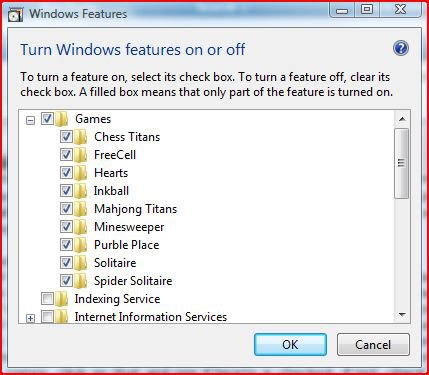
hi cazador and welcome to the forums, if the game is not showing in the games folder, can you check in this folder for the game, c:/program files/microsoft games/hearts/hearts.exe, if its there, just drag the hearts.exe to the games folder. if its not there, then you need to go to control panel, (classic view) click on programs and features, on the left theres an option called turn windows features on and off, click that and click continue on the UAC prompt, wait for it to load, when it has loaded, there should be a + sign next to games, click on that and see if hearts is checked, if not, check the box and it will start to install, if it is then uncheck and recheck.
Attached Thumbnails
windows-features.jpg  
My System SpecsSystem Spec
Reply

Thread Tools


Similar Threads
Thread Forum
Player's name in Hearts Vista Games
hearts Vista Games
Hearts Vista Games
Hearts Vista Games
Hearts problem... Vista Games


Vista Forums is an independent web site and has not been authorized,
sponsored, or otherwise approved by Microsoft Corporation.
"Windows Vista", the Start Orb, and related materials are trademarks of Microsoft Corp.
© Designer Media Ltd

1 2 3 4 5 6 7 8 9 10 11 12 13 14 15 16 17 18 19 20 21 22 23 24 25 26 27 28 29 30 31 32 33 34 35 36 37 38 39 40 41 42 43 44 45 46
