![]() |
![]() | ![]() | ![]() | ![]() | ![]() | ![]() | ![]() |
| Welcome to Windows Vista Forums. Our forum is dedicated to helping you find solutions with any problems, errors or issues you are experiencing with Windows Vista. The Vista forum also covers news and updates and has an extensive Windows Vista tutorial section that covers a wide range of tips and tricks. |
| |||||||
![]() |
| |
| | #1 (permalink) |
| Vista Ultimate x64 | Random crashes in just about any videogame Hi I've been having this problem for a while now so listen up (Screens are below for more info) When playing just any game it crashes and I get an error messege saying "Directx has encounterd an unrecoveralbe error" and Display driver "nvlddmkm" has stopped working. Then the computer flickers in and out and I am forced to restart the computer manualy. Thins I've tried is that I formated my main "C" harddrive and setup all newest drivers etc. That didn't fix this. Another thing I thought of is that the card was overheating, well it has a custom Thermal Right cooler and a 120mm fan but I still tried and opened up the case. That didn't have any effect. This is a strange problem because I am able to run tests such as 3d mark -Vantage, 06, 05 and 03 without any crashes. It's only when I play games for a while, and there doesn't seem to be a pattern in how long I can play it is totally random. So any ideas ? Regards Hallur |
My System Specs![]() |
| | #2 (permalink) |
| Vista Ultimate x64 | Re: Random crashes in just about any videogame Bump |
My System Specs![]() |
| | #3 (permalink) |
| Windows Vista x64 Ultimate | Re: Random crashes in just about any videogame try downloading and installing updated (NOT BETA) drivers from Welcome to NVIDIA - World Leader in Visual Computing Technologies |
My System Specs![]() |
| | #4 (permalink) |
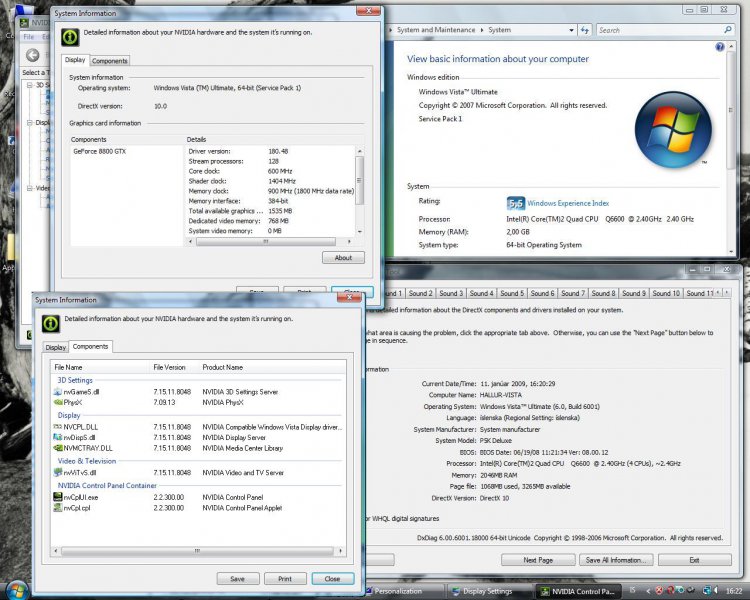
| Vista Ultimate x64 | Re: Random crashes in just about any videogame Shouldn't I have Directx 10.1 I have SP1 installed ------------------ System Information ------------------ Time of this report: 1/12/2009, 16:43:45 Machine name: HALLUR-VISTA Operating System: Windows Vista™ Ultimate (6.0, Build 6001) Service Pack 1 (6001.vistasp1_gdr.080917-1612) Language: Icelandic (Regional Setting: Icelandic) System Manufacturer: System manufacturer System Model: P5K Deluxe BIOS: BIOS Date: 06/19/08 11:21:34 Ver: 08.00.12 Processor: Intel(R) Core(TM)2 Quad CPU Q6600 @ 2.40GHz (4 CPUs), ~2.4GHz Memory: 2046MB RAM Page File: 1133MB used, 3200MB available Windows Dir: C:\Windows DirectX Version: DirectX 10 DX Setup Parameters: Not found DxDiag Version: 6.00.6001.18000 64bit Unicode |
My System Specs![]() |
| | #5 (permalink) |
| Vista Ultimate x64 SP1 | Re: Random crashes in just about any videogame Be aware that Vista comes loaded with DX10 out the box. In order to use DX10 (10.1) you'll have to have both a video card and game capable of DX10. If you have a DX10 card, but the game is DX9, your card will play in DX9 mode, likewise if you have a DX10 game, but a DX9 card, the game will be played in DX9 mode. If you have both a DX10 game and card, the game will be played in DX10. Note that some games will give you the option to choose either DX9 or 10. Examples of these games are: Bioshock Crysis Crysis Warhead Lost Planet: Colonies Edition I would suggest you update you DX files by downloading and installing both files. DX9 first, then the Runtime files. DX9 Update Download details: DirectX 9.0c Redistributable for Software Developers? DX End users Runtime (Nov 08) http://www.microsoft.com/downloads/d...displaylang=en And as has been stated, make sure you have the latest video card drivers, as well as the latest soundcard drivers. Hope this helps. Good luck. Edit: Even though your DX info reads DX10, (It'll still say that even after doing updates), it's 10.1 |
My System Specs![]() |
| | #6 (permalink) |
| Vista x64 + Windows 7 x64 (Ultimate) | Re: Random crashes in just about any videogame After doing what sygnus21 suggested and if you are still experiencing the problems, I would try re installing your drivers since 181 is already out. Did you recently updated your drivers, say from 178 to 180? if so, did you also uninstall the PhysX drivers and run a registry sweeper before installing the newer drivers? |
My System Specs![]() |
| | #7 (permalink) |
| Vista Ultimate x64 | Re: Random crashes in just about any videogame Games i've played so far have all crashed. Both dx 10 and 9. It actually first started with Fallout 3 and it's like the lower I have the settings, that's res and deatail, AA etc. the longer I can play. Games I've played so far since this started have all had this directx error. Fallout 3 Left 4 Dead Call of Duty: World at War ElderScrolls IV: Oblivion I'll try what you've recommanded and let you know if it works. |
My System Specs![]() |
| | #8 (permalink) |
| Vista x64 + Windows 7 x64 (Ultimate) | Re: Random crashes in just about any videogame Not 100% sure here but I think that Vista x64 requires at least 4GB of Ram to be able to work well, less than that and you are looking for trouble, of course this is only hearsay on my part and, hopefully, someone else will either confirm or deny this. You have a very good card, even by today's stds and you also stated that you have a cooler but, have you checked your temps? |
My System Specs![]() |
| | #9 (permalink) |
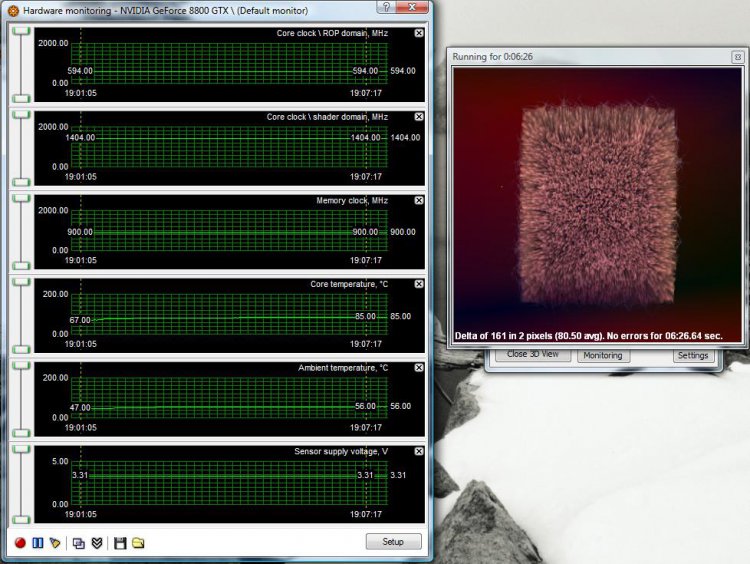
| Vista Ultimate x64 | Re: Random crashes in just about any videogame There doesn't seem to be too much heat... after all I have the best available aircooler for this card from ThermalRight. (See below on pic) Also when trying to remove the display driver I get this problem. |
My System Specs![]() |
| | #10 (permalink) |
| Vista Ultimate x64 SP1 | Re: Random crashes in just about any videogame Not 100% sure here but I think that Vista x64 requires at least 4GB of Ram to be able to work well, less than that and you are looking for trouble, of course this is only hearsay on my part and, hopefully, someone else will either confirm or deny this. You have a very good card, even by today's stds and you also stated that you have a cooler but, have you checked your temps? I would suggest hahallur follow my earlier suggestions and go from there. With the issues he's having, it's either a video card or driver issue. |
My System Specs![]() |
![]() |
| Thread Tools | |
| |
Similar Threads | ||||
| Thread | Forum | |||
| Random crashes | General Discussion | |||
| Random Crashes | Vista General | |||
| Random Vista Crashes | Vista General | |||
| Random crashes | Vista General | |||
| Random game crashes | Vista Games | |||