![]() |
![]() | ![]() | ![]() | ![]() | ![]() | ![]() | ![]() |
| Welcome to Windows Vista Forums. Our forum is dedicated to helping you find solutions with any problems, errors or issues you are experiencing with Windows Vista. The Vista forum also covers news and updates and has an extensive Windows Vista tutorial section that covers a wide range of tips and tricks. |
| |||||||
![]() |
| |
| | #1 (permalink) |
| 32 bit | Getting rid of Run as Administrator for Games Some of my games won't play because I have to right click each time and click on "run as administrator"... any way to get rid of that. Easy way, of course. |

My System Specs![]() |
| | #2 (permalink) |
| Vista Home Premium | Re: Getting rid of Administrator i dont believe that there is a way to get ride of it but to make is so you don't have to right click everything. Right click on the program, go to properties, and set it to run as admin. You still have to accept it but takes some of the time out of it |
My System Specs![]() |
| | #3 (permalink) |
| 32 bit | Re: Getting rid of Administrator Why did they ever make this feature on a home computer. I can see it for a workplace computer but I am the administrator and only one who uses this computer and this feature is a nuisance! I can't run and PDF or Adobe files without first saving it to my desktop and then opening Adobe and opening it from there as administrator. What a pain. |
My System Specs![]() |
| | #4 (permalink) |
| VISTA HOME PREMIUM X64/ 7 x64 / 7x86 | Re: Getting rid of Administrator Hi Barbee, UAC is an important security feature, better not to turn it off. I use this , you may like to take a look User Access Control - Vista User Account Control - UAC | Norton Labs Hope it helps SIW2 |
My System Specs![]() |
| | #5 (permalink) |
| 32 bit | Re: Getting rid of Administrator Hi Barbee, UAC is an important security feature, better not to turn it off. I use this , you may like to take a look User Access Control - Vista User Account Control - UAC | Norton Labs Hope it helps SIW2 Is there one for 32 ? It tells me I can't get it because I don't have 64. I joined a genealogy site that views old newspapers and I can't get Adobe to work. The only way I can open Adobe is from the Adobe Reader desktop icon by clicking "run as administrator". It won't open inside an email or program. How can I get it to do that? I paid a subscription to this site and can't view the newspapers. It tells me my side by side configuration is wrong and to see the application log... whatever that is. Please HELP |
My System Specs![]() |
| | #6 (permalink) |
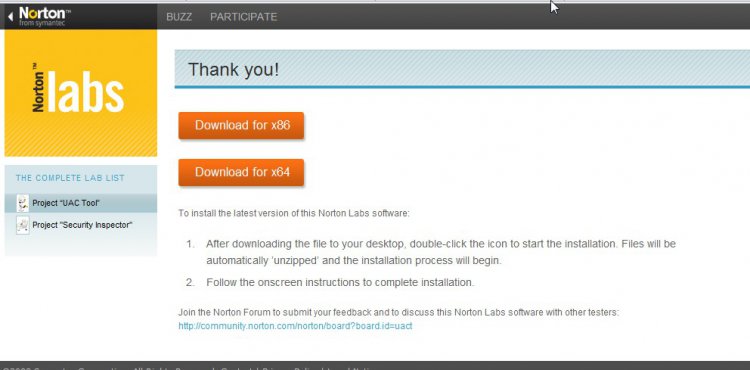
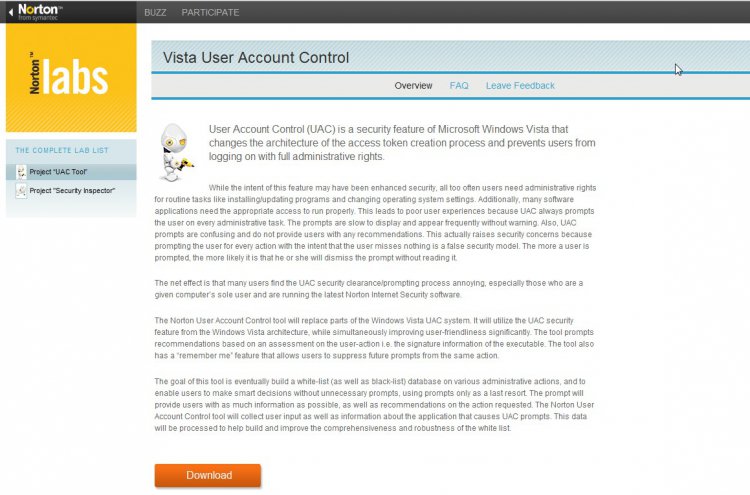
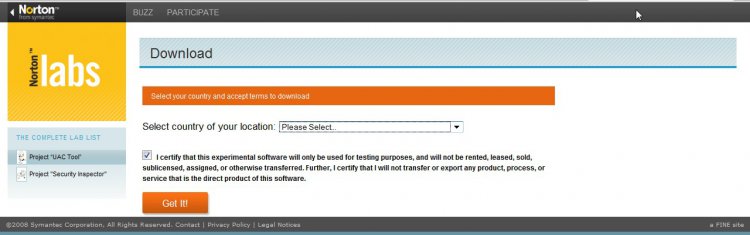
| VISTA HOME PREMIUM X64/ 7 x64 / 7x86 | Re: Getting rid of Run as Administrator for Games Hi Barbee, Not sure what you mean, both bit versions are offered. When you click this link: User Access Control - Vista User Account Control - UAC | Norton Labs You get this page: ![]() Click on Download - you get this page: ![]() Tick I Agree, and select your country from drop down box, click GET IT and you get this page: ![]() Select x86 for 32 bit, or x64 for 64bit. ftp://ftp.symantec.com/misc/sabu/nor...bs/NUACx86.exe If Adobe Reader is not working for you, you could try Foxit reader - there is a free version - it is smaller and faster than Adobe - many people prefer it. I do not have Adobe reader on my machine at all. As with many free programs, the install asks to add a Foxit toolbar as well as an eBay shortcut, and it wants to set your homepage to Foxit Software, so you may want to untick those during the installation. Foxit Reader | Office Download | PC World Hope it helps |
My System Specs![]() |
| | #7 (permalink) |
| 32 bit | Re: Getting rid of Run as Administrator for Games Oh, I didn't know 86 was 32... silly me! I downloaded it. It said there would be an icon on my desktop and guess what? There isn't. I did a search and found nothing. Where the heck is it? |
My System Specs![]() |
| | #8 (permalink) |
| 32 bit | Re: Getting rid of Run as Administrator for Games Ok downloaded Fox... I hope it works with the genealogy program. It works... thank you so much. I ditched Adobe. |
My System Specs![]() |
| | #9 (permalink) |
| VISTA HOME PREMIUM X64/ 7 x64 / 7x86 | Re: Getting rid of Run as Administrator for Games Hi Barbee, Glad it worked for you |
My System Specs![]() |
![]() |
| Thread Tools | |
| |
Similar Threads | ||||
| Thread | Forum | |||
| Disable Vista Games Explorer from auto-adding games | Gaming | |||
| Games willnot run "as an Administrator" | Gaming | |||
| Account 'NAMED' Administrator vs. 'administrator rights' question | Vista installation & setup | |||
| Games Explorer Works only w/ Administrator | Vista Games | |||
| Microsoft Offers More Ways to Play Games for Windows and Xbox 360 at German Games Convention | Vista News | |||