JavaScript is disabled. For a better experience, please enable JavaScript in your browser before proceeding.
You are using an out of date browser. It may not display this or other websites correctly.
You should upgrade or use an
alternative browser .
fullscreen games not compatable with vista aero
The problem I've been having is that when I try to run a game in full screen mode the game will just minimize itself and no matter how many times i try to bring it up it just flashes a black screen and then returns to the desktop with the game still minimized. I believe I've found what causes this but I'm still not satisfied with my current solution. What I've found so far is that on my computer full screen games don't like to run in 32bit color mode. I've got an ati card and when I change the color setting in the catalyst control center to 16bit also disabling aero the games seem to run fine. What I'm trying to find out I guess is
Manufacturer/Model
Dell
CPU
Q6600
Memory
4GB
Monitor(s) Displays
HP w2207h
Hard Drives
2x250GB HDDs
1x60GB OCZ SSD
6 external disks 60 to 640GBs
Other Info
Also 1xHP desktop, 1xHP laptop, 1xGateway laptop
Did you try updating your video card drivers?
Manufacturer/Model
Custom built (Myself)
CPU
Intel Core i3
Motherboard
Asus P7P55-M
Memory
8GB DDR3
Graphics card(s)
EVGA Nvidia GTX 550Ti FPB
Sound Card
Onboard
Monitor(s) Displays
HP w2207h with Acer H213H
Screen Resolution
1680x1050 and 1920x1080
Hard Drives
1 TB WD Caviar Black 32mb cache,
750 GB WD Caviar Blue,
500 GB WD Caviar Blue,
320 GB WD
PSU
Mushkin HP-550 550W Power suppy
Case
Cooler Master Elite310
Cooling
Air
Mouse
Microsoft Comfort 1000
Keyboard
Logitech Access 600
Internet Speed
15 Mb/s up and down
Other Info
I also have an Asus G53SW-A1
Gamerholic
Vista Guru
Gold Member
Hello NickC1689,
Manufacturer/Model
Self Build
CPU
QX9650 (black box) [email protected]
Motherboard
Asus P5Q Premium
Memory
8GB-4x2GB Corsair Dominator DDR 2-1066
Graphics card(s)
2 x ASUS EAH 4870 X 2 (Quad)
Sound Card
Supreme FX 2
Monitor(s) Displays
Fujitsu Siemens 22inch flat screen
Screen Resolution
1680x1050
Hard Drives
150 Gig WD Raptor
300 Gig Maxtor
300 Gig Maxtor, (External)
PSU
CoolerMaster 1000
Case
CoolerMaster N-Vidia stacker 830
Cooling
Noctua NH-U12P x 1x120mm fan, 6x120mm case fans
Mouse
Logitech G5
Keyboard
Logitech G15
Internet Speed
20Mbps
Other Info
Audio FX Pro 5+1 gaming head set
Lost in my own World
Power User
that is weird all my games work fine with aero and fullscreen i even have dreamscene running and have no issues.
Manufacturer/Model
CUSTOM BUILT BY ME
CPU
AMD PHENOM II X3 710 2.6GHZ Overclocked to 3.25GHZ Stable
Motherboard
Ecs Gf8200a Phenom-2 X4 Quad Core Mboard
Memory
8BG PC5300 4 x 2GB OCZ
Graphics card(s)
PCI-E ATI HD 4670 1GB Overclocked 4GB Total
Sound Card
Onboard 7.1 HD AUDIO
Monitor(s) Displays
55" Vizio LCD
Screen Resolution
1600 x 1200 HD
Hard Drives
1TB Seagate, 1TB Hitachi, 250GB Maxtor, 250GB Seagate
PSU
Kingwin ABT-610MM Maximum Power 610 Watt ATX 12V
Case
GENERIC
Cooling
Zalman CNPS7500-AlCu LED Universal CPU Cooler, 4 CASE FANS
Mouse
MICROSOFT WIRELESS MOUSE
Keyboard
MICROSOFT WIRELESS KEYBOARD
Internet Speed
CABLE 15MBPS
I run Everquest fine in full screen mode under vista 32-bit. I can even run both my accounts in full screen.
Manufacturer/Model
Acer Aspire X1700
Motherboard
ASUS
Memory
3 gigs
Graphics card(s)
EVGA 1 gig GeForce 210
Monitor(s) Displays
Vizio 21" tv
Screen Resolution
1920x1080 resolution
Hard Drives
1 terabyte sata in 1 partition
Cooling
fans that came with it
Mouse
basic USB
Keyboard
basic USB
Internet Speed
3 megabits on a cable modem, wired
I'm not sure if you have to change the color bit depth settings in the ATI control panel and then from the display menu under personalization, but have you looked in device manager for your gpu and if there is an exclamation mark? This sounds like a driver issue. What graphics card do you have?
Manufacturer/Model
Sony Vaio Z46GDU
CPU
[email protected] w/6MB L2 cache 1066MHz FSB
Memory
6GB DDR3 1066MHz SDRAM
Graphics card(s)
9300M GS 256MB + Intel Integrated 4500MHD
Monitor(s) Displays
13.1" WXGA True Colour Tough
Screen Resolution
1600x900
Hard Drives
320GB SATA 7200RPM
Internet Speed
1MB/s
Hi
Graphics card(s)
ASUS GeForce 8500GT (256 Mem 500x2) (475 Mhz GPU)
Monitor(s) Displays
ViewSonic VA2016w (LCD 20in, 16x10 ratio, 0.25 Dot Pitch
Screen Resolution
1680 x 1050
Hard Drives
Samsung HD5021J (500 Gig, Sata 2)
PSU
300 Watt Continous (350 Watt Max)
Mouse
Trust AMI Dual Scroll 300
Keyboard
Trust Direct Access II Keyboard
Internet Speed
ADSL2 (Upto 24 Meg) Connected at 11 Meg (3.8k from exchange)
Other Info
Multi Media PC, Blue Ray Drive ASUS BC-06B1ST
PC Geek
Vista Guru
Gold Member
Hi
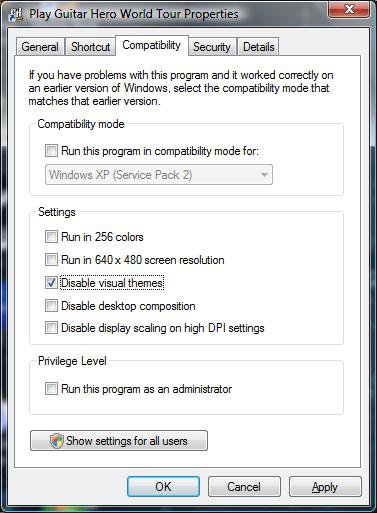
there is an option to disable themes on particular games when you right click the shortcut and go to compatability.
Manufacturer/Model
Custom Build
CPU
Intel Q6600 @ 2.8GHz
Motherboard
Evga NF78-CK-132-A 3-Way SLI
Memory
8Gb DDR2 Corsair Dominator @ 1066Mhz 5-5-5-15
Graphics card(s)
EVGA 560 GTX SC FTW 1GB
Sound Card
Realtek ALC888 7.1 Audio, Logitech G35 7.1 Surround Headset
Monitor(s) Displays
Dell S2409W 16:9, HDMi, DVI & VGA
Screen Resolution
1920 x 1080
Hard Drives
Samsung 7200rpm 250Gb SATA,
Samsung 7200rpm 750Gb SATA,
WD 7200rpm 1TB SCSI SATA.
PSU
Xigmatek 750W Quad sli quad core 80% eff
Case
Antec 900 Gaming Case
Cooling
Zalman CNPS9700-NT NVIDIA Tritium, Dominator RAM cooler
Mouse
Razor Lachesis Banshee V2 Blue, 4000DPI
Keyboard
Logitech generic keyboard
Internet Speed
16Mb Sky bb
Other Info
Wireless Gaming Receiver for Windows, Wireless Xbox 360 Pad, Wireless Xbox 360 Les Paul Guitar