
![]() |
![]() | ![]() | ![]() | ![]() | ![]() | ![]() | ![]() |
| Welcome to Windows Vista Forums. Our forum is dedicated to helping you find solutions with any problems, errors or issues you are experiencing with Windows Vista. The Vista forum also covers news and updates and has an extensive Windows Vista tutorial section that covers a wide range of tips and tricks. |
| |||||||
![]() |
| |
| | #1 (permalink) |
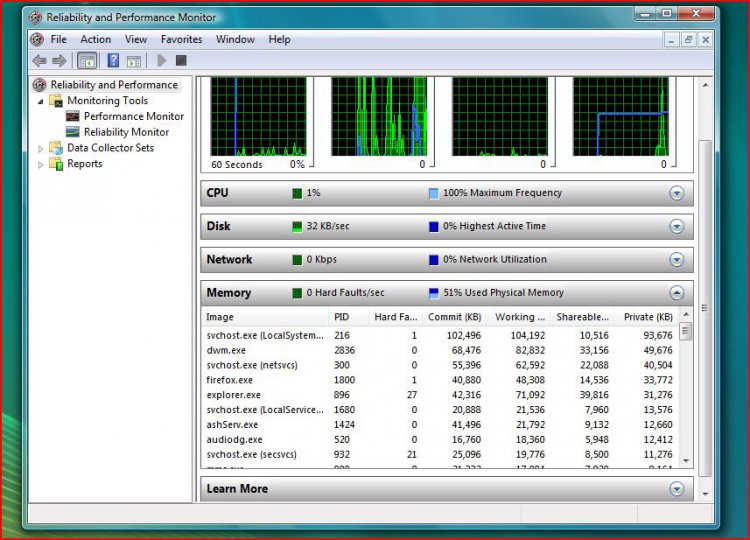
| Vista Ultimate x64 Service Pack I | Might be too much RAM usage on idle ook my computer is running idle and nothing is going on, i am just staring at the screen and it seems like a lot of ram is being used up...and i dont know whats eating it...is 51% a little too high for an idle..if so, can u guys help me point down whats eating it all up? thanks and theres an image below |
My System Specs![]() |
| | #2 (permalink) |
| Windows Vista X64 | Re: Might be too much RAM usage on idle Depends on what apps you have running ,even if the PC is "IDLE". I see "Firefox" running ,that is consuming around 40MB.There maybe other apps like these. As far as possible disable/remove all UNWANTED apps from startup.Will help a lot in reducing RAM usage. |
My System Specs![]() |
| | #3 (permalink) |
| Vista Ultimate x64 Service Pack I | Re: Might be too much RAM usage on idle actually....previously i have disabled all the unnecessary from msconfig |
My System Specs![]() |
| | #4 (permalink) |
| Vista Ultimate x32 | Re: Might be too much RAM usage on idle Vista just stores as much as it can in memory. An 'idle PC' only states something about CPU usage. In case of 'memory' a PC can only be called idle when it is turned off. Turning off some services can save you some Mb's, but Vista will fill that up again with other threads. That's just how they optimized performance networking and speed (RAM is faster than paging on HDD), I noticed that you use Aero desktop. That wil use up a lot of memory. Svchost always uses a lot, because svchost is the carrier of all necessary 'services' . |
My System Specs![]() |
| | #5 (permalink) |
| Vista Ultimate x64 Service Pack I | Re: Might be too much RAM usage on idle ahh svchost does use a lot..and yea i really dont use aero...but i guess it kind of looks cool...lol...well i guess 41% isnt really that bad...after disabling some stuff |
My System Specs![]() |
| | #6 (permalink) |
| Vista x64 Ultimate | Re: Might be too much RAM usage on idle Yes, that is just SuperFetch or SuperPre-Fetch, whatever it's called. Vista "learns" your computer usage and keeps your most active files pre-cached in RAM for faster execution. Its a neat feature, but it has shown some compatibility issues with some games and apps. By the way, if another application asks for that RAM, Vista will surrender the cache for active applications. |
My System Specs![]() |
![]() |
| Thread Tools | |
| |
Similar Threads | ||||
| Thread | Forum | |||
Serious System Lag, 51%-100% usage at idle, Driver Related? | Drivers | |||
| Unidentified CPU Usage At Idle (w/images) | Vista performance & maintenance | |||
| 50% CPU usage at idle...help (please) | General Discussion | |||
| At idle, no apps running: RAM usage = 851MB | Vista General | |||
| CPU Usage at Idle | Vista General | |||