Is there any way to turn off "Test Mode" in Vista x64 Ultimate?
Once upon a time I disabled driver signing through bcdedit /set nointegritychecks ON or bcdedit -set loadoptions DDISABLE_INTEGRITY_CHECKS (don't remember anymore).
Now I would like to enable it back on, but can't.
As suggested; bcdedit -deletevalue loadoption or bcdedit /set nointegritychecks OFF/NO didn't work.
Also atempt to remove only the "test mode" watermark by overwriting user32dll.mui also didn't work. I managed to overwrite the file with changed files in bots system32 and syswow64, but nothing changed.
re: How to turn OFF "Test Mode" in Vista x64 Ultimate
Yes I think I've tried that too.
I've tried everything what can be found through google.
Another thing worries me now; if I somehow manage to enable driver signing back on and my computer refuses to work because of some unsigned drivers, that I'm not aware of, could I turn driver signing back OFF?
Some people say it is impossible after certain microsoft updates...
Since my system works fine now on "test mode", could I only remove that anoying "test mode" watermark in some way other than described in my first post?
re: How to turn OFF "Test Mode" in Vista x64 Ultimate
Thanks Shawn, but...
I know what you are talking about. I've tried typing bcdedit /set testsigning off in command prompt as admin. It didn't work.
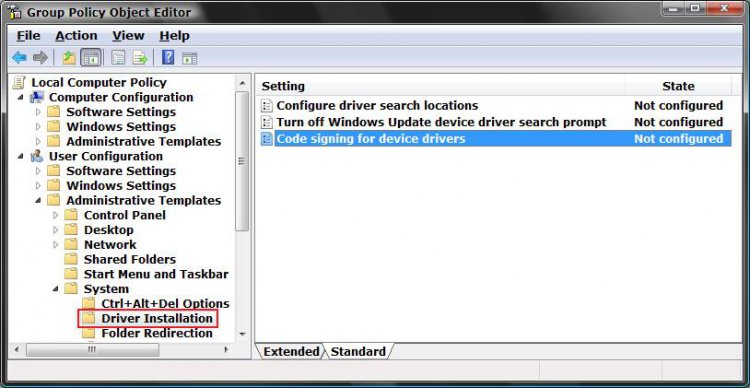
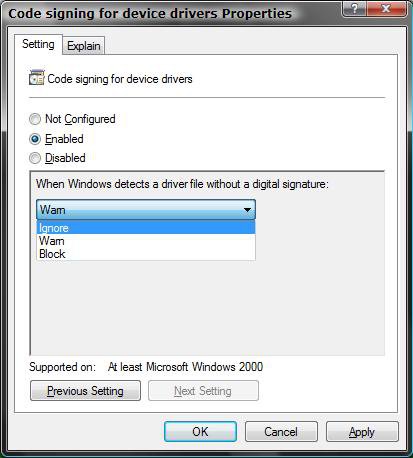
I just got an advice on PlanetAMD64 forum to try through editing gpedit.msc. I think it could work that way, but I am concerned about possibility not to be able to turn driver signing off again if necessary. People on PlanetAMD64 say that it is impossible to turn off driver signing after some KBXXXXX update. I don't want to take the risk.
Right now I would be pleased just to remove "Test mode" watermark on my desktop.
Can you, or someone else, help me with that?
re: How to turn OFF "Test Mode" in Vista x64 Ultimate
Estugarda,
Sorry no. The bcdedit /set testsigning off was the only way that I knew of to turn off Test Mode. Hopefully, the GPEDIT.MSC will do it for you as well.
re: How to turn OFF "Test Mode" in Vista x64 Ultimate
Sorry Shawn (aka brink), bcdedit /set testsigning off line is working afterall. There are so many (real or fake) versions of this online, that I somehow lost the oversight.
re: How to turn OFF "Test Mode" in Vista x64 Ultimate
Here is the location in the registry that pertains to driver signing. The values next to 'Policy' are the default ones for Vista Home Premium 32-bit. To modify them, you need to run the registry editor with administrative credentials.
4 x 4GB DDR3-1600 Corsair Vengeance CMZ8GX3M2A1600C9B (16GB)
Graphics card(s)
MSI GeForce GTX770 Gaming OC 2GB
Sound Card
Realtek High Definition on board solution (ALC 898)
Monitor(s) Displays
ViewSonic VA1912w Widescreen
Screen Resolution
1440x900
Hard Drives
OCZ Agility 3 120GB SATA III x2 (RAID 0)
Samsung HD501LJ 500GB SATA II x2
Hitachi HDS721010CLA332 1TB SATA II
Iomega 1.5TB Ext USB 2.0
WD 2.0TB Ext USB 3.0
4 x 4GB DDR3-1600 Corsair Vengeance CMZ8GX3M2A1600C9B (16GB)
Graphics card(s)
MSI GeForce GTX770 Gaming OC 2GB
Sound Card
Realtek High Definition on board solution (ALC 898)
Monitor(s) Displays
ViewSonic VA1912w Widescreen
Screen Resolution
1440x900
Hard Drives
OCZ Agility 3 120GB SATA III x2 (RAID 0)
Samsung HD501LJ 500GB SATA II x2
Hitachi HDS721010CLA332 1TB SATA II
Iomega 1.5TB Ext USB 2.0
WD 2.0TB Ext USB 3.0
I got this after turning off the signed drivers option, I thought I messed something up, or got a virus. Finally after doing a restore point and it was still on there, I turned to google. Brink is absolutely right, "bcdedit /set testsigning off" does work, but I didn't know that until I did a restart, LOL. THANKS BRINK!
For the love of god. I just want to remove the simple words "test mode" from my desktop. Why on earth do I have to change the integrity check or my REGISTRY!!!!
Worked for me as well. The "Test Mode" stamp is gone from my desktop now.
On a side note turning test mode on never allowed me to run unsigned drivers, which is the reason I turned it on in the first place. I was trying to run a virtual Linux / Fedora server under VMWare Server but could never get the VMWare software to install correctly because of the unsigned drivers issue.


 I've tried typing bcdedit /set testsigning off in command prompt as admin. It didn't work.