![]() |
![]() | ![]() | ![]() | ![]() | ![]() | ![]() | ![]() |
|
Welcome to Vista Forums we are your forum to discuss Windows Vista x64 and x86 systems. Whether you need help or just want to post an idea you have on Vista, this is the forum for you.
br> br> |
| |||||||
![]() |
| | Thread Tools | Display Modes |
| | #1 (permalink) |
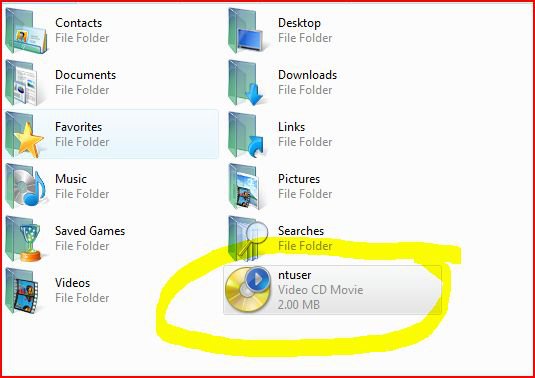
| Banned Rep Power: 0 ![]() ![]() ![]() | what exactly is Ntuser? what exactly is ntuser...it popped up out of nowhere about 3 days ago..and its kind of annoyin me..from what i heard is that it is a very important file for your computer..my question is why would it pop up in my user profile randomly...i got no rights to move it or rename it...even as an admin acc, its now on both my comps... |
My System Specs![]() |
| | #2 (permalink) |
| Member ![]() Rep Power: 11 ![]() ![]() ![]() | Re: what exactly is Ntuser? NTUser.dat is the file containing the Hkey_Current_User hive of the Registry and contains all your user settings, desktop customizations, etc. Consequently Windows will hold the file open all the time you're logged in. If you fool with it it will go BANG! |
My System Specs![]() |
| | #3 (permalink) |
| Banned Rep Power: 0 ![]() ![]() ![]() | Re: what exactly is Ntuser? heh like your enthusiastic answer...anyways..why would it be where it is now? it was never there before..maybe hidden somewhere..? oh well thanks |
My System Specs![]() |
| | #4 (permalink) |
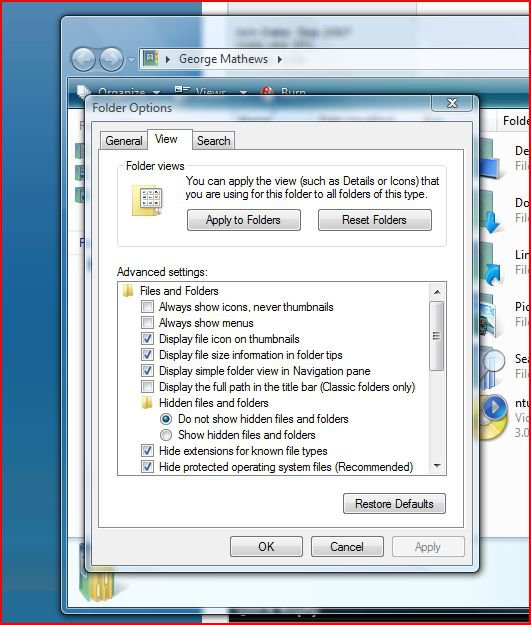
| Member ![]() Rep Power: 11 ![]() ![]() ![]() | Re: what exactly is Ntuser? Yes it's usually hidden. Did you change the View settings to show hidden or system files? If it gets on your nerves press Alt in Explorer, Tools, Folder Options, View, Do Not Show Hidden Files And Folders and it should disappear quick-smart |
My System Specs![]() |
| | #5 (permalink) |
| Banned Rep Power: 0 ![]() ![]() ![]() | Re: what exactly is Ntuser? actually it's on do not show hidden files...but its still there... |
My System Specs![]() |
| | #6 (permalink) |
| Member ![]() Rep Power: 11 ![]() ![]() ![]() | Re: what exactly is Ntuser? OK I did a search from the root using dir ntuser.dat /s and got File Not Found, which is what you would expect. I then did dir ntuser.dat /s /ash (search for files with the Hidden and System attributes set) and found it it in my profile directory, which is where it should be and where your version is. If you have not set Explorer to show hidden files, which you obviously haven't, it should be invisible. You could try and disappear it with attrib +h as a last resort... |
My System Specs![]() |
| | #7 (permalink) |
| Member ![]() Rep Power: 11 ![]() ![]() ![]() | Re: what exactly is Ntuser? Sorry that seems a bit offhand: right-click your user folder with Shift held down and the context menu will contain the extra item Open Command Window Here. When you have the console up, use the command Attrib +h NTUser.dat which should make the offending file disappear. |
My System Specs![]() |
| | #8 (permalink) |
| Banned Rep Power: 0 ![]() ![]() ![]() | Re: what exactly is Ntuser? yay it worked! |
My System Specs![]() |
| | #9 (permalink) |
| Newbie Rep Power: 1 ![]() | Re: what exactly is Ntuser? any help would be great thanks~ |
My System Specs![]() |
| | #10 (permalink) |
| Member ![]() Rep Power: 11 ![]() ![]() ![]() | Re: what exactly is Ntuser? The only other thing that springs to mind is starting the prompt as Administrator (click on the orb, type cmd, then pess Ctrl-Shift-Enter) and then navigate to the relevant folder and do the attrib +h thing |
My System Specs![]() |
![]() |
| Thread Tools | |
| Display Modes | |
| |
Similar Threads | ||||
| Thread | Thread Starter | Forum | Replies | Last Post |
| ntuser.dat files ? | bennys | General Discussion | 6 | 3 Weeks Ago 11:58 AM |
| ntuser.dat.LOG1 | Ed H | Vista General | 0 | 08-18-2008 06:31 PM |
| NTUSER.DAT files | Steve T | Vista General | 1 | 11-15-2007 05:15 PM |
| NTUSER.dat | Marek | Vista General | 2 | 05-22-2007 09:07 AM |
| NTUSER.DAT | Marek | Vista General | 2 | 05-19-2007 11:16 AM |