![]() |
![]() | ![]() | ![]() | ![]() | ![]() | ![]() | ![]() |
| Welcome to Windows Vista Forums. Our forum is dedicated to helping you find solutions with any problems, errors or issues you are experiencing with Windows Vista. The Vista forum also covers news and updates and has an extensive Windows Vista tutorial section that covers a wide range of tips and tricks. |
| |||||||
![]() |
| |
| | #1 (permalink) |
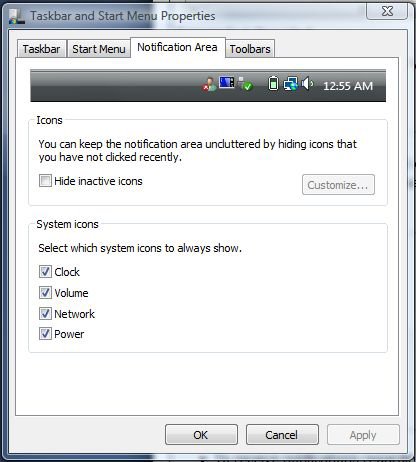
| Vista Ultimate x64 | Power Option Hi all is there any way to show the power plan in tray like in winxp so i can change between plans (balanced, power saver...) thanks |
My System Specs![]() |
| | #2 (permalink) |
| Windows 7 Ultimate x64 | Re: Power Option |
My System Specs![]() |
| | #3 (permalink) |
| Vista x64 Ultimate SP2, Windows 7 Ultimate x64 | Re: Power Option Hi LunaSanctus, In addition to z3r010's post, the Power option will only be available if you are running on battery power from a laptop or have a UPS backup for a desktop. If you are not, then you can create a Power Option shortcut to use instead. Power Options Desktop Shortcut You can then place it in Quick Launch or where it is easiest to use for you. Quick Launch Hope this helps, Shawn |
My System Specs![]() |
| | #4 (permalink) |
| Windows 7 Ultimate x64 | Re: Power Option |
My System Specs![]() |
| | #5 (permalink) |
| Vista x64 Ultimate SP2, Windows 7 Ultimate x64 | Re: Power Option LOL, I found out the hard way. |
My System Specs![]() |
| | #6 (permalink) |
| Windows 7 RC | Re: Power Option |
My System Specs![]() |
| | #7 (permalink) |
| Vista Ultimate x64 | Re: Power Option thanks for the info |
My System Specs![]() |
| | #8 (permalink) |
| Vista x64 Ultimate SP2, Windows 7 Ultimate x64 | Re: Power Option Your welcome from all of us. |
My System Specs![]() |
![]() |
| Thread Tools | |
| |
Similar Threads | ||||
| Thread | Forum | |||
| power option problem | General Discussion | |||
| Power Option when on UPS | Vista General | |||
| Sleep option under power greyed out | Vista performance & maintenance | |||
| Power Option Questions answered | Vista General | |||
| power option - Power button | Vista General | |||