Windows Vista Forums
Vista Forums Home Join Vista Forums Windows 7 Forum Vista Tutorials Tags
Welcome to Windows Vista Forums. Our forum is dedicated to helping you find solutions with any problems, errors or issues you are experiencing with Windows Vista. The Vista forum also covers news and updates and has an extensive Windows Vista tutorial section that covers a wide range of tips and tricks.

Go Back   Vista Forums > Vista Forums > General Discussion

Vista - Music Link in start menu

Reply
 
Old 03-17-2008   #1 (permalink)


Vista Ultimate x64


Music Link in start menu

I have a stupid amount of MP3's so I store them in my slave drive which is a lot bigger than the main drive.

The question I asked myself is can I link the Music link to the MP3 folder in the D drive which was easily done with the properties by right clicking the Music and altering the location of the folder.

So now when I hover over the music in the start menu it shows a long list of MP3’s which I don’t mind.

The thing that is annoying is that if I click the Music link it doesn’t go to the folder like the others in the start menu i.e. Document & Pictures. I have to right click then click open.

I bet the first thing you think is what a lazy bas!$rd lol? It’s Just weird the fact it doesn’t work the same way as the other links in the start menu.

Another thing I would like to do is rename the Music link if that is possible?

My System SpecsSystem Spec
Old 03-17-2008   #2 (permalink)


Vista x64 Ultimate SP2, Windows 7 Ultimate x64


Re: Music Link in start menu

Hi Soulfinger,

You might consider restoring the default location for the C:\Users\(username)\Music folder and just create a shortcut to the music folder on the D drive and place it in the C:\Users\(username)\Music folder. This way you do not have the extremely long list, and the D drive folder opens in a separate windows when you click on the shortcut. Plus, you can name the shortcut anything.

I noticed that some users folders will open in a separate window when you click on them while others will have to be right clicked, but they all still display as a menu from the Start menu main Username folder. I suppose it's a quirk considering you can choose to have them display as a link or menu in the Start menu Customize options.

Hope this helps,
Shawn
My System SpecsSystem Spec
Old 03-17-2008   #3 (permalink)


Vista 64-bit Ultimate Win7 64-bit Ultimate XP SP3 32-bit Pro


Re: Music Link in start menu

Hi Soulfinger

I did much the same thing as you but
when I click on the "music" link in the
start menu the file opens.
It might be because I don't have the "hover
to show list option" thing going, could that be the difference.

Quote:
So now when I hover over the music in the start menu it shows a long list of MP3’s which I don’t mind.
Quote:
The thing that is annoying is that if I click the Music link it doesn’t go to the folder like the others in the start menu i.e. Document & Pictures. I have to right click then click open.
Maybe it's worth a try ???

Later, Ted

Be sure and let us know what you figure out!
My System SpecsSystem Spec
Old 03-17-2008   #4 (permalink)


Vista Ultimate x64


Re: Music Link in start menu

Thanks for the quick replies. That solved it Shawn! I just changed the Music to “Display as link” in customize start menu. should have thought of that myself.
Hope that helps you to Ted.

And the Music name changed automatically to what i wanted!!! must have been my telepathic powers?


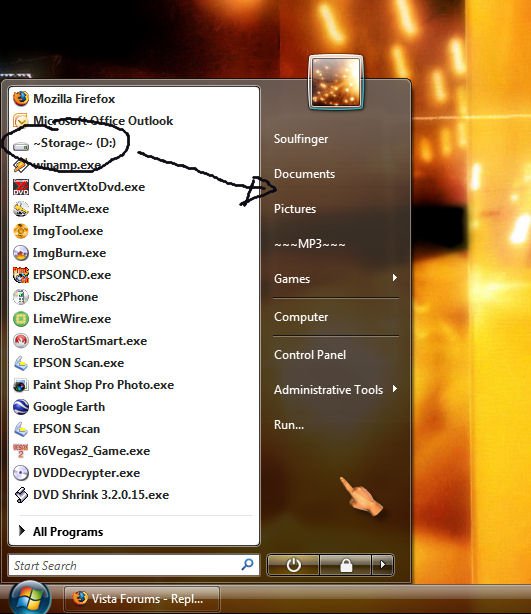
Another thing can I add my D drive to the start menu as well’ I mean I can add it to the bit on the left the white bit but would be nice to have it on the fancy glass bit... Sorry for being very technical there?


Cheers!
My System SpecsSystem Spec
Old 03-17-2008   #5 (permalink)


Vista 64-bit Ultimate Win7 64-bit Ultimate XP SP3 32-bit Pro


Re: Music Link in start menu

Hi Soulfinger

Quote:
That solved it Shawn! I just changed the Music to “Display as link”
That is what I was trying to say,

Quote:
I don't have the "hover
to show list option" thing going, could that be the difference.
Glad you got it sorted out.
Thanks for the reply!

Also I have been told that you can use those links
for anything you want, but I haven't learned how yet!
Please keep us informed!

Later Ted
My System SpecsSystem Spec
Old 03-17-2008   #6 (permalink)


Vista 64-bit Ultimate Win7 64-bit Ultimate XP SP3 32-bit Pro


Re: Music Link in start menu

Hey Soulfinger

Maybe if you R. Click. on the link you want to use
Click properties > Location, Give it a try ?????

Be sure and let me know!

Later Ted
My System SpecsSystem Spec
Old 03-17-2008   #7 (permalink)


Vista Ultimate x64


Re: Music Link in start menu

Sorry Ted didn’t realise that is what you were trying to say.

Don't have a location option on the right click of the hard Drive.
I’m sure this can be done just need to look into it. When I do I will post it.
My System SpecsSystem Spec
Old 03-17-2008   #8 (permalink)


Vista 64-bit Ultimate Win7 64-bit Ultimate XP SP3 32-bit Pro


Re: Music Link in start menu

No problem Soulfinger

No I didn't mean at HD, I meant at
Start Menu !!!

Quote:
You said

but would be nice to have it on the fancy glass bit...
Quote:
Maybe if you R. Click. on the link you want to use
Click properties > Location, Give it a try ?????
Yes do let us know. I will stay subscribed to
this thread. As I too am interested in knowing!

Later Ted

Last edited by Bare Foot Kid; 03-17-2008 at 09:55 PM..
My System SpecsSystem Spec
Old 03-17-2008   #9 (permalink)


Vista x64 Ultimate SP2, Windows 7 Ultimate x64


Re: Music Link in start menu

Quote  Quote: Originally Posted by Soulfinger View Post
Thanks for the quick replies. That solved it Shawn! I just changed the Music to “Display as link” in customize start menu. should have thought of that myself.
Hope that helps you to Ted.

And the Music name changed automatically to what i wanted!!! must have been my telepathic powers?


Another thing can I add my D drive to the start menu as well’ I mean I can add it to the bit on the left the white bit but would be nice to have it on the fancy glass bit... Sorry for being very technical there?


Cheers!
Soulfinger,

Yes, there is a way to Pin the D drive to the Start menu. You will need to enable the option to allow a folder to be pinned to the Start menu first. This will show you how:

Start Menu - Pin Folder To

Afterwards, in Computer, hold down the Shift key and right click on the D drive and click Pin to Start Menu. It will now be pinned to the Start menu on the left side.

Shawn
My System SpecsSystem Spec
Old 03-17-2008   #10 (permalink)


Vista Ultimate x64


Re: Music Link in start menu

Thanks for the reply Shawn. I meant pin it to the black bit, is that possible?

the method works to pin it to the white bit but I had already had a link there with the method of dragging the Drive to the start menu.

alot simpler but it works just the same.

Cheers.
My System SpecsSystem Spec
Reply

Thread Tools


Similar Threads
Thread Forum
Music link in Right Pane of Start Menu Vista music pictures video
"Music" link gone from Start Menu Vista General
Music link in Start menu Vista music pictures video
MUSIC link gone from Start menu Vista file management
START MENU RIGHT PANE LINK OR MENU OPTION Vista General


Vista Forums is an independent web site and has not been authorized,
sponsored, or otherwise approved by Microsoft Corporation.
"Windows Vista", the Start Orb, and related materials are trademarks of Microsoft Corp.
© Designer Media Ltd

1 2 3 4 5 6 7 8 9 10 11 12 13 14 15 16 17 18 19 20 21 22 23 24 25 26 27 28 29 30 31 32 33 34 35 36 37 38 39 40 41 42 43 44 45 46