![]() |
![]() | ![]() | ![]() | ![]() | ![]() | ![]() | ![]() |
|
Welcome to Vista Forums we are your forum to discuss Windows Vista x64 and x86 systems. Whether you need help or just want to post an idea you have on Vista, this is the forum for you.
br> br> |
| |||||||
![]() |
| | Thread Tools | Display Modes |
| | #1 (permalink) |
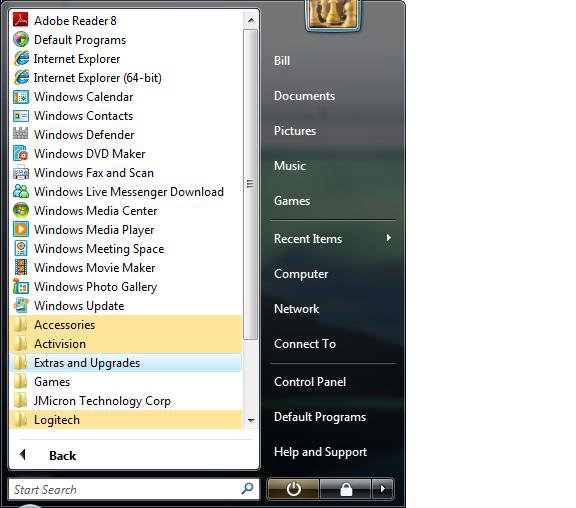
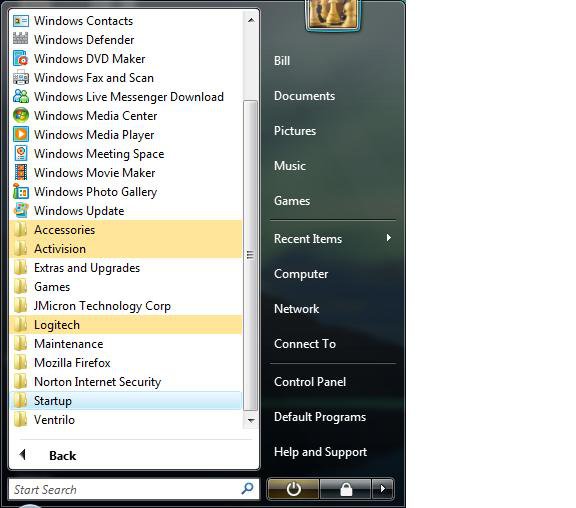
| Junior Member | vista x64 missing start menu items hi all ![]() im having a problem with the startup menu on vista x64 ive installed vista everything went great after installing i lookked at the all programs menu it had loads of icons for the likes of media centre and other free vista apps anyway ive installed drivers some of my programs done a windows update downloaded all updates come back to the all programs menu and am missing loads of icons i havent a clue how this as happend look at this pic and i have lost everything in the list thats above windows update ![]() any ideas whats happened ? |
| | #2 (permalink) |
| Administrator | Re: vista x64 missing start menu items Hi Lee, I would just create another user account temporarily, and copy the shortcuts over to the hidden folder C:\ProgramData\Microsoft\Windows\Start Menu\Programs , then delete the new account. This will save you some time from trying to track them all down. You will still have to manually create the other program shortcuts though. This tutorial will help with the Start menu: Start Menu - Shortcuts Hope this helps, Shawn |
| | #3 (permalink) |
| Junior Member | Re: vista x64 missing start menu items thanks i will bookmark this thread for next time it annoyed me that much i formated and reinstalled lol so far ive got most of the main programs and all updates installed and still have the icons so it's looking good for now |
| | #4 (permalink) |
| Administrator | Re: vista x64 missing start menu items Lee, LOL, I hear you. Sometimes a reinstall is just quicker to make sure it will work. ![]() Once you get everything setup and running smoothly, I would recommend that you do a Complete PC Backup since you have the Ultimate Vista edition. This way it will only take only about an hour to be fully restored with everything. I use a separate partition to make it easier to keep the backup up to date when you make changes. Backup: Backup Complete Computer Partition: Disk Management - Shrink Partition |
| | #5 (permalink) |
| Junior Member | Re: vista x64 missing start menu items unreal mate it happend again lol i have tried to open a new account but they are gone from the folder totaly so they won't show in the new account i think i know whats doing it (sortoff) when i setup windows after loading up my programs i try to limit what programs start on bootup, when i do this i go to msconfig and take the unneeded ones out the startup and reboot the 3 programs i took out of startup where adobereader powerdvd 8 and nero 8 BUT saying that id just installed powerdvd 8 so it could have been just that fact that i had installed powerdvd but i doubt it cos it happend with powerdvd 7 also last time i installed vista some 2 days ago lol ive found alot of the shortcuts and replaced them but there are alot that i can't find. brink would there be any chance you could copy your default vista shortcuts from the folder and upload them or email me them ![]() |
| | #6 (permalink) |
| Administrator | Re: vista x64 missing start menu items Lee, I'm afraid that I destroyed most of my default settings. ![]() This link will show you how to restore the Administrative Tools shortcuts. Administrative Tools - Restore Shortcuts If you can list the ones you need, I'll post a ZIP file of the ones I can get for you. Shawn |
| | #7 (permalink) |
| Junior Member | Re: vista x64 missing start menu items ive found alot of them mate but i can't help but think the list don't look as big as it did and im not sure what missing cos im new to vistax64 its only the windows default programs that sit above the widows update tab but as im new to vista i wanted to have a good play with the programs not a problem, im sure i will find them once i find out what they are lol and store them on my external drive for next time i mess it up |
| | #8 (permalink) |
| Banned | Re: vista x64 missing start menu items If I can figure out how to do a screenshot, I do one for you. I just installed and have a minimum of excess BS on so far. LOL I was going to wait til tomorrow to try to learn anything else since my brain hurts but I'll give it a go. Check back in about 10 minutes. |
| | #9 (permalink) |
| Administrator | Re: vista x64 missing start menu items Bubba, You can take a screenshot by pressing the PrtScrn key, then open C:\Windows\System32\mspaint.exe and press Ctrl+V to paste the screenshot in Paint. Save it has a JPG. When you are writing your post here, click on the Paperclip icon to upload the screenshot to be attached to your post, then click on the Paperclip icon again to select it to add into your post to be displayed. Shawn |
| | #10 (permalink) |
| Administrator | Re: vista x64 missing start menu items Lee, You might also try a System Restore using a restore point dated before this problem to see if it can restore them. If not, you can undo the System Restore from the link in related links. System Restore - How to Shawn |
| |
| |
![]() |
| Thread Tools | |
| Display Modes | |
| |
Similar Threads | ||||
| Thread | Thread Starter | Forum | Replies | Last Post |
| Missing Start Menu items (2nd try) | Billy | Vista General | 4 | 07-29-2008 07:59 AM |
| Missing "Recent Items" entry in Start Menu | Neolith | Vista installation & setup | 7 | 06-25-2008 10:36 PM |
| Missing Start Menu/Toolbar and desktop items! | caraz | Vista General | 1 | 02-16-2008 07:25 AM |
| Start menu items missing sometimes | jimbur | Vista General | 7 | 01-15-2008 09:50 AM |
| Things Missing From Recent Items in the Start Menu | BJLineham | Vista file management | 1 | 03-03-2007 12:45 PM |