
Ok I just upgraded to Vista Ultimate for work related reasons. The thing is most everything runs but when I open I text file in notepad then right click to select all or what ever before the context menu comes up I get an error that shuts down what ever program I was running. This also occurs in Sidebar, Task manager , and just about every exe that is part of windows. Third party apps don't seem to be affected (that i can remember anyway)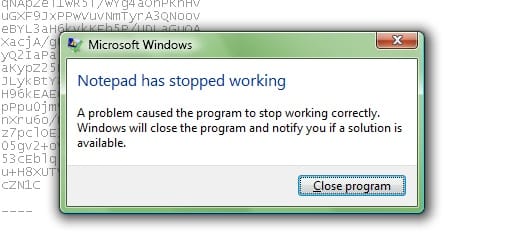 Jest now I ran Paint to paste a screen shot and went edit>paste but as soon as I opened the edit menu Crash! so i tried Paint.net same thing. I then right clicked the paint.net short cut and hit "run as Administrator" and I could paste the screen shot into a file no sweat.
The account is a local admin account that I am logged into at the moment. so I really do not understand. the same with the windows sidebar and a few other apps if I right click anywhere in them they crash then I right6 click the shortcut and run as admin and they work. I even tried going into the properties of Windows sidebar shortcut in the star menu clicking properties>shortcut>advanced>and checking Run as Administrator but Still get the crashes when I first reboot Vista until I specifically Start it by Right clicking and hitting Run as Administrator.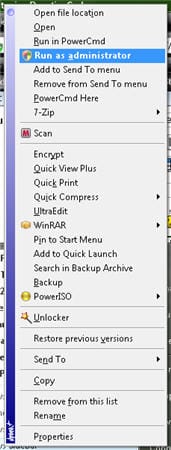
If anyone knows how to fix these problems PLEASE please help me I'm beyond frustrated and can no longer think straight on this issue. I hated vista before I even had to install it now I truly despise it. The really horrible thing is because of this problem I'm behind on a work project and If I can't suss this out and square it away I'm going to have to either pay someone else to get the proj done on time and/or lose the client/job.
I don't even know how to correctly research this issue everything I Google brings up slow responding right click context menu probs or similar. And i Have tried those solutions just on the hope and prayer that they did the trick but no joy.
I can't afford to do a reinstall as my current Backup solution is incompatible with vista and its honestly more time i lose in an already behind-the-eight ball schedule. Anyway I hope My problem was clear and that one of you fine users know a way to help.
I hate Formating as a 'solution" I'm the type that is obsessed with knowing the answers to problems like this in case i see them again.
I've done a Sfc /scannow and it is clean, plus every other thing i can think of.
The account is a local admin account that I am logged into at the moment. so I really do not understand. the same with the windows sidebar and a few other apps if I right click anywhere in them they crash then I right6 click the shortcut and run as admin and they work. I even tried going into the properties of Windows sidebar shortcut in the star menu clicking properties>shortcut>advanced>and checking Run as Administrator but Still get the crashes when I first reboot Vista until I specifically Start it by Right clicking and hitting Run as Administrator.
If anyone knows how to fix these problems PLEASE please help me I'm beyond frustrated and can no longer think straight on this issue. I hated vista before I even had to install it now I truly despise it. The really horrible thing is because of this problem I'm behind on a work project and If I can't suss this out and square it away I'm going to have to either pay someone else to get the proj done on time and/or lose the client/job.
I don't even know how to correctly research this issue everything I Google brings up slow responding right click context menu probs or similar. And i Have tried those solutions just on the hope and prayer that they did the trick but no joy.
I can't afford to do a reinstall as my current Backup solution is incompatible with vista and its honestly more time i lose in an already behind-the-eight ball schedule. Anyway I hope My problem was clear and that one of you fine users know a way to help.
I hate Formating as a 'solution" I'm the type that is obsessed with knowing the answers to problems like this in case i see them again.
I've done a Sfc /scannow and it is clean, plus every other thing i can think of.


