Windows Vista Forums
Vista Forums Home Join Vista Forums Donate Vista Tutorials Tags

Welcome to Vista Forums we are your forum to discuss Windows Vista x64 and x86 systems. Whether you need help or just want to post an idea you have on Vista, this is the forum for you.
Register at Vista forums...the world biggest Windows Vista resource Join Vista Forums Now

Go Back   Vista Forums > Vista Forums > General Discussion

changing the language in dialouge boxes from italian to english

Update your Vista Drivers Update Your Drivers Now!!
Reply
 
Thread Tools Display Modes
Old 06-05-2008   #1 (permalink)
Newbie


Join Date: Jun 2008
vista home premuim
 
Rep Power: 3
pandemonking is on a distinguished road
  pandemonking is offline

changing the language in dialouge boxes from italian to english

i have recently purchased a new laptop from italy ... all dialouge boxes and even the startup menu are in italian can anybody tell me how i can change these to english ???

My System SpecsSystem Spec
Old 06-05-2008   #2 (permalink)
Dzomlija's Avatar
Resistance is Futile


Join Date: Aug 2007
Windows Vista x64 Ultimate
South Africa
 
Rep Power: 101
Dzomlija has a reputation beyond reputeDzomlija has a reputation beyond reputeDzomlija has a reputation beyond reputeDzomlija has a reputation beyond reputeDzomlija has a reputation beyond reputeDzomlija has a reputation beyond reputeDzomlija has a reputation beyond reputeDzomlija has a reputation beyond reputeDzomlija has a reputation beyond reputeDzomlija has a reputation beyond reputeDzomlija has a reputation beyond repute
  Dzomlija is offline

Re: changing the language in dialouge boxes from italian to english

Quote:
pandemonking
View Post
i have recently purchased a new laptop from italy ... all dialouge boxes and even the startup menu are in italian can anybody tell me how i can change these to english ???
This may be a bit hard to do, since everything is in Italian, so I've included a few screenshots:

Windows Vista MUIs provide a translated version of most of the user interface. MUIs require a license to be used and are only available with Windows Vista Ultimate and Windows Vista Enterprise.

1. Go to the Microsoft Local Language" website (Unlimited Potential - Programs / Local Language Program) , and download the language you want, which in this case would be English.

2. Open "Control Panel"

3. Under "Clock, Language, and Region", click "Change display language":
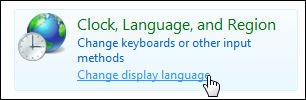
Name:  cp_change_language.jpg
Views: 10
Size:  19.6 KB

4. In the "Regional and Language Options" window, click "Install/uninstall languages..." (you will need to respond to a UAC prompt):
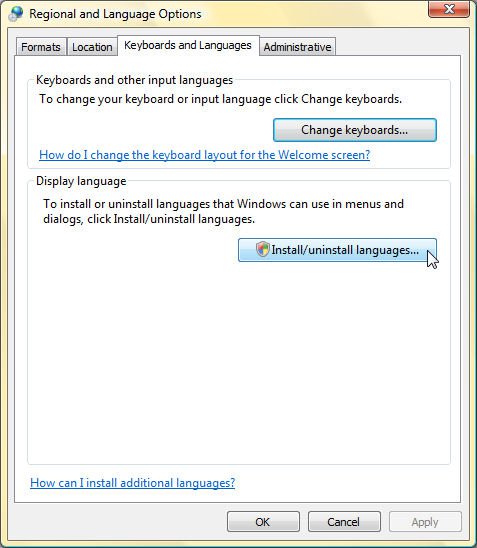
Name:  cp_regional_and_language.jpg
Views: 10
Size:  69.2 KB

6. Click "Remove Languages":

Name:  cp_remove_languages.jpg
Views: 10
Size:  18.1 KB

7. If you have both English AND Italian listed, select Italian, then click Next. If you only have Italian listed, click the Back button then proced to step 8 below.

8. Click "Install Languages":

Name:  cp_install_languages.jpg
Views: 9
Size:  17.7 KB

9. Browse for the folder containing the language pack you downloaded in 1)


I hope that helped somewhat

My System SpecsSystem Spec
Reply

Thread Tools
Display Modes


Similar Threads
Thread Thread Starter Forum Replies Last Post
changing language from german to english stevenjasmin Vista installation & setup 1 12-26-2007 02:02 PM
Changing language [Korean to English] jenn84 Vista installation & setup 4 11-02-2007 06:55 AM
Changing language on Vista (ITALIAN to ENGLISH) bdamjan Vista General 4 02-13-2007 12:49 PM
Changing language from Italian to English Del Vista General 2 02-08-2007 06:17 PM
changing language italian to english =?Utf-8?B?dGhlbWVwYXJr?= Vista installation & setup 8 07-23-2006 11:59 AM


Update your Vista Drivers Update Your Vista Drivers Now!!

Vistax64.com is an independent web site and has not been authorized,
sponsored, or otherwise approved by Microsoft Corporation.
"Windows Vista", the Start Orb, and related materials are trademarks of Microsoft Corp.
© Designer Media 2005-2008
