
Hello All - (1st time poster...somewhat long time reader). 
Here's a wacky one.
I have a Network Connections Icon or rather Link (cpl?) on my desktop (Vista
Business) that I can't figure out how to remove.
So far :
When I right click it - the options are :
Open
Explore
Create Shortcut
I'm at a loss.
I've tried rebooting in safe mode and still the same 3 options.
I've went to the desktop folder and it's not showing there.
I've also tried dragging it to the taskbar and nothing (see attached .jpg).
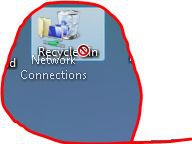
Any suggestions?
Here's a wacky one.
I have a Network Connections Icon or rather Link (cpl?) on my desktop (Vista
Business) that I can't figure out how to remove.
So far :
When I right click it - the options are :
Open
Explore
Create Shortcut
I'm at a loss.
I've tried rebooting in safe mode and still the same 3 options.
I've went to the desktop folder and it's not showing there.
I've also tried dragging it to the taskbar and nothing (see attached .jpg).
Any suggestions?
My Computer
System One
-
- CPU
- 1.87 gigahertz Intel Core 2 Du
- Motherboard
- MSI - P965 Neo-F
- Memory
- 2 gigs - A-data
- Graphics card(s)
- Geforce - 7300LE
- Hard Drives
- 1 - 250 gig sata hdd 2 - 150 gig sata hdd. 2 - usb hdd's - 40/80 gig
