![]() |
![]() | ![]() | ![]() | ![]() | ![]() | ![]() | ![]() |
| Welcome to Windows Vista Forums. Our forum is dedicated to helping you find solutions with any problems, errors or issues you are experiencing with Windows Vista. The Vista forum also covers news and updates and has an extensive Windows Vista tutorial section that covers a wide range of tips and tricks. |
| |||||||
![]() |
| |
| | #1 (permalink) |
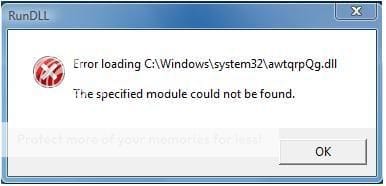
| Vista Home Premium 32bit | RunDLL Error ! ![]() I downloaded something, and im getting this error everytime i turn (log in) on my computer. I already got rid of the download that caused this. Please help me out! Last edited by transpark; 07-20-2008 at 11:58 PM.. |
My System Specs![]() |
| | #2 (permalink) |
| Vista Home Premium 32bit | Re: RunDLL Error ! bump |
My System Specs![]() |
| | #3 (permalink) |
| Win XP Pro / Win Vista Ultimate | Re: RunDLL Error ! |
My System Specs![]() |
| | #4 (permalink) |
| Vista Ultimate x64 MAK, OpenSolaris 5, Gentoo 2008.1.... | Re: RunDLL Error ! Run a full virus check on your computer - though you got rid of the file it may have automatically executed itself and installed a virus, and now the registry is set to run this missing file.... Also, please do *not* bump your posts, especially when not older than a week - you have to realize that there are Quote: Threads: 172,391, Posts: 806,772, Members: 51,359 Quote: Currently Active Users: 1637 (131 members and 1506 guests) |
My System Specs![]() |
| | #5 (permalink) |
| Vista Home Premium 32bit | Re: RunDLL Error ! I bumped because this thread was on page 3 and thought not many people would read it. Sorry And thanks for the replies, I tried full scan with Norton 08 and found 2 trojans and got rid of them.. I'll see if that fixed the problem |
My System Specs![]() |
| | #6 (permalink) |
| Vista Home Premium 32bit | Re: RunDLL Error ! The message is still coming out even though I got rid of 2 trojans found (full virus scan in safe mode). Is there another way I can fix this problem? |
My System Specs![]() |
| | #7 (permalink) |
| Vista Ultimate x64 SP1 | Re: RunDLL Error ! What anti-virus are you using? What are the names of the trojans? Did you disable system restore before you scanned? I'd check and see if anything new has been loaded into msconfig and the services.msc menus. |
My System Specs![]() |
| | #8 (permalink) |
| Vista Home Premium 32bit | Re: RunDLL Error ! hi there, thanks for reply I'm using Norton Internet Security 2008. I had 'Trojan.Vundo' and 'W32.DSSS.Trojan'. And I didn't disable system restore. |
My System Specs![]() |
| | #9 (permalink) |
| Vista Ultimate x64 SP1 | Re: RunDLL Error ! Your anti-virus should take care of W32.DSS; it should also take care of Vundo, but you have to run the scan with system restore turned off. Here's a removal tool that might help you? Run it in safe mode, again with system restore turned off. Trojan.Vundo Removal Tool - Symantec.com |
My System Specs![]() |
| | #10 (permalink) |
| Vista Ultimate x64_SP1 | Re: RunDLL Error ! That sure looks like a Vundo... You must have double-clicked on the downloaded file, which in this case installed approx. 2 .exe files in the system32 folder and some .ini file. If you know when you installed those, you can just go by date and delete the files permanently. |
My System Specs![]() |
![]() |
| Thread Tools | |
| |
Similar Threads | ||||
| Thread | Forum | |||
| RunDLL Error | Vista performance & maintenance | |||
| RunDLL Error | General Discussion | |||
| RunDLL error help! | Vista performance & maintenance | |||
| RunDll error | Vista installation & setup | |||
| RunDLL Error | Vista performance & maintenance | |||
