
Windows Vista Forums
Vista Forums Home Join Vista Forums Windows 7 Forum Vista Tutorials Tags
Welcome to Windows Vista Forums. Our forum is dedicated to helping you find solutions with any problems, errors or issues you are experiencing with Windows Vista. The Vista forum also covers news and updates and has an extensive Windows Vista tutorial section that covers a wide range of tips and tricks.

Go Back   Vista Forums > Vista Forums > General Discussion

Vista - Thumbnails and transparency

Reply
 
Old 08-03-2008   #1 (permalink)


Vista Home Basic 32 bit


Thumbnails and transparency

Hey guys Im new to vista but really like it alot except that my install does not have the thumbnails off the task bar or transparency. I have Vista Home Basic 32bit. I installed this the same time as a friend of mine we both bought the same version for vista (At a discount of course) His install has these options but mine does not. I have posted else where without any real answers to my questions, most everyone said make sure your video graphics drivers are installed which of course they are. Im running a brand new system :

2Gb Dual Channel OCZ 800Mhz ram
AMD Black Edition 3500+
Geforce 8500Gt with 1gig ram
160 G Sata Western digital
MSI K9VGM-V Motherboard - VIA K8M890

I have of course Activated my install and ran all the nec. updates including SP1.
Is there a way i can tweak this think to have these featurs that i like so much??
Any help would be much appreciated.
JRockZ

My System SpecsSystem Spec
Old 08-03-2008   #2 (permalink)


Windows Vista x64 Ultimate


Re: Thumbnails and transparency

Quote  Quote: Originally Posted by JRockZ View Post
Hey guys Im new to vista but really like it alot except that my install does not have the thumbnails off the task bar or transparency. I have Vista Home Basic 32bit. I installed this the same time as a friend of mine we both bought the same version for vista (At a discount of course) His install has these options but mine does not. I have posted else where without any real answers to my questions, most everyone said make sure your video graphics drivers are installed which of course they are. Im running a brand new system :

2Gb Dual Channel OCZ 800Mhz ram
AMD Black Edition 3500+
Geforce 8500Gt with 1gig ram
160 G Sata Western digital
MSI K9VGM-V Motherboard - VIA K8M890

I have of course Activated my install and ran all the nec. updates including SP1.
Is there a way i can tweak this think to have these featurs that i like so much??
Any help would be much appreciated.
JRockZ
Those features of which you speak will require Aero, which is not included with Vista Home Basic. For that you'll need to us Windows Anytime Upgrade to upgrade to Vista Home Premium or Vista Ultimate.
My System SpecsSystem Spec
Old 08-03-2008   #3 (permalink)


Vista Home Basic 32 bit


Re: Thumbnails and transparency

Quote  Quote: Originally Posted by Dzomlija View Post
Quote  Quote: Originally Posted by JRockZ View Post
Hey guys Im new to vista but really like it alot except that my install does not have the thumbnails off the task bar or transparency. I have Vista Home Basic 32bit. I installed this the same time as a friend of mine we both bought the same version for vista (At a discount of course) His install has these options but mine does not. I have posted else where without any real answers to my questions, most everyone said make sure your video graphics drivers are installed which of course they are. Im running a brand new system :

2Gb Dual Channel OCZ 800Mhz ram
AMD Black Edition 3500+
Geforce 8500Gt with 1gig ram
160 G Sata Western digital
MSI K9VGM-V Motherboard - VIA K8M890

I have of course Activated my install and ran all the nec. updates including SP1.
Is there a way i can tweak this think to have these featurs that i like so much??
Any help would be much appreciated.
JRockZ
Those features of which you speak will require Aero, which is not included with Vista Home Basic. For that you'll need to us Windows Anytime Upgrade to upgrade to Vista Home Premium or Vista Ultimate.
No im sorry it does include it as i said my friend HAS the EXACT same install and his has these options.
Anyone else have any ideas?
Thanks
JRockZ

EDIT!!! I GOT IT i had a reliability score of 1.0 for some reason and after i refreshed the transparency and thumbnails are now working!!! whoo Hoo!!
thanks anyhow guys.
JRockZ

Last edited by JRockZ; 08-03-2008 at 01:57 PM..
My System SpecsSystem Spec
Old 08-03-2008   #4 (permalink)


Vista Home Premium 32-bit & Vista Ultimate 64-bit both Service Pack 2 W7 Pro RTM 7600 32 & 64


Re: Thumbnails and transparency

Hi JRockZ,

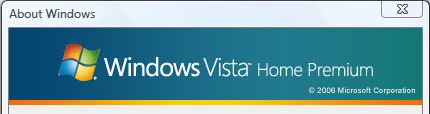
Are you sure that your friend has actually installed the same version of Vista as you? To check, click on the start orb and type 'winver' into the search box and press enter/return. Does your PC and that of your friend show the same? The following illustration is from my version of Vista, and shows what you are looking for.
capture.jpg

All Vista DVDs are created the same, and it is the Key that you enter during the installation that determines which version of Vista that gets installed. Your friend might have installed WITHOUT entering the Key and chosen a different version of Vista to see what the features are. Of course, if that is what s/he's done, then should s/he choose to keep that version then a Key will need to be purchased pertaining to that version. As Steven has pointed out, the features you mentioned require the Aero interface, which is NOT available in Vista Home Basic.
Dwarf
My System SpecsSystem Spec
Old 08-03-2008   #5 (permalink)


Vista Home Basic 32 bit


Re: Thumbnails and transparency

Dwarf
Yes i have that same image and so dose my friend, as i said in Edit above i now have transparency and thumbnail views, My reliability score must have not set when i installed but as soo as i refreshed it it went from 1.0 to 4.4 and the transparency and thumbnails started working in fcat i think it even changed while it was still refreshing.
Thanks
JRockZ
My System SpecsSystem Spec
Reply

Thread Tools


Similar Threads
Thread Forum
Transparency in taskbar gone General Discussion
Transparency General Discussion
Transparency Box Vista General
window transparency? Vista General
Transparency effect Vista General


Vista Forums is an independent web site and has not been authorized,
sponsored, or otherwise approved by Microsoft Corporation.
"Windows Vista", the Start Orb, and related materials are trademarks of Microsoft Corp.
© Designer Media Ltd

1 2 3 4 5 6 7 8 9 10 11 12 13 14 15 16 17 18 19 20 21 22 23 24 25 26 27 28 29 30 31 32 33 34 35 36 37 38 39 40 41 42 43 44 45 46