![]() |
![]() | ![]() | ![]() | ![]() | ![]() | ![]() | ![]() |
| Welcome to Windows Vista Forums. Our forum is dedicated to helping you find solutions with any problems, errors or issues you are experiencing with Windows Vista. The Vista forum also covers news and updates and has an extensive Windows Vista tutorial section that covers a wide range of tips and tricks. |
| |||||||
![]() |
| |
| | #1 (permalink) |
| Member | Fonts won't change |
My System Specs![]() |
| | #2 (permalink) |
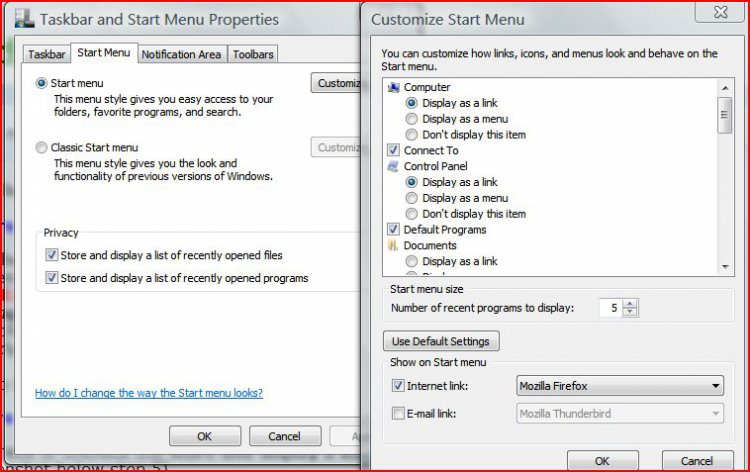
| Antidisestablishmentarian | Re: Fonts won't change No offense, but I don't see any problems in those two windows at all, and nothing to do with Fonts. Could you be more specific? |
My System Specs![]() |
| | #3 (permalink) |
| Member | Re: Fonts won't change The size of the fonts is in my estimation is at only an 8 or 9. Although I have everything that is available set to 12 and 13. I can find nothing that will change these types of windows. Thanks, |
My System Specs![]() |
| | #4 (permalink) |
| Antidisestablishmentarian | Re: Fonts won't change They won't change. You have to enable the use of large fonts through out your entire system - Control Panel --> Personalization --> use link on left that says Adjust Font Size (DPI) |
My System Specs![]() |
| | #5 (permalink) |
| Member | Re: Fonts won't change I didn't want to do that as it then makes somethings to large and you can't then turn them down individually. I thought that possible there might be some way to regulate that in the Registry. Thanks |
My System Specs![]() |
| | #6 (permalink) |
| Antidisestablishmentarian | Re: Fonts won't change No offense, but then you need to state that so we don't go around in circles. AFAICT, there is not a way to adjust the fonts of system dialogs like that without using the large FONTS, but since I have never actually tried to do that, I cannot be sure. Is there anything else that you have tried or don't want to do so we won't have any more repeat posts? |
My System Specs![]() |
| | #7 (permalink) |
| Member | Re: Fonts won't change I don't now why you are taking this attitude...but you can bet it will be the last time I am here... |
My System Specs![]() |
| | #8 (permalink) |
| Antidisestablishmentarian | Re: Fonts won't change You can all it an attitude if you like - but if you already knew about enabling large fonts and had said so, then my answer would have been simple - without hacking the actual dialogs with something like reshacker, you simply cannot do it. It took 6 posts to get out what needed to be gotten out, and you started with absolutely no explanation of the problem and continued on with just leaving things up in the air without explaining what you wanted and how you had tried. Also, if you have bothered to read the stickies up above in the forum, you'd have seen General Advice - ***Please read before posting*** - which specifically states General Advice - ***Please read before posting*** - be specific. If you look at my post count and my rep and my time here, you'll see I help - but to waste 6 posts on something that you could have easily covered in one single post may seem like too much effort to you and may not be a waste of time to you - but I could have been helping others who needed it and were willing to accept a solution. Whether you come back or not does not mean that much to me. Whether you learn how to ask questions does - because your time may not be valuable to you, but mine is to me. |
My System Specs![]() |
![]() |
| Thread Tools | |
| |
Similar Threads | ||||
| Thread | Forum | |||
| Fonts - Change Default | Tutorials | |||
| How can you change Vista Desktop fonts | General Discussion | |||
| How to change these fonts? | General Discussion | |||
| change fonts permanently for ALL colors | PowerShell | |||
| How do you change the program fonts | Vista mail | |||
