![]() |
![]() | ![]() | ![]() | ![]() | ![]() | ![]() |
| Welcome to Windows Vista Forums. Our forum is dedicated to helping you find solutions with any problems, errors or issues you are experiencing with Windows Vista. The Vista forum also covers news and updates and has an extensive Windows Vista tutorial section that covers a wide range of tips and tricks. |
| | |||||||
| | Vista - Computer wake up problem |
| |
| 09-12-2008 | #1 |
| Vista 32 bit | Computer wake up problem Hey guys, quick question... My pc seems to wake up on it's own at 7 am every day. It used to wake up at 10 am but somehow changed to 7 am. I checked all of the things listed on the first page here Power Options and Sleep Mode Problems , and I have nothing enabled to wake up the pc nor do I have any tasks scheduled for that time each morning. It stopped for a while and out of nowhere it started again at 7 AM. If anyone could help me out I would appreciate it. I also checked all of the wake on link settings and they are disabled as well. Wait for link however is set to auto detect... not sure what that means but i dont think that has anything to do with the random wakeups. Any info is appreciated. |
| My System Specs |
| 09-12-2008 | #2 |
| VISTA HOME PREMIUM X64/ 7 x64 / 7x86 | Re: Computer wake up problem Check out step 4 of the tutorial again- the command prompt option it shouLd list anything that can wake up your machine - if there is anything, turn it off SIW2 |
| My System Specs |
| 09-13-2008 | #3 |
| Vista 32 bit | Re: Computer wake up problem Nothing is listed in the command prompt to wake the my pc when running the powercfg -devicequery wake_armed command. |
| My System Specs |
| 09-13-2008 | #4 |
| Ultimate x64 | Re: Computer wake up problem anti virus scan? |
| My System Specs |
| 09-13-2008 | #5 |
| Vista 32 bit | Re: Computer wake up problem Nope.. I have that turned off as well. |
| My System Specs |
| 09-14-2008 | #6 |
| Vista 32 bit | Re: Computer wake up problem Here's another weird thing about it... Once it comes on by itself, if I don't use the pc in the next 5 min it goes back to sleep! But I have my sleep timer off yet it goes to sleep on it's own when it awakes on it's own... It just happened again and I checked a bunch of task and event logs but couldn't find anything set at 10 am. Is there a way to run a log of tasks other than viewing them in computer management? |
| My System Specs |
| 11-11-2008 | #7 |
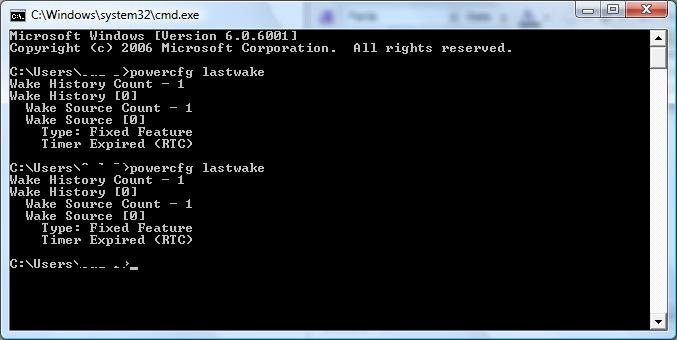
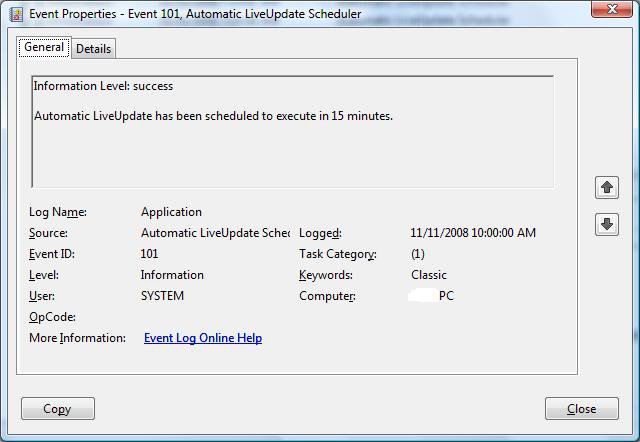
| Vista 32 bit | Re: Power Options and Sleep Mode Problems Hey guys, I have followed this tutorial and I am still having the same issues. I disabled all functions to "wake up the computer" in power mgt in control panel. My wake on lan is disabled in the bios and network properties. I also disabled all of my startup apps in msconfig. I have also disabled all scheduled tasks but to no avail. Also, when I check the event log I am seeing this activity right before and after my pc wakes up on it's on at 7:00 am and 10:am everyday.... Date: 11/11/2008 7:00:00 AM Event ID: 1003 Task Category: None Level: Warning Keywords: Classic User: N/A Computer: -PC Description: Your computer was not able to renew its address from the network (from the DHCP Server) for the Network Card with network address 001E8C05DC6B. The following error occurred: The operation was canceled by the user.. Your computer will continue to try and obtain an address on its own from the network address (DHCP) server. When running powercfg lastwake I get this message in the cmd prompt: I also noticed this was running at the same time as well. I had Live update disabled but it still seems to run... Any information to resolve this issue other than anything listed in this thread would be appreciated. ![]() |
| My System Specs |
| 11-12-2008 | #8 |
| Vista x64 Ultimate SP2, Windows 7 Ultimate x64 | Re: Computer wake up problem Here's another weird thing about it... Once it comes on by itself, if I don't use the pc in the next 5 min it goes back to sleep! But I have my sleep timer off yet it goes to sleep on it's own when it awakes on it's own... It just happened again and I checked a bunch of task and event logs but couldn't find anything set at 10 am. Is there a way to run a log of tasks other than viewing them in computer management? I'm not sure if you found a solution to this part of your problem yet, but this tutorial will show you how to adjust the return to sleep wait time when the computer wakes up and is idle. For your wakeup issue, it looks like whatever program (Windows Live ??) the "Automatic LiveUpdate" is for may be the cause. See if there is an option in that program to turn off automatic update checking. Hope this helps, Shawn |
| My System Specs |
![]() |
| Thread Tools | |
| |
| Similar Threads for: Computer wake up problem | ||||
| Thread | Forum | |||
| Cant wake up after put computer into sleep | Vista General | |||
| please help! computer won't wake up after sleep | General Discussion | |||
| my computer doesn't wake up with IR remote | Vista installation & setup | |||
| Computer won't wake up | Vista General | |||
| Wake Computer | Vista General | |||