Windows Vista Forums
Vista Forums Home Join Vista Forums Windows 7 Forum Vista Tutorials Tags
Welcome to Windows Vista Forums. Our forum is dedicated to helping you find solutions with any problems, errors or issues you are experiencing with Windows Vista. The Vista forum also covers news and updates and has an extensive Windows Vista tutorial section that covers a wide range of tips and tricks.

Go Back   Vista Forums > Vista Forums > General Discussion

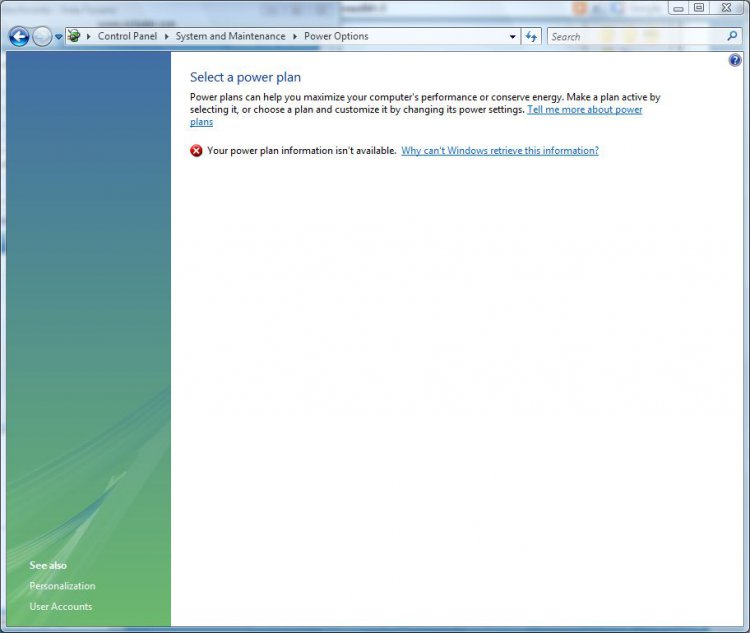
Vista - Power Options Corrupt (power plan unavailable)

Reply
 
Old 08-31-2009   #11 (permalink)


Vista Bussiness x64 PL


Re: Power Options Corrupt (power plan unavailable)

Quote  Quote: Originally Posted by dollym1019 View Post
Would you please send me a copy of the registry keys that restored your power options.
In post 8 you have already everything what you need

My System SpecsSystem Spec
Old 08-31-2009   #12 (permalink)


Windows 7 RC x64


Re: Power Options Corrupt (power plan unavailable)

Thank You !!!!!
My System SpecsSystem Spec
Old 09-11-2009   #13 (permalink)


Vista Ultimate


Re: Power Options Corrupt (power plan unavailable)

so i have tried to follow Flavius directions in post 8 however i am stomped by the last part of your direction..... the part where u say:


Next choose File>>Import :choose my *.reg file,apply +restart computer

When I click import on the registry editior i am confused as to what i should type as the file name.... Can u please be a bit more specific...

also wat am I doing with the Power opt attachment.. when i open it where do i save it to?? The last part of the directions has me COMPLETELY stomped so hoping for a clearer response..

Thanks and much appreciation all the way from trinidad and tobago!
My System SpecsSystem Spec
Old 09-12-2009   #14 (permalink)


Vista Bussiness x64 PL


Re: Power Options Corrupt (power plan unavailable)

Quote  Quote: Originally Posted by shellybelly1801 View Post
so i have tried to follow Flavius directions in post 8 however i am stomped by the last part of your direction..... the part where u say:


Next choose File>>Import :choose my *.reg file,apply +restart computer

When I click import on the registry editior i am confused as to what i should type as the file name.... Can u please be a bit more specific...

also wat am I doing with the Power opt attachment.. when i open it where do i save it to?? The last part of the directions has me COMPLETELY stomped so hoping for a clearer response..

Thanks and much appreciation all the way from trinidad and tobago!


1.Download PSTools PsTools
extract from this psexec.exe and place it in C:\Windows\System32
2.Download PowerOpt.zip and save anywhere as you whish -you can save it on your Desktop,in Documements...it's without any meaning where you save it -it's your choose.
3.Extract from PowerOpt.zip PowerOpt.reg file
4.Run cmd.exe with administrative previlliges (right click on cmd.exe as admin) and type in window:

psexec -s -i -d regedit

(above command will run regedit from SYSTEM account level -it is neccassary)
5.choose File>>Import ,find location where you store PowerOption.reg,choose this file,apply and next restart computer
My System SpecsSystem Spec
Old 09-12-2009   #15 (permalink)


Vista Ultimate


Re: Power Options Corrupt (power plan unavailable)

so I have followed ur instructions.. it said registry keys were successfully imported.. i restarted, went to control panel and I am still getting he error saying "my power plan isn't available.." any other ideas?
My System SpecsSystem Spec
Old 09-12-2009   #16 (permalink)


Vista Bussiness x64 PL


Re: Power Options Corrupt (power plan unavailable)

Quote  Quote: Originally Posted by shellybelly1801 View Post
so I have followed ur instructions.. it said registry keys were successfully imported.. i restarted, went to control panel and I am still getting he error saying "my power plan isn't available.." any other ideas?
Have you tried "sfc /scannow" command? If yes post log from this:

Run cmd.exe with administrative previlliges (right click on cmd.exe as admin) and type in window:

findstr /c:"[SR]" %windir%\logs\cbs\cbs.log >%userprofile%\Desktop\sfcdetails.txt

On your desktop appear sfcdetails.txt file ->attache this file to post.
My System SpecsSystem Spec
Old 09-12-2009   #17 (permalink)


Vista Ultimate


Re: Power Options Corrupt (power plan unavailable)

yes i did try the 1st suggestion and nothing worked.. I followe dur directions. Please see the attached file.
Attached Files
File Type: txt sfcdetails.txt (38.8 KB, 15 views)
My System SpecsSystem Spec
Old 09-13-2009   #18 (permalink)


Vista Bussiness x64 PL


Re: Power Options Corrupt (power plan unavailable)

Strange.You have fixed all keys,there are no any errors in system files also:

Run cmd.exe with administrative previlliges (right click on cmd.exe as admin) and type:

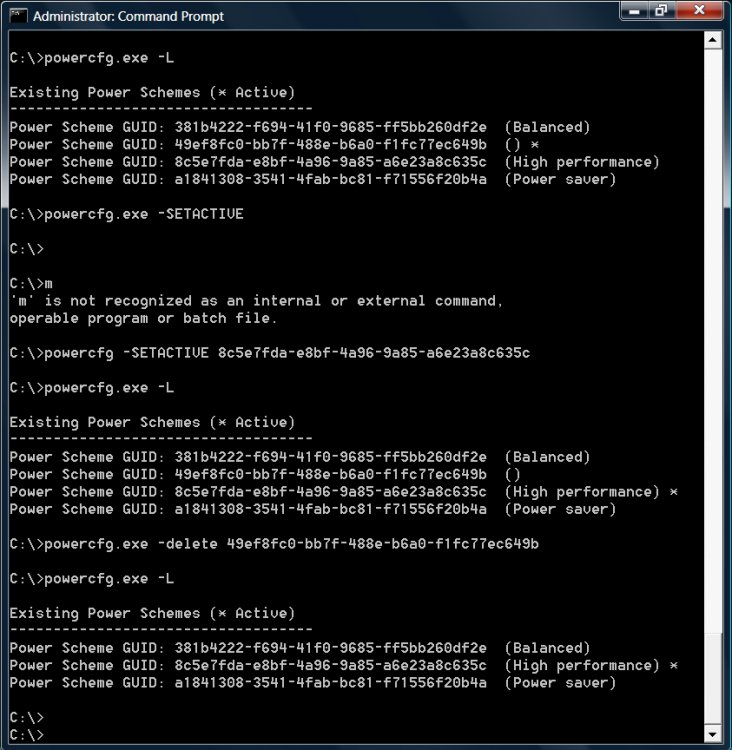
powercfg -restoredefaultschemes

+restart

If still no effects I think you'll will have to use System Restore or Repair Install
System Restore - undo

Repair Install For Vista
My System SpecsSystem Spec
Old 09-13-2009   #19 (permalink)


Vista Ultimate


Re: Power Options Corrupt (power plan unavailable)

hmmm no help with the cmd.exe. so it seems as though i will definitely have to do a system restore but this problem has been happening so long that to find a restore point that will encompass the time period is impossible.. My cd rom also isnt working so i cant reinstall everything. Is there anyway i can restore in light of my above problems??
My System SpecsSystem Spec
Old 09-13-2009   #20 (permalink)


Vista 32 win 7 7600 32 bit


Re: Power Options Corrupt (power plan unavailable)

Quote  Quote: Originally Posted by shellybelly1801 View Post
hmmm no help with the cmd.exe. so it seems as though i will definitely have to do a system restore but this problem has been happening so long that to find a restore point that will encompass the time period is impossible.. My cd rom also isnt working so i cant reinstall everything. Is there anyway i can restore in light of my above problems??
At some point yu are going to have to consider a clean re-install. Do you have a recent working backup? do you have a ssecond HD or USB stick to re-install from?

Ken
My System SpecsSystem Spec
Reply

Thread Tools


Similar Threads
Thread Forum
Useful tool for power enthusiasts on the go (advanced power options) General Discussion
Power Management/Power Options in Vista Vista General
almost no power plan options work Vista General
Power Plan Options Vista account administration
Power Plan Options Vista General


Vista Forums is an independent web site and has not been authorized,
sponsored, or otherwise approved by Microsoft Corporation.
"Windows Vista", the Start Orb, and related materials are trademarks of Microsoft Corp.
© Designer Media Ltd

1 2 3 4 5 6 7 8 9 10 11 12 13 14 15 16 17 18 19 20 21 22 23 24 25 26 27 28 29 30 31 32 33 34 35 36 37 38 39 40 41 42 43 44 45 46