![]() |
![]() | ![]() | ![]() | ![]() | ![]() | ![]() | ![]() |
| Welcome to Windows Vista Forums. Our forum is dedicated to helping you find solutions with any problems, errors or issues you are experiencing with Windows Vista. The Vista forum also covers news and updates and has an extensive Windows Vista tutorial section that covers a wide range of tips and tricks. |
| |||||||
![]() |
| |
| | #1 (permalink) |
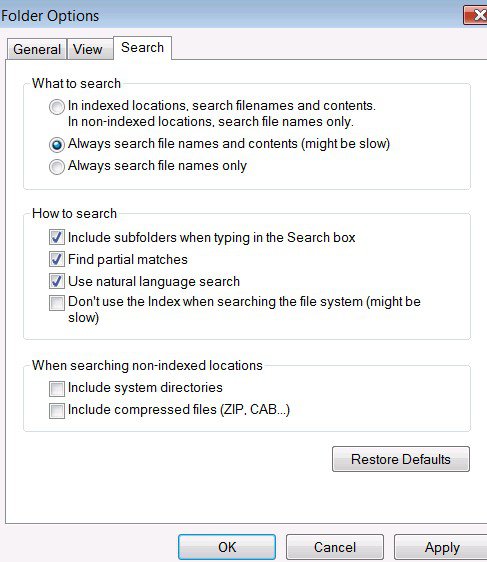
| Vista Home Premium 64 bit | Advanced search In XP you used to be able to do and advanced search where you could also search for text inside the files, is that still possible in vista? (in other words if you were searching for a letter that had the text in it "dear Mr. Smith" you could put "dear Mr. Smith" in the advance search, and it would find the document) |
My System Specs![]() |
| | #2 (permalink) |
| Vista Home Premium 32-bit & Vista Ultimate 64-bit both Service Pack 2 W7 Pro RTM 7600 32 & 64 | Re: Advanced search Hi Funky Keyboard and welcome to the forums ![]() This is quite easy to do. Click the start orb and in the box marked 'Start Search', simply type in the phrase you are looking for. As you are typing, a list of matches will appear above, and will alter as you are typing. All you need to do is to click on the appropriate item in the list and the document will open in the current default program for its type. You can also start programs in this way as well. |
My System Specs![]() |
| | #3 (permalink) |
| VISTA HOME PREMIUM X64/ 7 x64 / 7x86 | Re: Advanced search |
My System Specs![]() |
![]() |
| Thread Tools | |
| |
Similar Threads | ||||
| Thread | Forum | |||
| Advanced Search | Tutorials | |||
| Advanced search? | Vista General | |||
| advanced search | Vista General | |||
| Number of files in search results using 'Advanced Search' | Vista file management | |||
| Advanced Search | Vista file management | |||