Windows Vista Forums
Vista Forums Home Join Vista Forums Windows 7 Forum Vista Tutorials Tags
Welcome to Windows Vista Forums. Our forum is dedicated to helping you find solutions with any problems, errors or issues you are experiencing with Windows Vista. The Vista forum also covers news and updates and has an extensive Windows Vista tutorial section that covers a wide range of tips and tricks.

Go Back   Vista Forums > Vista Forums > General Discussion

Vista - Change Desktop Icon for custom images

Reply
 
Old 09-25-2008   #1 (permalink)


Windows Vista ltimate 32bit


Change Desktop Icon for custom images

Hi there I know where to go to change icons but vista will not allow me to use a custome image.

I am right clicking the desktop > Personalize > then on the left hand side clicking Change Desktop Icons.

But when I browse to my image it does not allow it. I also want to change the default image for folders as well.


Any ideas how I can get around this?

My System SpecsSystem Spec
Old 09-25-2008   #2 (permalink)


Vista x64 Ultimate SP2, Windows 7 Ultimate x64


Re: Change Desktop Icon for custom images

Hello Matt,

What type of image are you trying to use to replace the icon with? You will only be able to use 256x256 pixel .ico (icon) files for these. This will give you some more details about icons for Vista if needed.

Vista Icons - Introducing Vista Icons - How to create Vista Icons


To change the default Folder icons, this tutorial will show you how to. You will need to change the DefaultIcon for the Folder key in step 6.

File Extension Type Icon - Change

Hope this helps,
Shawn
My System SpecsSystem Spec
Old 09-25-2008   #3 (permalink)


Vista 64-bit Ultimate Win7 64-bit Ultimate XP SP3 32-bit Pro


Re: Change Desktop Icon for custom images

Hello ibit-matt.

In addition to Brink's suggestions have a look at this, at the link below.

Folder Preview Picture Change

Keep us informed!


Later Ted
My System SpecsSystem Spec
Old 09-25-2008   #4 (permalink)


Windows Vista ltimate 32bit


Thanks

I have created .ico file now but how do I globally change all the folder icons?
My System SpecsSystem Spec
Old 09-25-2008   #5 (permalink)


Vista x64 Ultimate SP2, Windows 7 Ultimate x64


Re: Change Desktop Icon for custom images

Matt,

To change the default icon for all folders, this tutorial will show you how to. You will need to change the DefaultIcon for the Folder key in step 6.

File Extension Type Icon - Change

Hope this helps,
Shawn
My System SpecsSystem Spec
Old 09-26-2008   #6 (permalink)


Windows Vista ltimate 32bit


Re: Change Desktop Icon for custom images

Sorry Im being really stupid. Do I need to find the file extension that controls the folders and edit the key to point to the new icon?

If so what is the file extension for a folder?
My System SpecsSystem Spec
Old 09-26-2008   #7 (permalink)


Vista x64 Ultimate SP2, Windows 7 Ultimate x64


Re: Change Desktop Icon for custom images

No problem Matt. There is not a file extension for folder, just a key entry for it in the registry. The key you will be looking for in step 7, for the left pane of the registry, is named Folder. That just happens to be the name of it.

File Extension Type Icon - Change
My System SpecsSystem Spec
Old 09-26-2008   #8 (permalink)


Windows Vista ltimate 32bit


Re: Change Desktop Icon for custom images

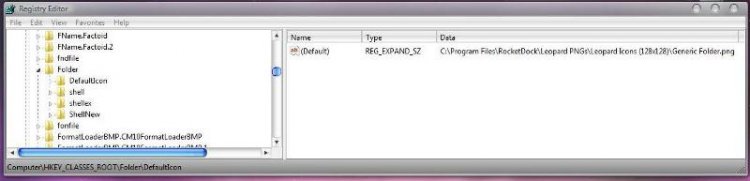
I have edited the key but nothing changed after a reboot.

I have pointed the key to a .png and .ico file and both did not work,

See screen attached

screen.jpg
My System SpecsSystem Spec
Old 09-26-2008   #9 (permalink)


Vista x64 Ultimate SP2, Windows 7 Ultimate x64


Re: Change Desktop Icon for custom images

I cannot quite make out what it says, but you need to use a .ico file that is a 256x256 pixel icon that is made for Vista. Is this for the DefaultIcon folder under Folders?

Vista Icons - Introducing Vista Icons - How to create Vista Icons


If all else fails, you can use the program IconPackager with a 30 day trial period to make the changes you need to the icons. Afterwards, you should be able to uninstall the program and keep the new icon changes.

http://www.stardock.com/products/iconpackager/index.asp
My System SpecsSystem Spec
Old 09-27-2008   #10 (permalink)


Windows Vista ltimate 32bit


Re: Change Desktop Icon for custom images

Is this for the DefaultIcon folder under Folders? = Yes

I will try again.


Is this the tpe of path I should using

C:\Program Files\RocketDock\Leopard PNGs\Leopard Icons (128x128)\Generic Folder.ico


Thanks so far Brink ;-)
My System SpecsSystem Spec
Reply

Thread Tools


Similar Threads
Thread Forum
Solved Desktop Icon font color change General Discussion
Can not change icon for C:\<User Name>\Desktop General Discussion
How to change folder icon that can preview images in the folder? Vista General
Change actual desktop icon (explorer) Vista General
Double icon images on desktop Vista General


Vista Forums is an independent web site and has not been authorized,
sponsored, or otherwise approved by Microsoft Corporation.
"Windows Vista", the Start Orb, and related materials are trademarks of Microsoft Corp.
© Designer Media Ltd

1 2 3 4 5 6 7 8 9 10 11 12 13 14 15 16 17 18 19 20 21 22 23 24 25 26 27 28 29 30 31 32 33 34 35 36 37 38 39 40 41 42 43 44 45 46