Windows Vista Forums

Vista x64 and RAM debacle...
  1. #1


    Lost in Cyberspace
    Join Date : Sep 2008
    Miami, Florida. USA
    Posts : 1,234
    Vista x64 + Windows 7 x64 (Ultimate)
    Local Time: 09:57 AM
    usa us florida

    Vista x64 and RAM debacle...

    Coming from XP, I was under the understanding that the more memory your system had the faster it would run until someone showed me the light and told me that XP was only capable of working well with 2GB of Ram... 3GB if you know what you're doing and could tweak something.

    Later I learn that Vista needed 4GB to run and since I now have 4GB's and it feels like Vista is very stable and perhpas slightly faster than my XP, I think that people were correct.

    Being said that, I have heard people getting into having 8GB's or even more and since DDR2 memory is at its lowest I was thinking on jumping on that band wagon but then, it hit me... what if Vista is only capable of using 4GB and the rest would just be a waste or even worse, it could very well hinder the OS performance?

    What is the scoop? If my motherboard is capable of accepting say 8GB's of Ram, would I be helping my Vista x64 OS by adding 4 more GB's to it or would I just be wasting my money? Also, seeing as to I also dual boot with XP, would my XP OS suffer from that as well?

    I know someone will ask if I really need all that Memory and the answer would be, I don't really know, all I know is that I want to game as smooth as possible and if adding more memory will help me do that w/o having to overclock my CPU or GPU... I am all for it, aside from the fact that I also want to know whether Vista is capable of accepting more than 4GB and still use it at its maximum.


      My System SpecsSystem Spec

  2. #2
    Bare Foot Kid's Avatar

    Technophile Wannabe


    Join Date : Feb 2008
    The Lowcountry
    Posts : 2,617
    Vista 64-bit Ultimate Win7 64-bit Ultimate XP SP3 32-bit Pro
    Local Time: 09:57 AM
    usa us south carolina


    Re: Vista x64 and RAM debacle...

    Hello AstaLaVista.

    I 'borrowed' this somewhere ...

    The 32-bit editions of Windows Vista Home Basic, Home Premium, Business, Enterprise and Ultimate, all support a maximum of 4 GB of RAM. The real variations come when we start looking at the 64-bit versions. On a system running x64 Vista Home Basic, you can add as much as 8 GB of RAM. x64 Vista Home Premium supports as far as 16 GB of RAM.

    But it will take no less than 128 GB of RAM in order to satiate x64 Vista Business, Enterprise and Ultimate. 128 GB of RAM is the maximum supported physical limit in the case of these three operating systems.

    However, with Windows Vista, there is a clear distinction between the maximum supported physical memory and the virtual addresses that the operating system will use. The x86 editions of Vista will not deliver full support for all the RAM installed in the case that this amounts to 4GB. And there are also some limitations involving x64 platforms.

    Later Ted

      My System SpecsSystem Spec

  3. #3


    Lost in Cyberspace
    Join Date : Sep 2008
    Miami, Florida. USA
    Posts : 1,234
    Vista x64 + Windows 7 x64 (Ultimate)
    Local Time: 09:57 AM
    usa us florida

      Thread Starter

    Re: Vista x64 and RAM debacle...

    But it will take no less than 128 GB of RAM in order to satiate x64 Vista Business, Enterprise and Ultimate.
    Hmmm, I find this a little hard to swallow!

    Even at the cheap prices we have seen the DDR2's go for, who can afford 128 GB of Ram and what Mobo supports this for the regular and casual home user?

    If that is the case, I have to go rob a bank... see you later!

      My System SpecsSystem Spec

  4. #4
    atl530i's Avatar

    Member
    Join Date : Oct 2008
    Atlanta, GA
    Posts : 47
    Vista Ultimate x64 SP1
    Local Time: 09:57 AM
    usa us georgia


    Re: Vista x64 and RAM debacle...

    Stick with 4GB and you should be okay. If you have apps that use a lot of RAM, then upgrade to 8GB. It should not hinder x64 OS performance at all.

      My System SpecsSystem Spec

  5. #5


    Maniac
    Join Date : Mar 2008
    Jacksonville, Florida, USA
    Posts : 152
    Vista Ultimate x64
    Local Time: 09:57 AM
    usa us florida


    Re: Vista x64 and RAM debacle...

    Quote Originally Posted by AstaLaVista View Post
    I know someone will ask if I really need all that Memory and the answer would be, I don't really know, all I know is that I want to game as smooth as possible and if adding more memory will help me do that w/o having to overclock my CPU or GPU... I am all for it, aside from the fact that I also want to know whether Vista is capable of accepting more than 4GB and still use it at its maximum.
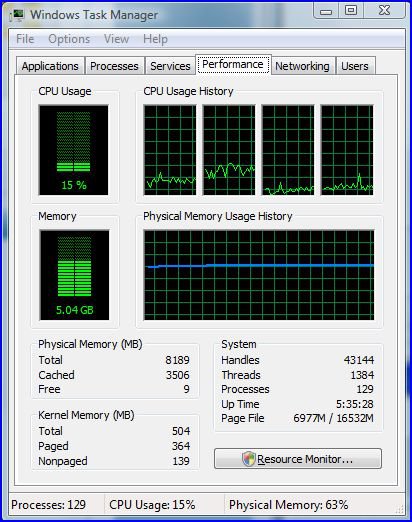
    Yes.

    moreram.jpg

      My System SpecsSystem Spec

  6. #6
    atl530i's Avatar

    Member
    Join Date : Oct 2008
    Atlanta, GA
    Posts : 47
    Vista Ultimate x64 SP1
    Local Time: 09:57 AM
    usa us georgia


    Re: Vista x64 and RAM debacle...

    Quote Originally Posted by HexManiac View Post
    Quote Originally Posted by AstaLaVista View Post
    I know someone will ask if I really need all that Memory and the answer would be, I don't really know, all I know is that I want to game as smooth as possible and if adding more memory will help me do that w/o having to overclock my CPU or GPU... I am all for it, aside from the fact that I also want to know whether Vista is capable of accepting more than 4GB and still use it at its maximum.
    Yes.

    Click image for larger version. 

Name:	MoreRAM.JPG 
Views:	129 
Size:	67.2 KB 
ID:	7079
    129 processes Damn.

      My System SpecsSystem Spec

  7. #7
    Cyberwolf's Avatar

    Member
    Join Date : Sep 2008
    Posts : 83
    Windows Vista Home Edition SP1 32Bit
    Local Time: 08:57 AM


    Re: Vista x64 and RAM debacle...

    Quote Originally Posted by AstaLaVista View Post
    But it will take no less than 128 GB of RAM in order to satiate x64 Vista Business, Enterprise and Ultimate.
    Hmmm, I find this a little hard to swallow!

    Even at the cheap prices we have seen the DDR2's go for, who can afford 128 GB of Ram and what Mobo supports this for the regular and casual home user?

    If that is the case, I have to go rob a bank... see you later!
    MOST applications and games that the everyday user would use, will not be able to make use of more than 4 Gigs.

    I run 4 Gigs with a Quad Core processor and have never had a bottle necking issue when it involves memory.

    If your big into 3D graphics rendering, AutoCAD, or running a web server or the like, then it becomes important to have more than 4Gb.

    If your running Crysis, COD4, Word, Firefox, Blu-Ray watching, etc, you really won't need more than 4Gb. At least under Vista. New applications or new OS's may change this but for now 4 is plenty.

      My System SpecsSystem Spec

  8. #8
    Dzomlija's Avatar

    Resistance is Futile


    Join Date : Aug 2007
    South Africa
    Posts : 2,217
    Windows Vista x64 Ultimate
    Local Time: 03:57 PM
    south africa


    Re: Vista x64 and RAM debacle...

    Only 64-bit applications can use more than 2GB ram. 32-Bit apps, by their very nature and by design, can only use 2GB, even if that app is run on a 64-bit OS.

    The advantage of having more than 4GB installed is that when you run many applications, the ram would be available to them. Vista x64 uses some very crafty memory management procedures to allow 32-bit apps to run in the higher address spaces.

    It just comes down to the more the merrier. You can never have enough...

      My System SpecsSystem Spec

  9. #9
    acdcfan's Avatar

    Senior Member
    Join Date : May 2008
    Fremantle, Western Australia
    Posts : 253
    Ultimate 64 SP1
    Local Time: 09:57 PM
    australia au west australia 2


    Re: Vista x64 and RAM debacle...

    Quote Originally Posted by HexManiac View Post
    Quote Originally Posted by AstaLaVista View Post
    I know someone will ask if I really need all that Memory and the answer would be, I don't really know, all I know is that I want to game as smooth as possible and if adding more memory will help me do that w/o having to overclock my CPU or GPU... I am all for it, aside from the fact that I also want to know whether Vista is capable of accepting more than 4GB and still use it at its maximum.
    Yes.

    Click image for larger version. 

Name:	MoreRAM.JPG 
Views:	129 
Size:	67.2 KB 
ID:	7079
    woot...... 129 processes
    what are you running........server?

      My System SpecsSystem Spec

  10. #10


    Maniac
    Join Date : Mar 2008
    Jacksonville, Florida, USA
    Posts : 152
    Vista Ultimate x64
    Local Time: 09:57 AM
    usa us florida


    Re: Vista x64 and RAM debacle...

    Quote Originally Posted by acdcfan View Post
    Quote Originally Posted by HexManiac View Post
    Quote Originally Posted by AstaLaVista View Post
    I know someone will ask if I really need all that Memory and the answer would be, I don't really know, all I know is that I want to game as smooth as possible and if adding more memory will help me do that w/o having to overclock my CPU or GPU... I am all for it, aside from the fact that I also want to know whether Vista is capable of accepting more than 4GB and still use it at its maximum.
    Yes.

    Click image for larger version. 

Name:	MoreRAM.JPG 
Views:	129 
Size:	67.2 KB 
ID:	7079
    woot...... 129 processes
    what are you running........server?
    I was running 3 virtual machines through VMWare Workstation (all using 1GB), SQL Server 2005 Management studio, VS 2005, InstallShield 2008 and a couple of XML and hex editors and burning a backup DVD. I had a couple of Word docs and an Excel spreadsheet open as well. And the Vista forums up as well. I was taking a break .

      My System SpecsSystem Spec

Page 1 of 2 12 LastLast
Vista x64 and RAM debacle... problems?

Similar Threads
Thread Thread Starter Forum Replies Last Post
Re: The looming SP1 debacle SG Vista General 0 09 Feb 2008
RE: The looming SP1 debacle PNutts Vista General 1 09 Feb 2008
Digital Camera Debacle LordForrest Vista music pictures video 0 21 Mar 2007
Windows Explorer Debacle Modsci Vista file management 3 27 Jun 2006