![]() |
![]() | ![]() | ![]() | ![]() | ![]() | ![]() | ![]() |
| Welcome to Windows Vista Forums. Our forum is dedicated to helping you find solutions with any problems, errors or issues you are experiencing with Windows Vista. The Vista forum also covers news and updates and has an extensive Windows Vista tutorial section that covers a wide range of tips and tricks. |
| |||||||
![]() |
| |
| | #1 (permalink) |
| Windows Vista™ Home Premium | Picture icon preview in browser ik this is going to sound like a very stupid question. do u know how to make the icons the actual picture ex: when i go to MY PICTURES i would like to preview the picture instead of this really weird icon. do u know if this is possible in vista? i know it is in XP thanks ben |
My System Specs![]() |
| | #2 (permalink) |
| Vista x64 Ultimate SP2, Windows 7 Ultimate x64 | Re: Picture icon preview in browser Hello Ben, This tutorial will help show you how to turn on thumbnails in Windows Explorer for this. Thumbnails in Windows Explorer Hope this helps, Shawn |
My System Specs![]() |
| | #3 (permalink) |
| Windows Vista™ Home Premium | Re: Picture icon preview in browser hey brink, tried the first two and they would not work anything else? |
My System Specs![]() |
| | #4 (permalink) |
| Vista x64 Ultimate SP2, Windows 7 Ultimate x64 | Re: Picture icon preview in browser Doublecheck with the TIP box at that link to see if Windows Photo Gallery is set as the default program with all of it's associations set to it. |
My System Specs![]() |
| | #5 (permalink) |
| Windows Vista™ Home Premium | Re: Picture icon preview in browser Doublecheck with the TIP box at that link to see if Windows Photo Gallery is set as the default program with all of it's associations set to it. ![]() i tried the first two ways and checked the default program and it was set to all defaults. i even tried installing the registry download but nothing happened. any other suggestions? |
My System Specs![]() |
| | #6 (permalink) |
| Vista x64 Ultimate SP2, Windows 7 Ultimate x64 | Re: Picture icon preview in browser You might see if rebuilding the icon cache can help since what you have tried so far checks out. |
My System Specs![]() |
| | #7 (permalink) |
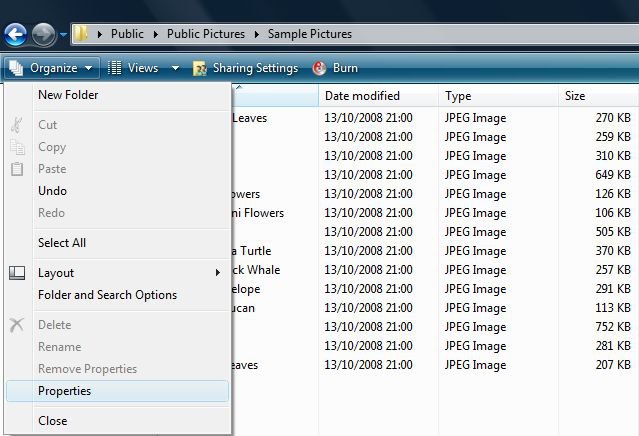
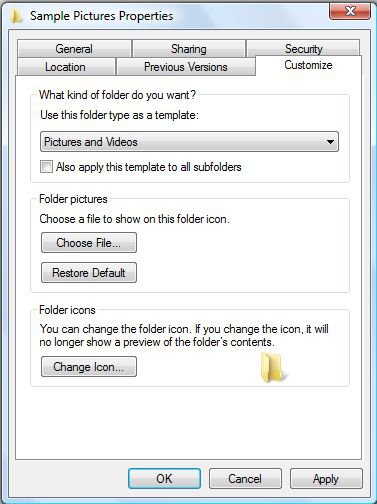
| Vista Home Premium 32-bit & Vista Ultimate 64-bit both Service Pack 2 W7 Pro RTM 7600 32 & 64 | Re: Picture icon preview in browser Hi Ben, Can you post a snip of this 'weird icon'. I have a feeling that it is this one: If it is, then this is easy to solve. Click on 'Organize' and then click 'Properties'. Select the 'Customize' tab and ensure that under 'Use this folder type as a template:' it displays 'Pictures and Videos'. If not, use the drop down box to select this option. Finally, click on 'OK' to close the dialogue panel. |
My System Specs![]() |
| | #8 (permalink) |
| Vista Home Premium x64 | Re: Picture icon preview in browser Make sure you have Menu Bar Enabled: GO TO> Organize> LayOut> Menu Bar (CLICK THIS To Enable) Then, in the menu bar the classic: <File, Edit, View, Tools & Help> should appear GO TO> Tools> FolderOptions {3 tabs will appear: <General, View, Search>} GO TO>*UNCHECK "Always show icons,never thumbnails" (to disable the annoying icon) CLICK APPLY & OK Your Pictures should be replacing the icon and appearing as default Hope this helps. I just figured this out.. I had been looking at the previous posts and its the same thing everywhere, not useful at all for my version at least!! GOOD LUCK! |
My System Specs![]() |
![]() |
| Thread Tools | |
| |
Similar Threads | ||||
| Thread | Forum | |||
| Desktop icon picture preview | Microsoft Office | |||
| picture preview | Vista General | |||
| Icon border changes but picture on icon stays the same when enlarg | Vista General | |||
| Preview Pane in Web Browser | Vista General | |||
| Picture icons don't show preview of picture | Vista music pictures video | |||