![]() |
![]() | ![]() | ![]() | ![]() | ![]() | ![]() | ![]() |
| Welcome to Windows Vista Forums. Our forum is dedicated to helping you find solutions with any problems, errors or issues you are experiencing with Windows Vista. The Vista forum also covers news and updates and has an extensive Windows Vista tutorial section that covers a wide range of tips and tricks. |
| |||||||
![]() |
| |
| | #1 (permalink) |
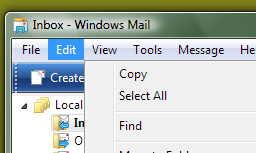
| Vista Home Premium 64bit SP1 | Menus are offset in certain programs I have noticed that in certain programs (windows mail, dreamweaver, to name but two), the menus in the menu-bar are offset to the right when I open them. They appear not directly below the menu, but below-to-the right of them. Look at the screenshot for details. What can be causing this (it doesn't happen in every program, that is the weird thing about it) |
My System Specs![]() |
| | #2 (permalink) |
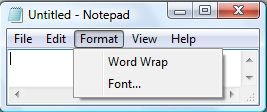
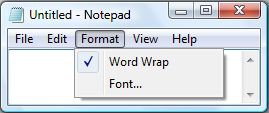
| Vista Home Premium 32-bit & Vista Ultimate 64-bit both Service Pack 2 W7 Pro RTM 7600 32 & 64 | Re: Menus are offset in certain programs Hi LPent, This is perfectly normal. This space in the menus is reserved for check boxes to show when a certain option has been selected, for example 'Word Wrap' in 'Notepad'. |
My System Specs![]() |
| | #3 (permalink) |
| Vista Home Premium 64bit SP1 | Re: Menus are offset in certain programs Hi, I know about the "checkbox" space, but that is not what I am seeing. Compare your screen shots with mine and you'll see the menu is completely (including "checkbox"-space) offset by a width which is -I am guessing- the width of the name of the menu. |
My System Specs![]() |
| | #4 (permalink) |
| Vista x64 Ultimate SP2, Windows 7 Ultimate x64 | Re: Menus are offset in certain programs Hello LPent, I know that if the window is on the edge of the screen, it will cause the menus to open a bit off or on the other side if there is not enough room for the menu to open normally. If the above is not so, then you might also try this tutorial to toggle the settings to see if that can help. Hope this helps, Shawn |
My System Specs![]() |
| | #5 (permalink) |
| Vista Home Premium 64bit SP1 | Re: Menus are offset in certain programs Ha, indeed, the problem is with the tablet pc settings. When set to "right-handed" and when there is not enough room on the left, the menu shows this behaviour. The same is true for setting it to "left-handed", but there the "problem" is less obvious as one rarely has a menu on the far right side of the screen. Thanks, "problem" solved. |
My System Specs![]() |
| | #6 (permalink) |
| Vista x64 Ultimate SP2, Windows 7 Ultimate x64 | Re: Menus are offset in certain programs You're welcome Lpent. I'm happy to hear that you got it sorted. Shawn |
My System Specs![]() |
![]() |
| Thread Tools | |
| |
Similar Threads | ||||
| Thread | Forum | |||
| Explorer problem on start and context menus and long starting programs | General Discussion | |||
| FTP timestamp and offset Problem | Vista General | |||
| Accessing Multipage TIFF file via byte offset in .NET? | .NET General | |||
| Information from Exception Offset | Vista General | |||
| can I remove the explorer bar from my programs menus | Vista General | |||