How do I put the hard drive space used and free space on the Partition C: ? Partition D:\ and Partition E:\ has it but for some reason drive C:\ is missing it doesn't say how much space is used and how much space is free. The GBs are missing

You are using an out of date browser. It may not display this or other websites correctly.
You should upgrade or use an alternative browser.
You should upgrade or use an alternative browser.
Solved How to bring back the amount of free space and used space on a hard drive
- Thread starter VistaKing
- Start date
I'm a little confused about your question
You can't see how much drive space you have left when viewing your C drive via My Computer, or similar?
If you right-click on My Computer and select Manage, when the new window pops up click on Disk Management from the left hand side. What does that tell you about C drive? Assuming your C drive is actually a hard drive (and not a CD drive or something, though I have never heard of this happening and don't even know if it's possible to have C as your CD drive), you should see details at the top of the screen such as how much space you have left, by percentage of total capacity, as well as GB
You can't see how much drive space you have left when viewing your C drive via My Computer, or similar?
If you right-click on My Computer and select Manage, when the new window pops up click on Disk Management from the left hand side. What does that tell you about C drive? Assuming your C drive is actually a hard drive (and not a CD drive or something, though I have never heard of this happening and don't even know if it's possible to have C as your CD drive), you should see details at the top of the screen such as how much space you have left, by percentage of total capacity, as well as GB
My Computer
System One
-
- CPU
- AMD x2 Dual Core 3600+ 1.9GHz
- Motherboard
- GigaByte GA-M55SLI-S4
- Memory
- 2GB DDR PC2 5300 RAM
- Graphics card(s)
- NVidia GeForce GTS 250 512mb
I could see the graphic and the GB size underneath it on partition D and E . I just can't see the size underneath the C drive in COMPUTER. It has the graphic but not whats underneath it like the text. I want to get that back . The grey text underneath the graphic.
My Computer
Sorry, I haven't seen that before, not with it being a physical hard drive
Did you try my previous suggestion? Or if you right click the drive in Computer and select Properties, does it at least tell you then the amount of space used and free?
Did you try my previous suggestion? Or if you right click the drive in Computer and select Properties, does it at least tell you then the amount of space used and free?
My Computer
System One
-
- CPU
- AMD x2 Dual Core 3600+ 1.9GHz
- Motherboard
- GigaByte GA-M55SLI-S4
- Memory
- 2GB DDR PC2 5300 RAM
- Graphics card(s)
- NVidia GeForce GTS 250 512mb

z3r010
Staff member
Vistaking
Do you have the view set to tiles?
Do you have the view set to tiles?
My Computers
System One System Two
-
- Operating System
- Windows 11 Workstation
- Manufacturer/Model
- doofenshmirtz evil incorporated
- CPU
- Ryzen 9 5950X
- Motherboard
- Asus ROG Crosshair VIII Formula
- Memory
- Corsair Vengeance RGB PRO Black 64GB (4x16GB) 3600MHz AMD Ryzen Tuned DDR4
- Graphics card(s)
- ASUS AMD Radeon RX 6900 XT 16GB ROG Strix LC OC
- Sound Card
- Creative
- Monitor(s) Displays
- 3 x27" Dell U2724D & 1 x 34" Dell U3415W
- Hard Drives
- Samsung 980 Pro 1TB M.2 2280 PCI-e 4.0 x4 NVMe Solid State Drive
- PSU
- 1500W ThermalTake Toughpower
- Case
- ThermalTake Level 10 GT
- Cooling
- Enermax Liqtech 240
- Mouse
- Logitech Performance MX
- Keyboard
- Surface Ergonomic.
- Internet Speed
- 350 Mb/s
- Other Info
- WinTV NovaTD HP CP1515n Color Laser Sony BD-5300S-0B Blu-ray Writer Microsoft LifeCam Cinema APC 750i Smart UPS
-
- Operating System
- windows 10
- Manufacturer/Model
- Surface Pro 3
- CPU
- 1.9GHz Intel Core i5-4300U (dual-core, 3MB cache, up to 2.9GHz with Turbo Boost)
- Memory
- 4GB
- Monitor(s) Displays
- 12" Multi Touch
- Screen Resolution
- 2160 x 144
- Hard Drives
- 128GB
- Mouse
- Logitech
- Keyboard
- yes
- Internet Speed
- 350 Mb/s
Vistaking
Do you have the view set to tiles?
Yes I do . I could see the amount under the graphic amount on partition D and partition E. Only one thats missing is on the C: Partition.
My Computer

Vistaking
Do you have the view set to tiles?
Yes I do . I could see the amount under the graphic amount on partition D and partition E. Only one thats missing is on the C: Partition.
Have you changed the volume label for the C:? It is possible that you C: label is too long, and is therefore wrapping. There is a limited amount of screen space for the display of tiles, and the wrapping of the long label is pushing the freespace text off the tile, like shown here:
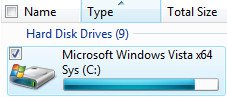
If you shorten the label, then you will not have this problem, as shown here:
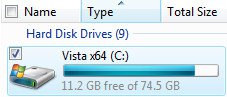
To change the label of any of your drives, do the following:
- Press <WINDOWS_KEY>+<E> to Open "Computer" (or click the Start Orb and select "Computer").
- Click the drive for which you want to change the label, then press <F2>
- Type the desired label. Note that you are limited to a maximum of 32 characters.
- Press <ENTER>. You will be prompted twice with UAC
- That's It!
My Computer
System One
-
- Manufacturer/Model
- Custom Build
- CPU
- AMD Phenom 9600 Quad
- Motherboard
- ASUS MB-M3A32-MVP Deluxe/WiFi
- Memory
- 2 x A-Data 2GB DDR2-800
- Graphics card(s)
- ASUS ATI Radeon HD 2400PRO
- Monitor(s) Displays
- SAHARA 21"
- Screen Resolution
- 1600x1200
- Hard Drives
- 2 x 80GB Seagate (I) 2 x 120GB Seagate (I/S) 2 x 200GB Seagate (I/S) 2 x 250GB Seagate (I/S)
- PSU
- 800W
- Case
- Thermaltake Tai-Chi
- Cooling
- Tai-Chi Water Cooler
- Mouse
- Logitech
- Keyboard
- Genius
- Internet Speed
- 384kbps
- Other Info
- Currently dual booting between Vista x64 Ultimate Windows 7 BETA x64
Vistaking
Do you have the view set to tiles?
Yes I do . I could see the amount under the graphic amount on partition D and partition E. Only one thats missing is on the C: Partition.
Have you changed the volume label for the C:? It is possible that you C: label is too long, and is therefore wrapping. There is a limited amount of screen space for the display of tiles, and the wrapping of the long label is pushing the freespace text off the tile, like shown here:
If you shorten the label, then you will not have this problem, as shown here:
To change the label of any of your drives, do the following:
- Press <WINDOWS_KEY>+<E> to Open "Computer" (or click the Start Orb and select "Computer").
- Click the drive for which you want to change the label, then press <F2>
- Type the desired label. Note that you are limited to a maximum of 32 characters.
- Press <ENTER>. You will be prompted twice with UAC
- That's It!
Thank You , Man it worked just renamed it without the CAPS and it shows what I wanted it to show.
My Computer
This was so amazing I had to register and post to thank you.
It was bothering the crap out of me I thought something was wrong with either the registry or the HD itself, MBR or something.
It should really truncate the Drive name, and leave the capacity field completely seperate...
Amazing perception, thank you again for solving my annoyance. You even had pictures!
-----------
Alternate searches:
Vista 64 not showing / displaying hardrive capacity in tile view under my computer.
It was bothering the crap out of me I thought something was wrong with either the registry or the HD itself, MBR or something.
It should really truncate the Drive name, and leave the capacity field completely seperate...
Amazing perception, thank you again for solving my annoyance. You even had pictures!
-----------
Alternate searches:
Vista 64 not showing / displaying hardrive capacity in tile view under my computer.
Last edited:
My Computer
This was so amazing I had to register and post to thank you.
It was bothering the crap out of me I thought something was wrong with either the registry or the HD itself, MBR or something.
It should really truncate the Drive name, and leave the capacity field completely seperate...
Amazing perception, thank you again for solving my annoyance.
-----------
Alternate searches:
Vista 64 not showing hardrive capacity in tile view under my computer.
Welcome to the forums, Vodanh. Enjoy your stay!
My Computer
System One
-
- Manufacturer/Model
- Custom Build
- CPU
- AMD Phenom 9600 Quad
- Motherboard
- ASUS MB-M3A32-MVP Deluxe/WiFi
- Memory
- 2 x A-Data 2GB DDR2-800
- Graphics card(s)
- ASUS ATI Radeon HD 2400PRO
- Monitor(s) Displays
- SAHARA 21"
- Screen Resolution
- 1600x1200
- Hard Drives
- 2 x 80GB Seagate (I) 2 x 120GB Seagate (I/S) 2 x 200GB Seagate (I/S) 2 x 250GB Seagate (I/S)
- PSU
- 800W
- Case
- Thermaltake Tai-Chi
- Cooling
- Tai-Chi Water Cooler
- Mouse
- Logitech
- Keyboard
- Genius
- Internet Speed
- 384kbps
- Other Info
- Currently dual booting between Vista x64 Ultimate Windows 7 BETA x64