![]() |
![]() | ![]() | ![]() | ![]() | ![]() | ![]() | ![]() |
| Welcome to Windows Vista Forums. Our forum is dedicated to helping you find solutions with any problems, errors or issues you are experiencing with Windows Vista. The Vista forum also covers news and updates and has an extensive Windows Vista tutorial section that covers a wide range of tips and tricks. |
| |||||||
![]() |
| |
| | #1 (permalink) |
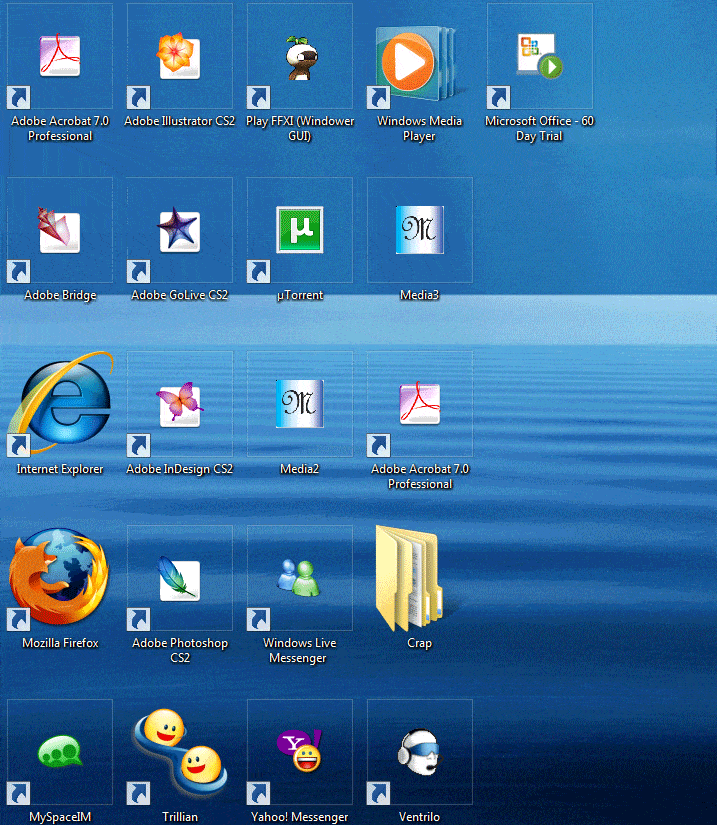
| Vista Home Basic 32bit | How do I resize these icons...? Been working on this for 2 weeks now and it's finally starting to get to me that it is impossible to do what I want to do. I have researched a lot of ways to do it, but it either is a failed process or, I'm just not doing it right ![]() What i want to do is get my other icons (such as my Adobe, Ventrillo, Final Fantasy XI) to show up as they are like my Internet Explorer, Windows Media Player, and Mozilla Firefox icons. Here are 2 images to show what I mean. ![]() ![]() For some odd reason, I just can't find out how to get the icons I want to resize the way the want them to. The icon "Media2," I did in Adobe Photoshop is a .bmp format image saved with the file extention .ico . Can someone help me out please? Oh, and I would also like to be able to resize them the way Vista does under my file directory as I am also having the same issure in there. |
My System Specs![]() |
| | #2 (permalink) |
| Vista x64 Ultimate SP2, Windows 7 Ultimate x64 | Re: How do I resize these icons...? Hello Elvaan, and welcome to Vista Forums. Unless the icons for the shortcuts are using a 256x256 bit icon, they will not display to the larger sizes that you want. That is why you see the box around the icons when you have the View set to large on those. You can read more information about Vista icons at this link. Vista Icons - Introducing Vista Icons - How to create Vista Icons Hope this helps, Shawn |
My System Specs![]() |
| | #3 (permalink) |
| Vista Ultimate | Re: How do I resize these icons...? You can also hold down the CTRL key and roll your mouse-roller up and down... This will resize all of your icons together and maybe you've tried that already, but it's a fast way to browse through several sizes and maybe you can get it to meet your needs... |
My System Specs![]() |
| | #4 (permalink) |
| Vista Home Basic 32bit | Re: How do I resize these icons...? Hello Elvaan, and welcome to Vista Forums. Unless the icons for the shortcuts are using a 256x256 bit icon, they will not display to the larger sizes that you want. That is why you see the box around the icons when you have the View set to large on those. You can read more information about Vista icons at this link. Vista Icons - Introducing Vista Icons - How to create Vista Icons Hope this helps, Shawn |
My System Specs![]() |
| | #5 (permalink) |
| Vista Ultimate x64 MAK, OpenSolaris 5, Gentoo 2008.1.... | Re: How do I resize these icons...? The basic idea here is that the OS includes only limited number of icons - for processes and such that *it* has native. Other apps that you install will only scale their icons accordingly if their installation package includes *multiple* size icons - those that don't don't have an icon in that particular size that you want, hence it shows a smaller icon with that little box around it. That is why you need that software - to make your *own* icon at that exact size that you want for it to display correctly. Does it make a bit more sense now? |
My System Specs![]() |
| | #6 (permalink) |
| Vista Home Basic 32bit | Re: How do I resize these icons...? It makes a little more sence. Just sucks I have to go out and buy another piece of software. |
My System Specs![]() |
| | #7 (permalink) |
| Vista Ultimate x64 MAK, OpenSolaris 5, Gentoo 2008.1.... | Re: How do I resize these icons...? You don't have to go out and buy anything - there are freeware icon software available as well - see Free Software List for Vista And, FWIW, you could also bug Adobe and the other software developers to do something about it themselves.... |
My System Specs![]() |
| | #8 (permalink) |
| Vista Ultimate x64 | Re: How do I resize these icons...? Is there a way to make the titlebars and headings smaller? Again, thank you. |
My System Specs![]() |
| | #9 (permalink) |
| Vista Ultimate x64 SP2 | Re: How do I resize these icons...? Hi there, You can reach individual properties for all your windows and stuff by right clicking your desktop -> Personalize -> Color and Appearance of Windows (first option) and then click the lower option "Open the classic vindow something". Then select the option you want to handle and play a little with the numbers... You can change colors, fonts, icon sizes, etc. P.S. The option names I'm typing here might not be accurate... My OS is in Spanish so I'm translating to what sounds logic :P |
My System Specs![]() |
| | #10 (permalink) |
| Vista Ultimate x64 | Re: How do I resize these icons...? Hi there, You can reach individual properties for all your windows and stuff by right clicking your desktop -> Personalize -> Color and Appearance of Windows (first option) and then click the lower option "Open the classic vindow something". Then select the option you want to handle and play a little with the numbers... You can change colors, fonts, icon sizes, etc. P.S. The option names I'm typing here might not be accurate... My OS is in Spanish so I'm translating to what sounds logic :P |
My System Specs![]() |
![]() |
| Thread Tools | |
| |
Similar Threads | ||||
| Thread | Forum | |||
| How to programmatically resize the height of a custom IE toolbarwritten in C#? When I resize it, it shrinks but the real-estate it is in staysthe same size. | .NET General | |||
| How can I properly resize Vista icons using an editor? | Software | |||
| Can't resize C: ??? | Vista General | |||
| Icons Will Not Resize | Vista performance & maintenance | |||
| Folder / File Icons Gone, Reappear on Resize | Vista performance & maintenance | |||