![]() |
![]() | ![]() | ![]() | ![]() | ![]() | ![]() |
| Welcome to Windows Vista Forums. Our forum is dedicated to helping you find solutions with any problems, errors or issues you are experiencing with Windows Vista. The Vista forum also covers news and updates and has an extensive Windows Vista tutorial section that covers a wide range of tips and tricks. |
| |||||||
| | Vista - Icon changed |
| |
| 12-24-2008 | #1 |
| | Icon changed ![]() Snipping tool icon has changed and program no longer responds, can't understand why, I don't use it that much, Any ideas on recovery of correct icon and working. |
| My System Specs |
| 12-24-2008 | #2 |
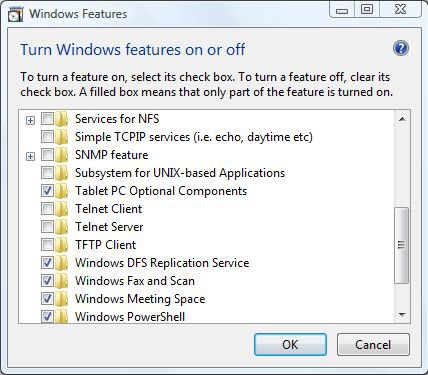
| Vista Home Premium 32-bit & Vista Ultimate 64-bit both Service Pack 2 W7 Pro RTM 7600 32 & 64 Doncaster, UK | Re: Icon changed Hi wysiwyg, Have you by any chance disabled the Tablet PC Optional Components as these are needed to enable the Sniping Tool. To reenable them, click on the start orb and type Programs and Features into the search box and press enter/return. Click on Turn Windows features on or off, and provide administrative credentials when prompted. Scroll down the list, and ensure that the above mentioned item is selected, i.e. is ticked (see image below), and then click OK. You may need to restart, but the tool should be back. |
| My System Specs |
| 12-24-2008 | #3 |
| | Re: Icon changed Hi wysiwyg, Have you by any chance disabled the Tablet PC Optional Components as these are needed to enable the Sniping Tool. To reenable them, click on the start orb and type Programs and Features into the search box and press enter/return. Click on Turn Windows features on or off, and provide administrative credentials when prompted. Scroll down the list, and ensure that the above mentioned item is selected, i.e. is ticked (see image below), and then click OK. You may need to restart, but the tool should be back. Attachment 8840 Would a Windows repair do any good. |
| My System Specs |
| 12-24-2008 | #4 |
| Vista Home Premium 32-bit & Vista Ultimate 64-bit both Service Pack 2 W7 Pro RTM 7600 32 & 64 Doncaster, UK | Re: Icon changed Hi wysiwig, Have a look at the following Tutorial (and its related links) to see if it can help you: System Files - SFC Command |
| My System Specs |
| 12-24-2008 | #5 |
| | Re: Icon changed Tried the "scannow" idea no joy, Went on MS site trying their forums for snipping problems, came across someone who'd re-installed his 2007 Office, and snip tool had restarted, So did a repair/reinstall with my Office 2000, and success, its working. Now can someone explain why Office affects the Snipping tool.? |
| My System Specs |
| 12-24-2008 | #6 |
| | Re: Icon changed Not Office directly - but your removal of the TabletPC service also disabled a part of Office that will integrate itself with a file that is used by Snipping Tool. Once you enabled the Service, a 'repair' of Office should also have worked. |
| My System Specs |
| 12-25-2008 | #7 |
| | Re: Icon changed Thanks John, its logical when you know. |
| My System Specs |
| 12-25-2008 | #8 |
| | Re: Icon changed Yeah, unfortunately, I found this out the hard way - *after* formatted and reinstalled Vista lol. |
| My System Specs |
![]() |
| Thread Tools | |
| |
| Similar Threads for: Icon changed | ||||
| Thread | Forum | |||
| Notepad Icon Changed Into Printer Icon - Please Help!! | Vista General | |||
| Notepad Icon Changed Into Printer Icon - Please Help | Vista General | |||
| Changed icon | Vista General | |||
| Computer Icon changed to WORD Icon with an envelope | Vista General | |||
| Icon has changed without any action by me | Vista performance & maintenance | |||