
Windows Vista Forums

Ink Levels Indicator and Epson Status Monitor Disabled
  1. #1


    Newbie
    Join Date : Oct 2008
    Posts : 5
    Vista Home
    Local Time: 05:27 AM

    Ink Levels Indicator and Epson Status Monitor Disabled

    Hi All,

    I have an Epson Stylus C64 printer which I am able to use as normal (with ink levels and status monitor appearing) on my old computer with Windows XP.

    My new laptop is Vista and although I have installed the Epson Stylus Printer Software that came with the printer onto the laptop, the Ink Indicator Levels and the Epson Status Monitor options showing in 'Printer Prefences' seem to be grayed-out/disabled. I am unable to gauge my ink levels so have no idea how much ink I have available and/or when to replace it. The actual printing seems to be fine at the moment but I am unable to tell when the ink requires replacing.

    I have tried to re-install the Epson Printer software but nothing seems to change - the ink levels and status monitor contine to be disabled/grayed out. I noticed that when installing the software I am asked to disable any anti-virus software - I have Norton installed but have no idea how to uninstall it - my computer also seems to be automatically provided with something called McAfee Security - again I am unsure how to disable this and whether in fact I need to do this - it may be that the anti-virus programs are hindering the Epson software from fully loading? Any ideas and/or suggestions would be most welcome.

    Thank you
    Lisa


      My System SpecsSystem Spec

  2. #2
    roy69's Avatar

    47,65,65,6B


    Join Date : Nov 2007
    uk
    Posts : 2,598
    Windows 7 home premium 64 bit
    Local Time: 12:27 PM
    uk uk devon


    Re: Ink Levels Indicator and Epson Status Monitor Disabled

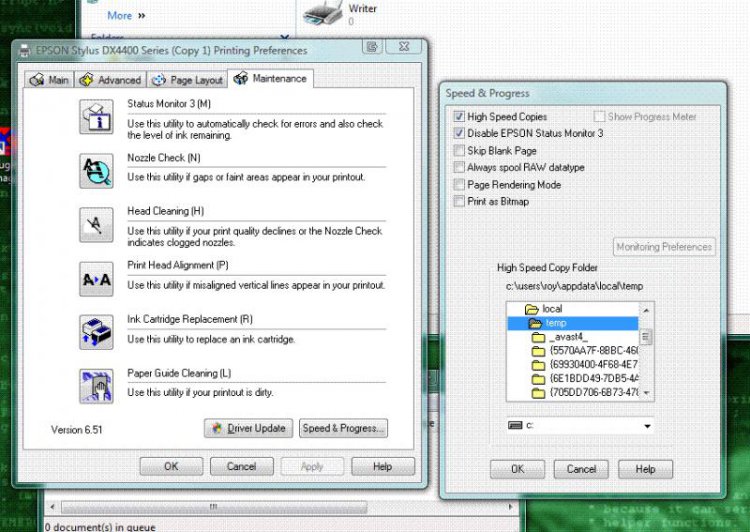
    Click on printing preferences.
    Click on Maintenance.
    Click on Speed and progress.
    Ensure the "Disable EPSON Status Monitor 3" is not ticked.
    capture.jpg

      My System SpecsSystem Spec

  3. #3
    Airbot's Avatar

    ---------------

    Join Date : Nov 2008
    Posts : 2,010
    Vista Ultimate SP2 x64 Windows 7 Ultimate x64 SP1
    Local Time: 06:27 AM


    Re: Ink Levels Indicator and Epson Status Monitor Disabled

    Quote Originally Posted by Lisa76 View Post
    Hi All,

    I have an Epson Stylus C64 printer which I am able to use as normal (with ink levels and status monitor appearing) on my old computer with Windows XP.

    My new laptop is Vista and although I have installed the Epson Stylus Printer Software that came with the printer onto the laptop, the Ink Indicator Levels and the Epson Status Monitor options showing in 'Printer Prefences' seem to be grayed-out/disabled. I am unable to gauge my ink levels so have no idea how much ink I have available and/or when to replace it. The actual printing seems to be fine at the moment but I am unable to tell when the ink requires replacing.

    I have tried to re-install the Epson Printer software but nothing seems to change - the ink levels and status monitor contine to be disabled/grayed out. I noticed that when installing the software I am asked to disable any anti-virus software - I have Norton installed but have no idea how to uninstall it - my computer also seems to be automatically provided with something called McAfee Security - again I am unsure how to disable this and whether in fact I need to do this - it may be that the anti-virus programs are hindering the Epson software from fully loading? Any ideas and/or suggestions would be most welcome.

    Thank you
    Lisa
    Well, there should be an option somewhere in the Norton program settings to disable it, although I'm not sure where. I believe Norton makes it really hard to find it, but looking threw all the settings you should be able to find it. Thenm you can disable it and reinstall the printer.

    If you have Mcafee antivirus as well, then you might have a problem as having two main Antivirus programs is not good. They will undoubtedly conflict with each other. My personal opinion would be to get rid of the Norton and Mcafee and go with something like Avast Home Edition. It works very well and it's free. Many people use it with great success, you can easily disable it by right clicking on the taskbar icon and click Stop on access Protection, then re enable it later.

    Last edited by Airbot; 02 Jan 2009 at 06:58 PM.
      My System SpecsSystem Spec

  4. #4


    Newbie
    Join Date : Oct 2008
    Posts : 5
    Vista Home
    Local Time: 05:27 AM


      Thread Starter

    Re: Ink Levels Indicator and Epson Status Monitor Disabled

    Quote Originally Posted by roy69 View Post
    Click on printing preferences.
    Click on Maintenance.
    Click on Speed and progress.
    Ensure the "Disable EPSON Status Monitor 3" is not ticked.
    Click image for larger version. 

Name:	Capture.jpg 
Views:	1877 
Size:	98.7 KB 
ID:	9129

    Hi Roy 69

    Have tried the above but the pop-up boxes are showing a rather reduced list of options:

    Speed & Progress pop-up box is showing options - high-speed copies (which I have ticked) - and - Always spool RAW datatypes (which is unticked) - then the high speed copy folder is listing onnly 3 folders - C - Windows - Temp -

    Not sure if this too is linked to the anti-virus programs that may be hindering the printer installation software from running fully?

      My System SpecsSystem Spec

  5. #5


    Newbie
    Join Date : Oct 2008
    Posts : 5
    Vista Home
    Local Time: 05:27 AM


      Thread Starter

    Re: Ink Levels Indicator and Epson Status Monitor Disabled

    Quote Originally Posted by Airbot View Post
    Quote Originally Posted by Lisa76 View Post
    Hi All,

    I have an Epson Stylus C64 printer which I am able to use as normal (with ink levels and status monitor appearing) on my old computer with Windows XP.

    My new laptop is Vista and although I have installed the Epson Stylus Printer Software that came with the printer onto the laptop, the Ink Indicator Levels and the Epson Status Monitor options showing in 'Printer Prefences' seem to be grayed-out/disabled. I am unable to gauge my ink levels so have no idea how much ink I have available and/or when to replace it. The actual printing seems to be fine at the moment but I am unable to tell when the ink requires replacing.

    I have tried to re-install the Epson Printer software but nothing seems to change - the ink levels and status monitor contine to be disabled/grayed out. I noticed that when installing the software I am asked to disable any anti-virus software - I have Norton installed but have no idea how to uninstall it - my computer also seems to be automatically provided with something called McAfee Security - again I am unsure how to disable this and whether in fact I need to do this - it may be that the anti-virus programs are hindering the Epson software from fully loading? Any ideas and/or suggestions would be most welcome.

    Thank you
    Lisa
    Well, there should be an option somewhere in the Norton program settings to disable it, although I'm not sure where. I believe Norton makes it really hard to find it, but looking threw all the settings you should be able to find it. Thenm you can disable it and reinstall the printer.

    If you have Mcafee antivirus as well, then you might have a problem as having two main Antivirus programs is not good. They will undoubtedly conflict with each other. My personal opinion would be to get rid of the Norton and Mcafee and go with something like Avast Home Editon. It works very well and it's free. Many people use it with great success, you can easily disable it by right clicking on the taskbar icon and click Stop on access Protection, then reanable it later.

    If you were to get rid of Norton, then get rid of the Symantec files as well as this is the Norton company.

    Hi Aaron,

    I would definitely like to remove the mcafee anti-virus software - it came with the laptop and the pop-up updates drive me mad - however there is no option on the mcafee settings to disable this - or maybe it is just well hidden so folk can't find it - any idea how I can remove this program? The Norton doesn' bother me so much...yet ... (although it may be preventing my printer software from functioning properly)...

      My System SpecsSystem Spec

  6. #6
    Airbot's Avatar

    ---------------

    Join Date : Nov 2008
    Posts : 2,010
    Vista Ultimate SP2 x64 Windows 7 Ultimate x64 SP1
    Local Time: 06:27 AM


    Re: Ink Levels Indicator and Epson Status Monitor Disabled

    You can uninstall in from Program and Features in the Control Panel from the start menu. But like I said, you should only have one major Antivirus program installed. Two active Antivirus programs will conflict and cause problems. If you do get Avast, then you wouldn't want Norton on too. You can have one major AV and one or more Antispyware programs like Spybot SD, Malwarebytes, Superantispyware and it will be alright. But Avast has an antispyware module in it as well as the Antivirus.

      My System SpecsSystem Spec

  7. #7
    roy69's Avatar

    47,65,65,6B


    Join Date : Nov 2007
    uk
    Posts : 2,598
    Windows 7 home premium 64 bit
    Local Time: 12:27 PM
    uk uk devon


    Re: Ink Levels Indicator and Epson Status Monitor Disabled

    If you bought the printer with an xp system try and download up to date software for vista..

      My System SpecsSystem Spec

  8. #8
    sygnus21's Avatar

    Here to learn
    Join Date : Mar 2008
    Hampton VA
    Posts : 1,033
    Vista Ultimate x64 SP1
    Local Time: 06:27 AM
    usa us virginia


    Re: Ink Levels Indicator and Epson Status Monitor Disabled

    @ Lisa76

    You'll need to go to Epson's website and look to see if they have Vista drivers for your printer. The drivers on your disk are not supported by Vista.

    I have two Epson printers (2200 & R800) and Epson put out vista drivers for both, including Vista x64. If they have the drivers for your printer, the ink levels will work as well. Mine does.

    Good luck.

      My System SpecsSystem Spec

  9. #9


    Join Date : Jan 2009
    Posts : 2
    Vista Home Premium 32bit
    Local Time: 06:27 AM


    Re: Ink Levels Indicator and Epson Status Monitor Disabled

    I had the same problem. It was because I had the drivers form my Epson Stylus 2200 installed but not the Monitor 3. I fixed it by installing it seperately from here...

    Epson Stylus Photo 2200, Drivers & Downloads - Technical Support - Epson America, Inc.

      My System SpecsSystem Spec

  10. #10


    Join Date : Jan 2009
    Posts : 2
    Vista Home Premium 32bit
    Local Time: 06:27 AM


    Re: Ink Levels Indicator and Epson Status Monitor Disabled

    I had the same problem. I'm running Vista 32bit and have an Epson Stylus 2200. I had a grayed out Status Monitor 3 and had less options for Speed and Progress. The fix ended up being going to the Epson page and downloading Status Monitor 3 seperately. It was on the same page as the drivers for my printer.

      My System SpecsSystem Spec

Page 1 of 2 12 LastLast
Ink Levels Indicator and Epson Status Monitor Disabled problems?

Similar Threads
Thread Thread Starter Forum Replies Last Post
Network Connectivity Status Indicator jimb11 Vista networking & sharing 3 09 Feb 2010
Epson status monitor elladave Vista print fax & scan 14 21 Dec 2009
Epson Ink Monitor Graham Chadwick Vista General 3 12 Apr 2009
Epson status monitor problems Len Cuff Vista General 0 10 Sep 2007
Epson status monitor Epson Printer & Scanner Vista print fax & scan 5 06 Mar 2007