I accidentally clicked on the switch button next to lock in the start menu, and the screen went off, i tried every button on the keyboard and cannot get the computer to wake up. i hold down the power button for a few seconds to turn off the computer, and when i turn the computer back on, the fan starts running and the led light on, but still no screen, like its still in the sleep mode. please help. what else can i try to get it back on?

You are using an out of date browser. It may not display this or other websites correctly.
You should upgrade or use an alternative browser.
You should upgrade or use an alternative browser.
please help! computer won't wake up after sleep
- Thread starter jchao929
- Start date

My guess is that when you press the power button, it gets in sleep mode faster than you would expect, not turning really off.
Unplug the power cable, wait 3-4 seconds and plug the power cable back in.
Turn on your pc and try again to see what happens.
Unplug the power cable, wait 3-4 seconds and plug the power cable back in.
Turn on your pc and try again to see what happens.
My Computer
System One
-
- Manufacturer/Model
- Limneos
- CPU
- Intel Core2Duo E4500 2.2GHz
- Motherboard
- Asus P5LD2-X/1333
- Memory
- 2GB 800Mhz Kingston DDR2
- Graphics card(s)
- Nvidia 8500GT
Well then, if your computer is completely shut off, and when you turn it on it only shows black screen, then you have another problem , not resuming from sleep.
Sleep state saves your current state to RAM, which means that a power shutdown clears this state and you should be able to boot from scratch.
If you hibernated instead of sleeping, then again you should see at least the BIOS welcome screen when you turn on your pc, and then windows should try to resume.
But if it's all black, I suggest you check for connection problems, monitor cables disconnected etc. I know you will say it worked fine before you set it to sleep, but believe me, you never know. If the problem persists, you must consider clearing the BIOS from the motherboard jumper or changing a PSU, in my technical experience.
Tip: Leave the computer without power cable for at least one minute, then try again.
Sleep state saves your current state to RAM, which means that a power shutdown clears this state and you should be able to boot from scratch.
If you hibernated instead of sleeping, then again you should see at least the BIOS welcome screen when you turn on your pc, and then windows should try to resume.
But if it's all black, I suggest you check for connection problems, monitor cables disconnected etc. I know you will say it worked fine before you set it to sleep, but believe me, you never know. If the problem persists, you must consider clearing the BIOS from the motherboard jumper or changing a PSU, in my technical experience.
Tip: Leave the computer without power cable for at least one minute, then try again.
My Computer
System One
-
- Manufacturer/Model
- Limneos
- CPU
- Intel Core2Duo E4500 2.2GHz
- Motherboard
- Asus P5LD2-X/1333
- Memory
- 2GB 800Mhz Kingston DDR2
- Graphics card(s)
- Nvidia 8500GT
thank you again for your advice, i'll give that a try. really hoping its just the cables.
My Computer
also, one more thing i noticed thats strange, its when i turn on the power, the computer would start running for a few seconds, (the fan and light), and it'll suddenly stop for 2-3 seconds and start running again. does that mean anything?
My Computer
It could be a problem with your PSU (Power Supply Unit).
You can buy and install a new one, you can do it yourself, the costs starts from 25$-35$. If you have another PC handy, try using the other PC's PSU and see if you get the same problem. If it boots fine, buy a new PSU.
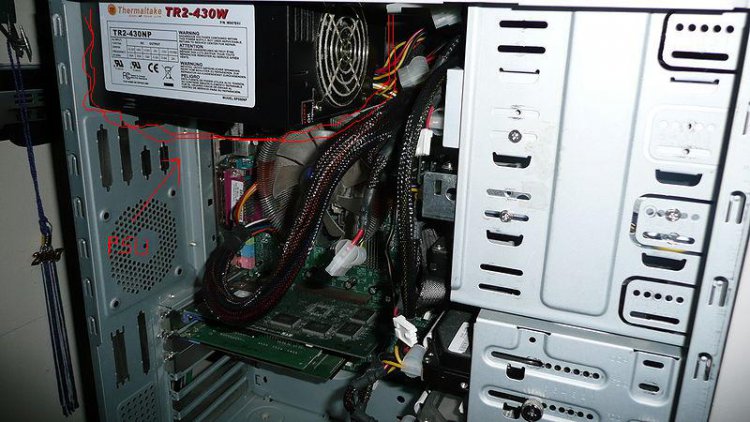
You can buy and install a new one, you can do it yourself, the costs starts from 25$-35$. If you have another PC handy, try using the other PC's PSU and see if you get the same problem. If it boots fine, buy a new PSU.
Last edited by a moderator:
My Computer
System One
-
- Manufacturer/Model
- Limneos
- CPU
- Intel Core2Duo E4500 2.2GHz
- Motherboard
- Asus P5LD2-X/1333
- Memory
- 2GB 800Mhz Kingston DDR2
- Graphics card(s)
- Nvidia 8500GT
Hi.
Out of interest, was this propblem ever resolved?
I have the same problem, with my PC not waking up after sleep mode.
Would like to know how to resolve. Thanks
Out of interest, was this propblem ever resolved?
I have the same problem, with my PC not waking up after sleep mode.
Would like to know how to resolve. Thanks
My Computer

MSDOS
Banned
When ever you put your system in Sleep mode it saves all the data on the system memory and puts the system in a low power state ( suspended animation!!! , that's the buzz word ). Same goes for hibernate , only difference is that the data is saved on the Hard drive rather than on the memory. Now , if you can not wake up the system from standby you should first try shutting down the system , disconnecting the power cables , press and hold down the systen power button for few seconds. Then open the system cover,unplug the memory chips , wipe the memory sticks with a soft white cloth ( i know it sounds weird , but it helps) , put the memory sticks back in their respective slots. reboot your system. If that fails , sorry mate but time to get the Motherboard and memory cards checked / replaced.