Windows Vista Forums
Vista Forums Home Join Vista Forums Windows 7 Forum Vista Tutorials Tags
Welcome to Windows Vista Forums. Our forum is dedicated to helping you find solutions with any problems, errors or issues you are experiencing with Windows Vista. The Vista forum also covers news and updates and has an extensive Windows Vista tutorial section that covers a wide range of tips and tricks.

Go Back   Vista Forums > Vista Forums > General Discussion

Vista - System Restore problem

Reply
 
Old 01-08-2009   #1 (permalink)


Vista Home Premium 32bit SP1


System Restore problem

In a topic I raised on the Update forum, it was suggested that I always set a System Restore Point, but this would be no use to me (if I could do it even) because I cannot run System Restore on my system. The application simply doesn't launch, though something seems to be happening in the background. I cannot use Safe Mode to do it either as pressing F8 repeatedly on boot has no effect.
I have Vista Home Premium SP1.
I am the only user on this computer and use the default account (I think - I've never set up any specific accounts and only my name and Public are listed).
Can anyone advise why System Restore doesn't work? I've read that the window should open immediately.

My System SpecsSystem Spec
Old 01-08-2009   #2 (permalink)


Vista Bussiness x64 PL


Re: System Restore problem

Quote  Quote: Originally Posted by foxycat
I cannot use Safe Mode to do it either as pressing F8 repeatedly on boot has no effect.
If you really can't run system in Safe Mode it is due to probably some viruses,rootkits for example very popular rootkit Bagle which remove SafeBoot key which is responsible for Safe Mode

Question:
Do you have this key?

HKLM\System\CurrentControlSet\Control\SafeBoot

with subkeys Minimal and Network and deeply subkeys?

Last edited by Flavius; 01-08-2009 at 06:31 AM..
My System SpecsSystem Spec
Old 01-08-2009   #3 (permalink)


Vista Home Premium 32bit SP1


Re: System Restore problem

Yes, got those.
I have Kaspersky AV updating automatically so doubt any viruses have crept in.
My System SpecsSystem Spec
Old 01-08-2009   #4 (permalink)


Vista Ultimate


Re: System Restore problem

Hello foxyxat...


have you checked your System Properties to see if System Restore is enabled?

Anyway, it seems you can't even trigger the menu selection at startup, not that you can't just enter safemode...

I don't know if a rootkit could be related with that, as flavius said, but in worst case you can't even get a startup menu, why don't we just force it to appear?

You could try this:
(It's a silly solution, but you will get your menu)

Download and install EasyBCD (Scroll to the bottom of the linked page for download link)

Run EasyBCD, and where it says "Add/Remove Entries", go to the field "Add entry" and select e.g. Mac, Type=Generic X86 PC and press "add entry", then press the save button on top. Exit EasyBCD.

Restart your computer. You will get a menu to select which operating system to start, You will get 2 options:

1.Windows Vista
2.NTS Mac OS X

Select Windows vista with the arrow keys (besides, nts mac os x does not work, we just put it there to force the menu to appear, you can remove this entry from EasyBCD later), and then press F8. This will bring you the safemode selections menu. Select safe mode and press Enter. You will get into safemode where you can try your thing.

As for not being able to press F8 at startup , this might be happening for the following reason:
  • You are using a usb keyboard, and your BIOS is not set to support Legacy USB and/or USB Keyboard, letting you unable to use your keyboard until you enter Windows. You will have to enter bios (Press F1/F2/F10/DEL key at startup, depending on the manufacturer ) and change this setting under USB menu.
If this is the case, my suggestion for forcing menus manually won't work either cause you won't have a keyboard there too. You will need to enter bios to enable USB KEYBOARD support or use a PS/2 keyboard.
My System SpecsSystem Spec
Old 01-08-2009   #5 (permalink)


Vista Home Premium 32bit SP1


Re: System Restore problem

I don't know where to check System Properties to see if System Restore is enabled, but I think it is as I get messages telling me that restore points are being created when I install software and updates.

Thanks for your suggestion, but I really don't want to install anything else right now.

I have a USB keyboard connected using a PS/2 adaptor.

I'm sure I have accessed the start up menu using F8 on this keyboard before. I know it didn't work with the wireless keyboard that came with the PC.
My System SpecsSystem Spec
Old 01-08-2009   #6 (permalink)


Vista Ultimate


Re: System Restore problem

It's not about the keyboard, it's about the BIOS settings. Try using it without the adaptor then, and see if you can press F8. btw, if you follow the isntructions, EasyBCD is harmless and, after you're done, you can get rid of it. That's because, my suggestion above will bring up the Safe Mode menu no matter what.
My System SpecsSystem Spec
Old 01-08-2009   #7 (permalink)


Vista Ultimate


Re: System Restore problem

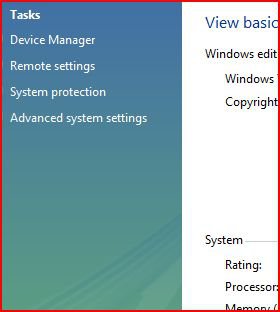
To check if Automatic System Restore is running, go to Start -> right click "MY COMPUTER" , select Properties. Then on the left Pane, select "System Protection".

Now check the list to see if you have a checkbox ticked next to your hard drive. If so, you have Automatic System Restore enabled. If not, it's disabled.
Attached Images
 
My System SpecsSystem Spec
Old 01-08-2009   #8 (permalink)


Vista Bussiness x64 PL


Re: System Restore problem

Quote  Quote: Originally Posted by foxycat
Yes, got those.
Because you have these keys this trouble don't cause by viruses only as said @limenos:
Quote:
it's about the BIOS settings.
@foxycat
Exaclty it concern about USB Legacy Support - find this option in your BIOS and turn it.
My System SpecsSystem Spec
Old 01-08-2009   #9 (permalink)


Vista Home Premium 32bit SP1


Re: System Restore problem

Yes, I have it. Last restore point 22:00 last night (I guess that was an automatic one).
My System SpecsSystem Spec
Old 01-08-2009   #10 (permalink)


Vista Ultimate


Re: System Restore problem

Ok then, all it's left is to try in safe mode. Enter BIOS and enable USB KEYBOARD support, then F8 will work and you won't need to install anything else, like EasyBCD
My System SpecsSystem Spec
Reply

Thread Tools


Similar Threads
Thread Forum
system restore Problem General Discussion
System Restore Problem General Discussion
System Restore problem Vista General
problem with system restore Vista General
System Restore Problem? Vista General


Vista Forums is an independent web site and has not been authorized,
sponsored, or otherwise approved by Microsoft Corporation.
"Windows Vista", the Start Orb, and related materials are trademarks of Microsoft Corp.
© Designer Media Ltd

1 2 3 4 5 6 7 8 9 10 11 12 13 14 15 16 17 18 19 20 21 22 23 24 25 26 27 28 29 30 31 32 33 34 35 36 37 38 39 40 41 42 43 44 45 46